セットアップガイド

Cursor IDEで自分のAPIキーを使う方法

Cursor Pro costs $20/month with a usage cap. With a RunAPI key you pay per token — the same Claude and GPT-4o models at 50% off official rates, no monthly fee, no Pro subscription required. This guide covers where to paste your key in Settings > Models, how to set the base URL (the step most guides skip), and how to fix the common 'unauthorized user api key' error.

June 23, 2026更新 RunAPI Editorial
一目でわかる

Cursorで自分のAPIキーを使えますか?

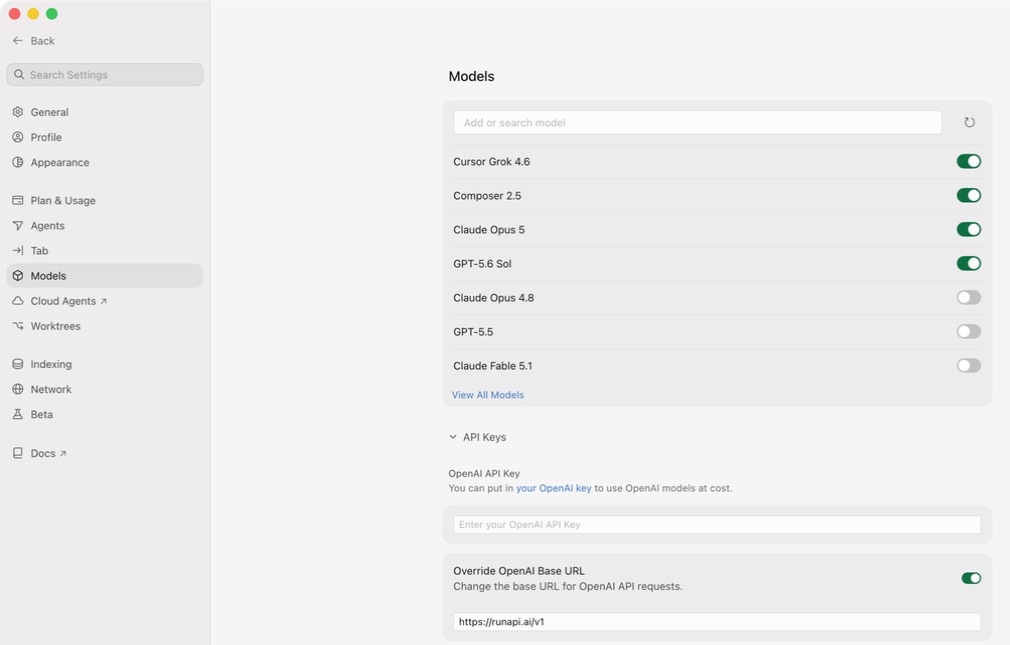
Yes. Cursor lets you add your own API key on the free plan — you do not need Cursor Pro. Go to Settings > Models, scroll to the OpenAI section, and fill in two fields: the OpenAI Base URL (https://runapi.ai/v1) and the OpenAI API Key (your RunAPI key). RunAPI gives you access to Claude 3.5 Sonnet, GPT-4o, Gemini, and other models at 50% of what Anthropic and OpenAI charge directly. The most common setup error — the 'unauthorized user api key' message — means the base URL field is empty, so Cursor is sending your key to the wrong endpoint.

すべてのCursorプランで動作

You do not need a Pro subscription to use your own API key. BYOK works on the free Cursor tier and on Pro.

OpenAI互換エンドポイント

RunAPI uses the same request and response format as the OpenAI API. Cursor's OpenAI API Key field accepts it without any code changes.

公式モデル価格の50%オフ

RunAPIはプロバイダー定価の半額で請求します。Claude 3.5 Sonnetの入力はAnthropicから直接購入する$3.00/Mトークンに対し、RunAPI経由では$1.50/Mトークンです。

「unauthorized user api key」を修正

This error almost always means the OpenAI Base URL field is empty. Set it to https://runapi.ai/v1 alongside your key and the error clears.

設定のウォークスルー

CursorにAPIキーを入力する場所

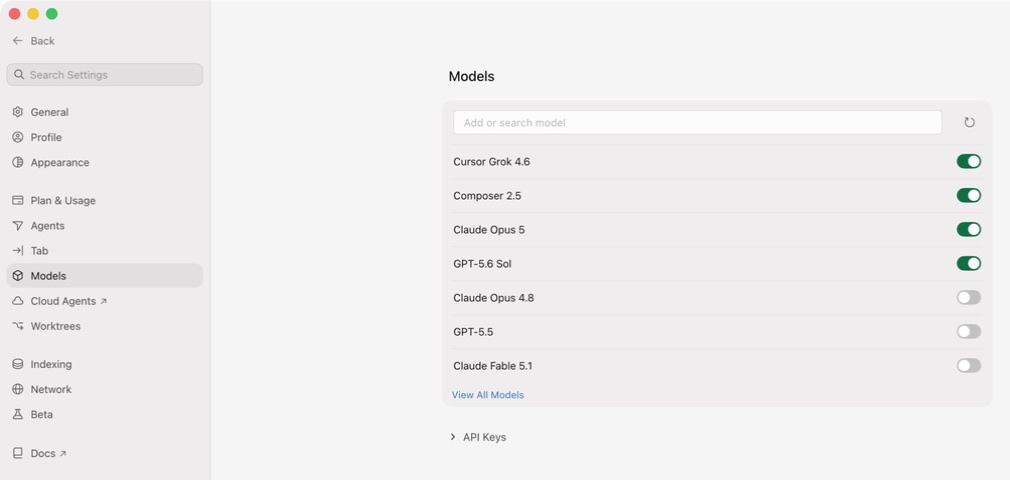
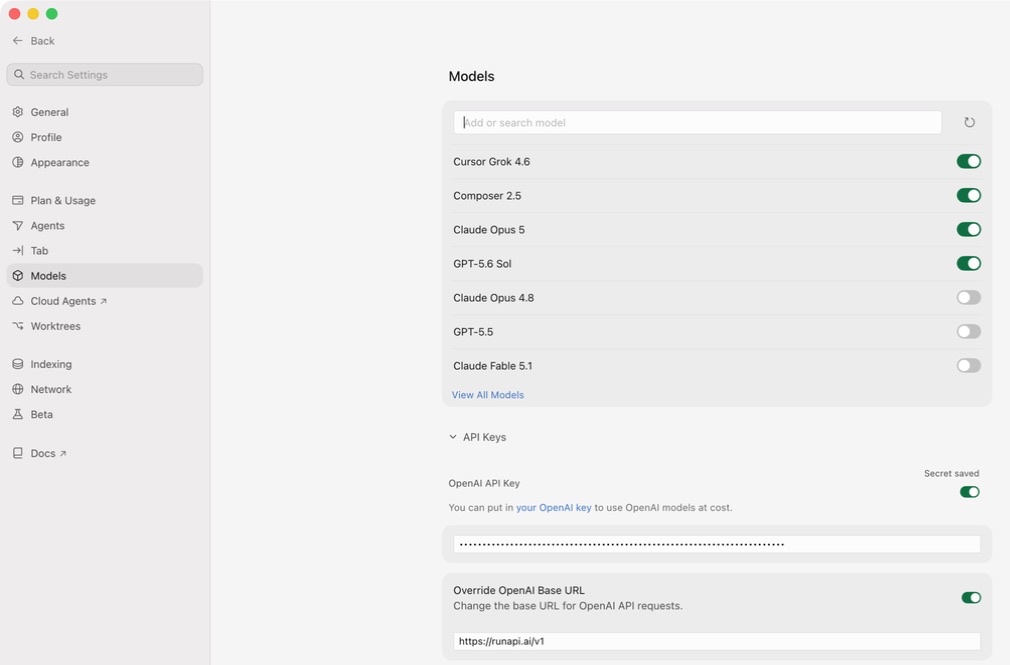
Cursor keeps all model configuration in one place. Open Cursor, press Cmd+Shift+J (Mac) or Ctrl+Shift+J (Windows/Linux) to open Settings, then click the Models tab on the left. Find the OpenAI section — you need to fill in two fields there. The OpenAI Base URL tells Cursor to send requests to RunAPI instead of OpenAI directly. The OpenAI API Key field is where you paste your RunAPI key. Both fields must be set. If you leave the base URL blank, Cursor sends your key to api.openai.com, which will reject it every time.

トラブルシューティング

Cursorの「unauthorized user api key」エラーの修正

The 'unauthorized user api key' message from Cursor means one of three things. First, the OpenAI Base URL field is empty, so Cursor sends your RunAPI key to api.openai.com, which rejects it — this is the most common cause. Second, the key was copied with a leading or trailing space. Third, the key was revoked or regenerated and the old value is stale. RunAPI keys start with 'rp-' and are not standard OpenAI keys — they will always fail if Cursor tries to authenticate them against openai.com. Always set the base URL alongside the key. If a specific model still returns an error after the key and URL are correct, double-check the model name matches the exact slug shown at runapi.ai/pricing — a mismatch returns a different error than an auth failure.

ベースURLがない

最も一般的な原因です。OpenAI Base URLが空白の場合、CursorはRunAPIキーをapi.openai.comに送信し、拒否されます。ベースURLをhttps://runapi.ai/v1に設定すると、エラーが解消されます。

余分な空白付きでコピーされたキー

Paste the key and look for a leading or trailing space. Some terminals and browsers add invisible whitespace when you copy. Delete the field and paste again if in doubt.

期限切れまたは無効化されたキー

RunAPIキーはダッシュボードから無効化できます。最近キーを再生成した場合、古い値は401を返します。Dashboard > API Keysから新しいキーをコピーしてください。

間違ったモデルスラッグ

キーとURLが正しいにもかかわらず特定のモデルがエラーを返す場合、モデル名がRunAPIのカタログと一致していない可能性があります。runapi.ai/pricingで正確なスラッグを確認し、Cursorのモデルフィールドに貼り付けてください。

Cursor Pro vs RunAPIでのBYOK

Cursor Proは月$20の価値があるか、それとも自分のキーを使うべきか?

Cursor Pro gives you a fixed monthly allowance of fast-model requests. Once you hit the cap, Cursor slows you down or stops until the month resets. BYOK with RunAPI has no cap — you pay per token at 50% of official rates. For most developers, the break-even point is around 8–12 hours of heavy AI coding per month. Below that, RunAPI costs less. Above that, a subscription becomes more predictable but not necessarily cheaper.

はじめに

Cursorを自分のAPIキーでセットアップする方法

1

無料RunAPIアカウントを作成する

runapi.aiにアクセスしてサインアップしてください。クレジットカードは不要です。接続をテストするための小さな無料クレジットが付与されます。

2

APIキーとベースURLをコピーする

In the RunAPI dashboard, go to API Keys and generate a key. Copy it right away and note the base URL — it is https://runapi.ai/v1.

3

Cursor Settingsを開く

In Cursor, press Cmd+Shift+J (Mac) or Ctrl+Shift+J (Windows/Linux) to open Settings. Click the Models tab on the left sidebar.

4

ベースURLを入力する

Scroll to the OpenAI section. Paste https://runapi.ai/v1 into the OpenAI Base URL field. Most guides skip this step — without it, Cursor sends all requests to OpenAI and rejects your key.

5

Paste your key and click Enable

Paste your RunAPI key into the OpenAI API Key field. Check that there is no leading or trailing whitespace. Toggle the OpenAI section on if it is off, then click Verify or Enable.

6

モデルを選択してテストする

In the Cursor chat bar, choose a model such as gpt-5.4. Send a test message. A response confirms the connection works. Check your RunAPI dashboard under Usage to see the request logged.

よくある質問

CursorのAPIキー設定FAQ

なぜCursorは「unauthorized user api key」と表示するのですか?

このエラーは、Cursorがターゲットにしているエンドポイントに対してキーを認証できない場合に表示されます。最も一般的な理由はOpenAI Base URLフィールドが空であることで、CursorがRunAPIキーをapi.openai.comに送信し、拒否されます。キーと一緒にベースURLをhttps://runapi.ai/v1に設定すると修正されます。

Do I need a Pro version of Cursor to add custom API keys?

No — you do not need a Pro subscription to use your own API key. Cursor lets you add custom API keys on the free plan. Go to Settings > Models, paste your key into the OpenAI API Key field, set the base URL, and you are done. Cursor's own built-in model requests have separate limits, but those do not apply when you supply your own key.

RunAPI経由でCursorでどのモデルを使用できますか?

RunAPIのカタログにあるチャット補完エンドポイントを公開しているすべてのモデル — Claude 3.5 Sonnet、Claude 3.7 Sonnet、GPT-4o、GPT-4.1、Gemini 1.5 Pro、Llama 3.1を含みます。runapi.ai/pricingの正確なモデルスラッグをCursorのモデルフィールドに入力してください。画像や音声モデルはCursorのチャットインターフェースでは利用できません。

RunAPIはCursor Proより安いですか?

軽度から中程度の使用については、はい。Cursor Proは月$20で、定額料金を希望する開発者に適しています。RunAPIはプロバイダー定価の50%でトークンごとに請求します — Claude 3.5 Sonnetの入力は$1.50/Mトークンです。Proの上限内に収まる重度ユーザーにとってはサブスクリプションの方が予測しやすいかもしれませんが、RunAPIにはスロットリングはありません。

同じRunAPIキーをWindsurfとClaude Codeでも使用できますか?

はい。1つのRunAPIキーがCursor、Windsurf、Claude Code、Codex、およびカスタムのOpenAI互換エンドポイントを受け入れる他のすべてのツールで機能します。使用量と支出は1つのRunAPIダッシュボードに統合されているため、ツールごとに別々のキーや残高を管理する必要はありません。

Cursorに入力する必要があるOpenAI Base URLは何ですか?

https://runapi.ai/v1に設定してください。OpenAIセクションがアクティブな場合、CursorはすべてのモデルリクエストにこのURLを使用します。このフィールドがないと、Cursorはリクエストをapi.openai.comに送信し、RunAPIキーを拒否して毎回未認証エラーを返します。

CursorでBYOKを使用すると、Cursorの組み込み機能は無効になりますか?

いいえ。Cursorのオートコンプリート、差分表示、エージェント機能は引き続き動作します。BYOKはCursorがチャットとインライン補完に使用するモデルとエンドポイントを変更するだけです。CursorのUIにデフォルトでリストされていないモデルを設定する場合は、モデルセレクターにスラッグを直接入力してください。

RunAPIキーがCursorで機能しているかどうかを確認するにはどうすればよいですか?

Cursorチャットで短いメッセージを送信し、RunAPIダッシュボードのUsageを確認してください。各リクエストから数秒以内に、モデル名、トークン数、コストを含む新しいログエントリが表示されます。エントリが表示されない場合、ベースURLまたはキーがRunAPIに届いていません。

関連コンテンツ

さらに探す

今日からCursorを自分のAPIキーで使い始めましょう

RunAPI gives you an OpenAI-compatible API key for Claude, GPT-4o, Gemini, and more at 50% off official rates. Paste it into Cursor's OpenAI API Key field in under two minutes and pay only for what you use.