دليل الإعداد

كيفية استخدام مفتاح API الخاص بك في Cursor IDE

Cursor Pro costs $20/month with a usage cap. With a RunAPI key you pay per token — the same Claude and GPT-4o models at 50% off official rates, no monthly fee, no Pro subscription required. This guide covers where to paste your key in Settings > Models, how to set the base URL (the step most guides skip), and how to fix the common 'unauthorized user api key' error.

تم التحديث June 23, 2026 RunAPI Editorial
نظرة سريعة

هل يمكنني استخدام Cursor بمفتاح API الخاص بي؟

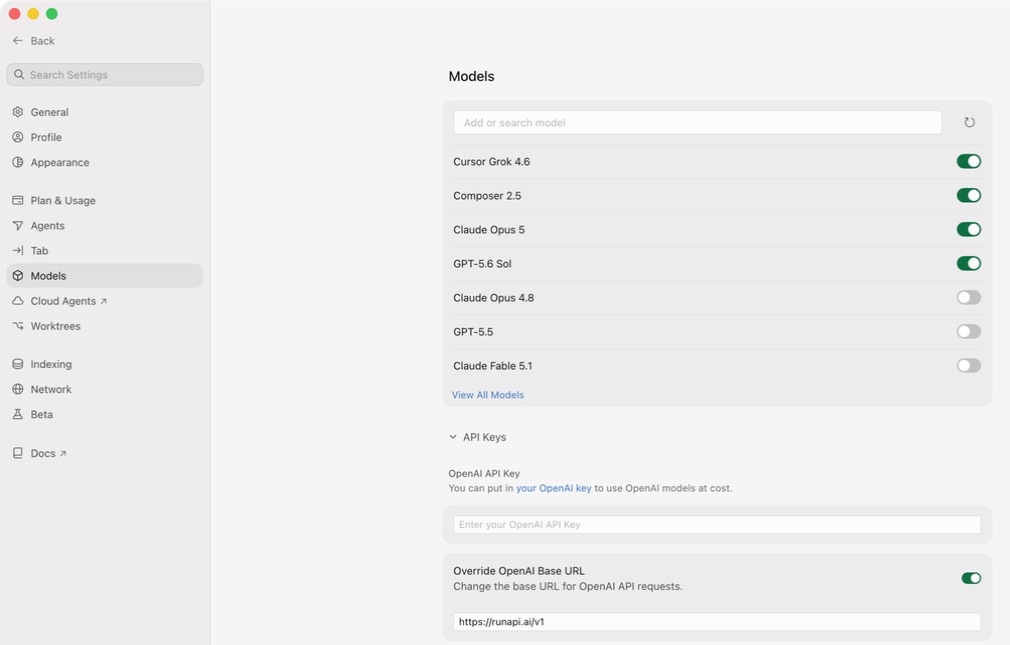
Yes. Cursor lets you add your own API key on the free plan — you do not need Cursor Pro. Go to Settings > Models, scroll to the OpenAI section, and fill in two fields: the OpenAI Base URL (https://runapi.ai/v1) and the OpenAI API Key (your RunAPI key). RunAPI gives you access to Claude 3.5 Sonnet, GPT-4o, Gemini, and other models at 50% of what Anthropic and OpenAI charge directly. The most common setup error — the 'unauthorized user api key' message — means the base URL field is empty, so Cursor is sending your key to the wrong endpoint.

يعمل على جميع خطط Cursor

You do not need a Pro subscription to use your own API key. BYOK works on the free Cursor tier and on Pro.

نقطة نهاية متوافقة مع OpenAI

RunAPI uses the same request and response format as the OpenAI API. Cursor's OpenAI API Key field accepts it without any code changes.

خصم 50% عن أسعار النماذج الرسمية

تُصدر RunAPI الفاتورة بنصف سعر قائمة المزود. يكلّف إدخال Claude 3.5 Sonnet $1.50/M tokens عبر RunAPI مقابل $3.00/M عبر Anthropic مباشرةً.

إصلاح خطأ unauthorized user api key

This error almost always means the OpenAI Base URL field is empty. Set it to https://runapi.ai/v1 alongside your key and the error clears.

شرح تفصيلي للإعدادات

أين تُدخل مفتاح API الخاص بك في Cursor

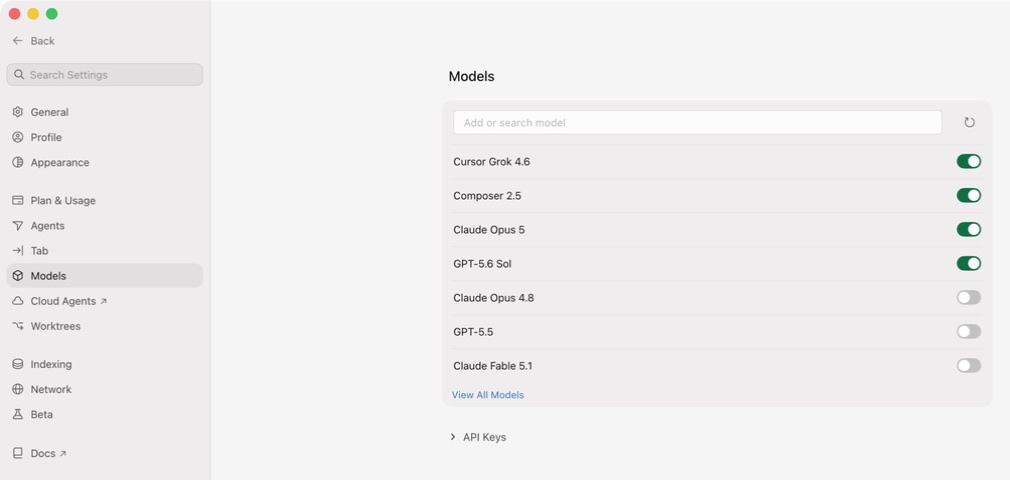
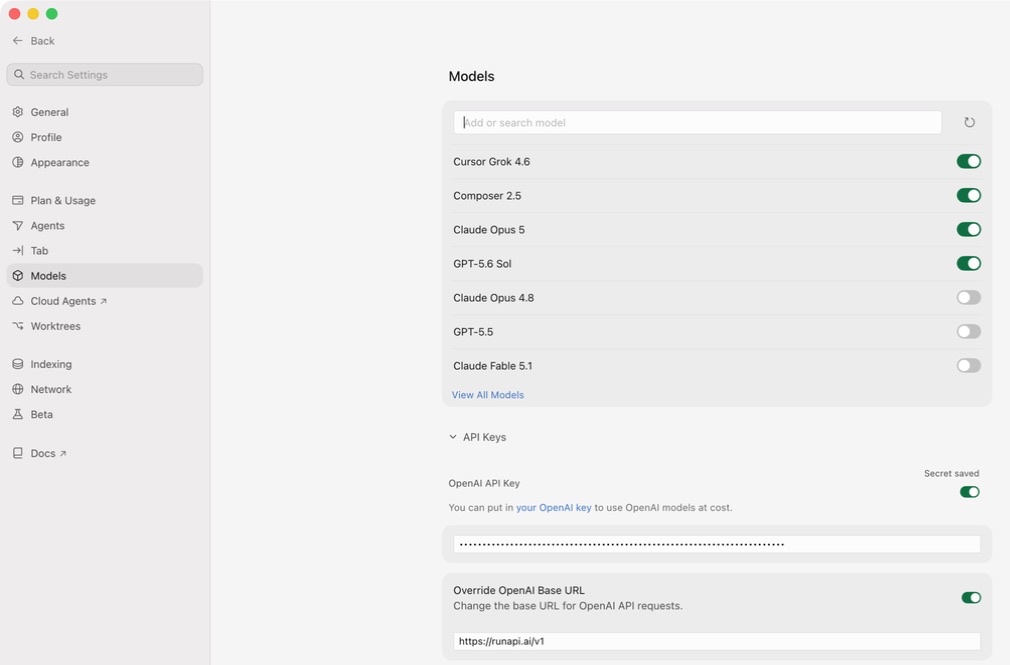
Cursor keeps all model configuration in one place. Open Cursor, press Cmd+Shift+J (Mac) or Ctrl+Shift+J (Windows/Linux) to open Settings, then click the Models tab on the left. Find the OpenAI section — you need to fill in two fields there. The OpenAI Base URL tells Cursor to send requests to RunAPI instead of OpenAI directly. The OpenAI API Key field is where you paste your RunAPI key. Both fields must be set. If you leave the base URL blank, Cursor sends your key to api.openai.com, which will reject it every time.

استكشاف الأخطاء وإصلاحها

إصلاح خطأ unauthorized user api key في Cursor

The 'unauthorized user api key' message from Cursor means one of three things. First, the OpenAI Base URL field is empty, so Cursor sends your RunAPI key to api.openai.com, which rejects it — this is the most common cause. Second, the key was copied with a leading or trailing space. Third, the key was revoked or regenerated and the old value is stale. RunAPI keys start with 'rp-' and are not standard OpenAI keys — they will always fail if Cursor tries to authenticate them against openai.com. Always set the base URL alongside the key. If a specific model still returns an error after the key and URL are correct, double-check the model name matches the exact slug shown at runapi.ai/pricing — a mismatch returns a different error than an auth failure.

عنوان URL الأساسي مفقود

السبب الأكثر شيوعًا. إذا كان حقل OpenAI Base URL فارغًا، يُرسل Cursor مفتاح RunAPI الخاص بك إلى api.openai.com الذي يرفضه. اضبط عنوان URL الأساسي على https://runapi.ai/v1 ليختفي الخطأ.

المفتاح منسوخ بمسافات زائدة

Paste the key and look for a leading or trailing space. Some terminals and browsers add invisible whitespace when you copy. Delete the field and paste again if in doubt.

مفتاح منتهي الصلاحية أو مُلغى

يمكن إلغاء مفاتيح RunAPI من لوحة التحكم. إذا أعدت توليد مفتاحك مؤخرًا، ستُعيد القيمة القديمة خطأ 401. انسخ المفتاح الجديد من Dashboard > API Keys.

معرّف نموذج خاطئ

إذا كان المفتاح وعنوان URL صحيحين لكن نموذجًا معينًا يُعيد خطأ، فقد لا يتطابق اسم النموذج مع كتالوج RunAPI. تحقق من المعرّف الدقيق على runapi.ai/pricing والصقه في حقل النموذج في Cursor.

Cursor Pro مقابل BYOK مع RunAPI

هل يستحق Cursor Pro دفع $20/month، أم ينبغي لك استخدام مفتاحك الخاص؟

Cursor Pro gives you a fixed monthly allowance of fast-model requests. Once you hit the cap, Cursor slows you down or stops until the month resets. BYOK with RunAPI has no cap — you pay per token at 50% of official rates. For most developers, the break-even point is around 8–12 hours of heavy AI coding per month. Below that, RunAPI costs less. Above that, a subscription becomes more predictable but not necessarily cheaper.

البدء

كيفية إعداد Cursor بمفتاح API الخاص بك

1

أنشئ حساب RunAPI مجانيًا

اذهب إلى runapi.ai وسجّل الدخول. لا يُشترط وجود بطاقة ائتمانية. تحصل على رصيد مجاني صغير لاختبار الاتصال.

2

انسخ مفتاح API وعنوان URL الأساسي

In the RunAPI dashboard, go to API Keys and generate a key. Copy it right away and note the base URL — it is https://runapi.ai/v1.

3

افتح إعدادات Cursor

In Cursor, press Cmd+Shift+J (Mac) or Ctrl+Shift+J (Windows/Linux) to open Settings. Click the Models tab on the left sidebar.

4

أدخل عنوان URL الأساسي

Scroll to the OpenAI section. Paste https://runapi.ai/v1 into the OpenAI Base URL field. Most guides skip this step — without it, Cursor sends all requests to OpenAI and rejects your key.

5

Paste your key and click Enable

Paste your RunAPI key into the OpenAI API Key field. Check that there is no leading or trailing whitespace. Toggle the OpenAI section on if it is off, then click Verify or Enable.

6

اختر نموذجًا واختبره

In the Cursor chat bar, choose a model such as gpt-5.4. Send a test message. A response confirms the connection works. Check your RunAPI dashboard under Usage to see the request logged.

أسئلة مطروحة بكثرة

الأسئلة الشائعة حول إعداد مفتاح API في Cursor

لماذا يُظهر Cursor خطأ unauthorized user api key؟

يظهر هذا الخطأ عندما يتعذر على Cursor مصادقة مفتاحك مقابل نقطة النهاية المستهدفة. السبب الأكثر شيوعًا هو أن حقل OpenAI Base URL فارغ، مما يجعل Cursor يرسل مفتاح RunAPI الخاص بك إلى api.openai.com الذي يرفضه. اضبط عنوان URL الأساسي على https://runapi.ai/v1 إلى جانب مفتاحك لإصلاح المشكلة.

Do I need a Pro version of Cursor to add custom API keys?

No — you do not need a Pro subscription to use your own API key. Cursor lets you add custom API keys on the free plan. Go to Settings > Models, paste your key into the OpenAI API Key field, set the base URL, and you are done. Cursor's own built-in model requests have separate limits, but those do not apply when you supply your own key.

ما النماذج التي يمكنني استخدامها في Cursor عبر RunAPI؟

أي نموذج في كتالوج RunAPI يعرض نقطة نهاية chat completions — بما في ذلك Claude 3.5 Sonnet وClaude 3.7 Sonnet وGPT-4o وGPT-4.1 وGemini 1.5 Pro وLlama 3.1. أدخل معرّف النموذج الدقيق من runapi.ai/pricing في حقل النموذج في Cursor. نماذج الصور والصوت غير متاحة في واجهة محادثة Cursor.

هل RunAPI أرخص من Cursor Pro؟

نعم، للاستخدام الخفيف إلى المتوسط. يناسب Cursor Pro بسعر $20/month المطورين الذين يريدون رسومًا ثابتة. تُصدر RunAPI فاتورة لكل رمز مميز بنسبة 50% من أسعار مزودي الخدمة. قد يجد المستخدمون الكثيفون الذين يبقون ضمن حصة Pro أن الاشتراك أكثر قابلية للتنبؤ، لكن لا يوجد تقييد مع RunAPI.

هل يمكنني استخدام نفس مفتاح RunAPI في Windsurf وClaude Code أيضًا؟

نعم. يعمل مفتاح RunAPI واحد عبر Cursor وWindsurf وClaude Code وCodex وأي أداة أخرى تقبل نقطة نهاية متوافقة مع OpenAI. يتم توحيد الاستخدام والإنفاق في لوحة تحكم RunAPI واحدة، لذلك لا تحتاج إلى إدارة مفاتيح أو أرصدة منفصلة لكل أداة.

ما عنوان URL الأساسي لـ OpenAI الذي يجب إدخاله في Cursor؟

اضبطه على https://runapi.ai/v1. يستخدم Cursor هذا العنوان لجميع طلبات النماذج عندما يكون قسم OpenAI نشطًا. بدون هذا الحقل، يُرسل Cursor طلباتك إلى api.openai.com بدلاً من ذلك، مما سيرفض مفتاح RunAPI ويُعيد خطأ غير مصرح به في كل مرة.

هل يؤدي استخدام BYOK في Cursor إلى تعطيل الميزات المدمجة في Cursor؟

لا. تستمر ميزات الإكمال التلقائي وعرض الفروق والوكيل في Cursor في العمل. لا يغير BYOK إلا النموذج ونقطة النهاية التي يستخدمها Cursor للمحادثة والإكمالات المضمنة. إذا قمت بضبط نموذج لا يُدرجه واجهة Cursor افتراضيًا، فاكتب المعرّف مباشرةً في محدد النموذج.

كيف أعرف إذا كان مفتاح RunAPI الخاص بي يعمل في Cursor؟

أرسل رسالة قصيرة في محادثة Cursor وتحقق من لوحة تحكم RunAPI ضمن Usage. يظهر إدخال سجل جديد يتضمن اسم النموذج وعدد الرموز المميزة والتكلفة في غضون ثوانٍ قليلة من كل طلب. إذا لم يظهر أي إدخال، فإن عنوان URL الأساسي أو المفتاح لا يصل إلى RunAPI.

ذات صلة

استكشف المزيد

ابدأ استخدام Cursor بمفتاح API الخاص بك اليوم

RunAPI gives you an OpenAI-compatible API key for Claude, GPT-4o, Gemini, and more at 50% off official rates. Paste it into Cursor's OpenAI API Key field in under two minutes and pay only for what you use.