INSTALLATIEGIDS

Je eigen API-sleutel gebruiken in Cursor IDE

Cursor Pro costs $20/month with a usage cap. With a RunAPI key you pay per token — the same Claude and GPT-4o models at 50% off official rates, no monthly fee, no Pro subscription required. This guide covers where to paste your key in Settings > Models, how to set the base URL (the step most guides skip), and how to fix the common 'unauthorized user api key' error.

Bijgewerkt op June 23, 2026 RunAPI Editorial
In het kort

Kan ik Cursor gebruiken met mijn eigen API-sleutel?

Yes. Cursor lets you add your own API key on the free plan — you do not need Cursor Pro. Go to Settings > Models, scroll to the OpenAI section, and fill in two fields: the OpenAI Base URL (https://runapi.ai/v1) and the OpenAI API Key (your RunAPI key). RunAPI gives you access to Claude 3.5 Sonnet, GPT-4o, Gemini, and other models at 50% of what Anthropic and OpenAI charge directly. The most common setup error — the 'unauthorized user api key' message — means the base URL field is empty, so Cursor is sending your key to the wrong endpoint.

Werkt op alle Cursor-abonnementen

You do not need a Pro subscription to use your own API key. BYOK works on the free Cursor tier and on Pro.

OpenAI-compatibel endpoint

RunAPI uses the same request and response format as the OpenAI API. Cursor's OpenAI API Key field accepts it without any code changes.

50% korting op officiële modelprijzen

RunAPI rekent de helft van de aanbiederslijstprijs. Claude 3.5 Sonnet-invoer kost $1,50/M tokens via RunAPI versus $3,00/M rechtstreeks via Anthropic.

Herstel 'unauthorized user api key'

This error almost always means the OpenAI Base URL field is empty. Set it to https://runapi.ai/v1 alongside your key and the error clears.

Instellingen doorlopen

Waar je je API-sleutel invoert in Cursor

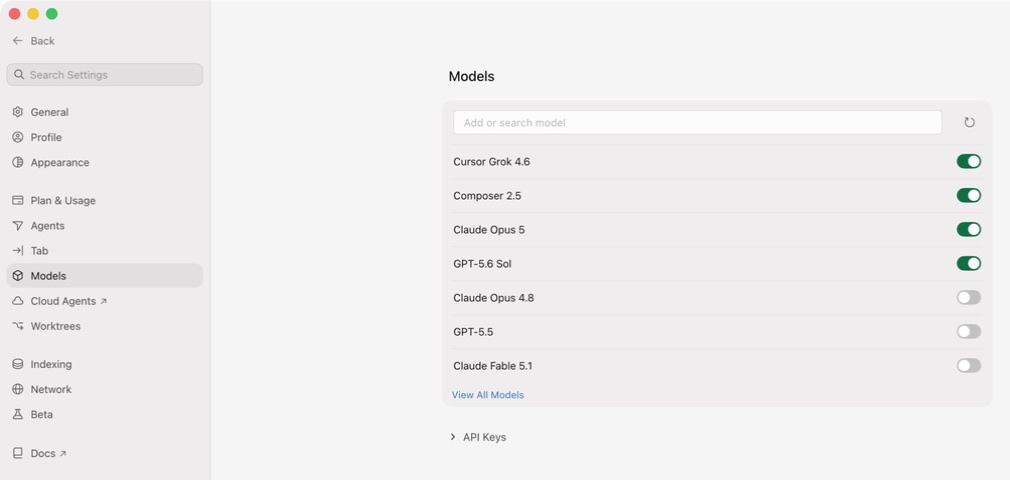
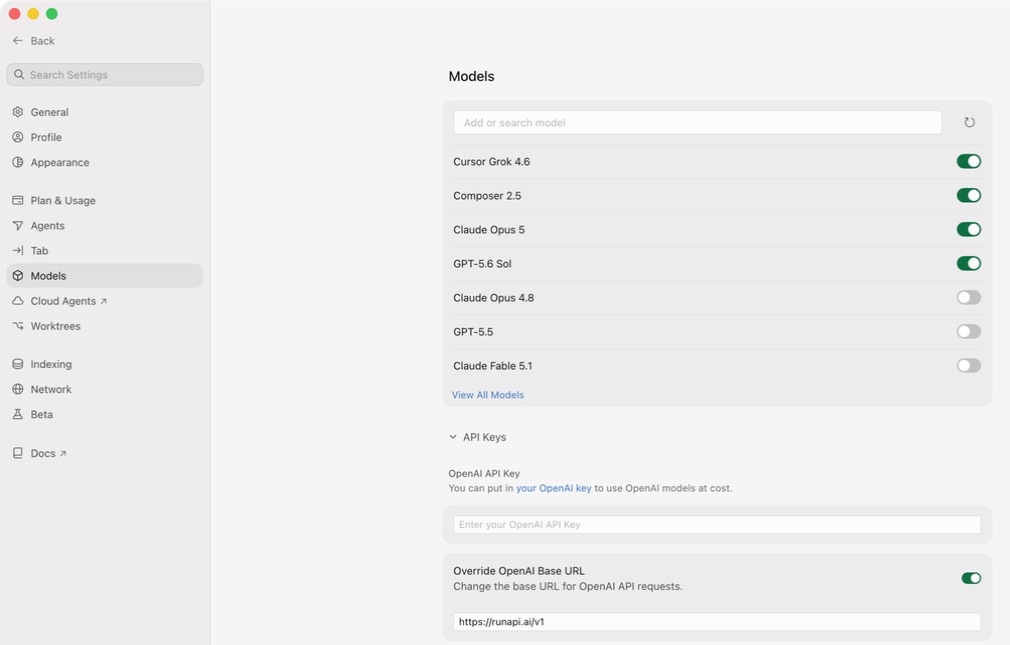
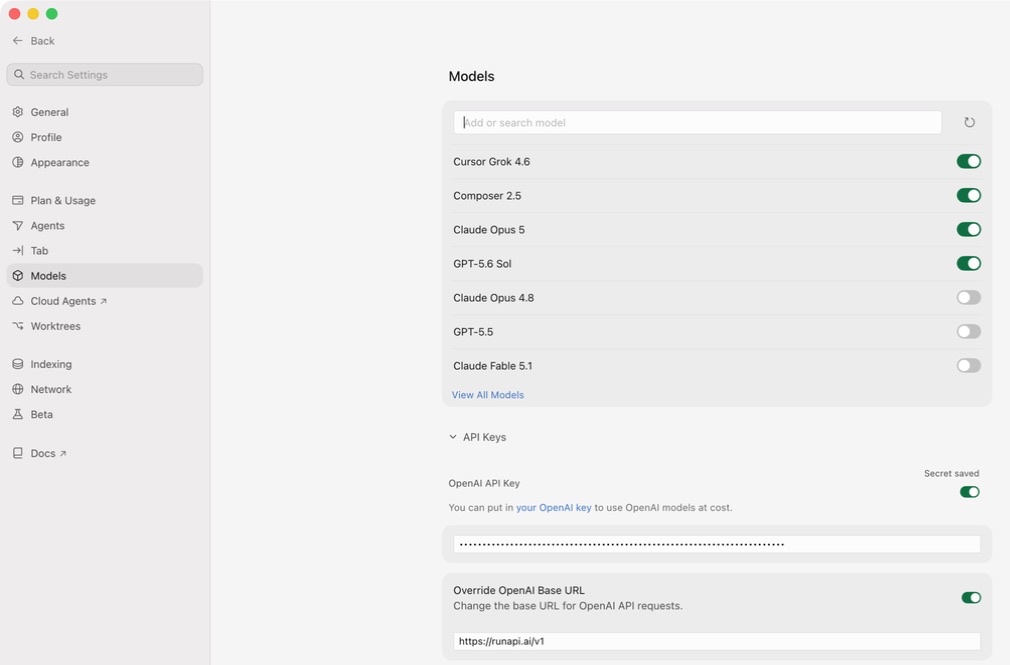
Cursor keeps all model configuration in one place. Open Cursor, press Cmd+Shift+J (Mac) or Ctrl+Shift+J (Windows/Linux) to open Settings, then click the Models tab on the left. Find the OpenAI section — you need to fill in two fields there. The OpenAI Base URL tells Cursor to send requests to RunAPI instead of OpenAI directly. The OpenAI API Key field is where you paste your RunAPI key. Both fields must be set. If you leave the base URL blank, Cursor sends your key to api.openai.com, which will reject it every time.

Probleemoplossing

De fout 'unauthorized user api key' in Cursor oplossen

The 'unauthorized user api key' message from Cursor means one of three things. First, the OpenAI Base URL field is empty, so Cursor sends your RunAPI key to api.openai.com, which rejects it — this is the most common cause. Second, the key was copied with a leading or trailing space. Third, the key was revoked or regenerated and the old value is stale. RunAPI keys start with 'rp-' and are not standard OpenAI keys — they will always fail if Cursor tries to authenticate them against openai.com. Always set the base URL alongside the key. If a specific model still returns an error after the key and URL are correct, double-check the model name matches the exact slug shown at runapi.ai/pricing — a mismatch returns a different error than an auth failure.

Ontbrekende basis-URL

De meest voorkomende oorzaak. Als OpenAI Basis-URL leeg is, stuurt Cursor je RunAPI-sleutel naar api.openai.com, die hem afwijst. Stel de basis-URL in op https://runapi.ai/v1 en de fout verdwijnt.

Sleutel gekopieerd met extra witruimte

Paste the key and look for a leading or trailing space. Some terminals and browsers add invisible whitespace when you copy. Delete the field and paste again if in doubt.

Verlopen of ingetrokken sleutel

RunAPI-sleutels kunnen worden ingetrokken via het dashboard. Als je onlangs je sleutel opnieuw hebt gegenereerd, geeft de oude waarde een 401 terug. Kopieer de nieuwe sleutel via Dashboard > API-sleutels.

Onjuiste modelslug

Als de sleutel en URL correct zijn maar een specifiek model een fout geeft, komt de modelnaam mogelijk niet overeen met de catalogus van RunAPI. Controleer de exacte slug op runapi.ai/pricing en plak hem in het modelveld van Cursor.

Cursor Pro vs BYOK met RunAPI

Is Cursor Pro $20/maand waard, of kun je beter je eigen sleutel gebruiken?

Cursor Pro gives you a fixed monthly allowance of fast-model requests. Once you hit the cap, Cursor slows you down or stops until the month resets. BYOK with RunAPI has no cap — you pay per token at 50% of official rates. For most developers, the break-even point is around 8–12 hours of heavy AI coding per month. Below that, RunAPI costs less. Above that, a subscription becomes more predictable but not necessarily cheaper.

Aan de slag

Cursor instellen met je eigen API-sleutel

1

Maak een gratis RunAPI-account aan

Ga naar runapi.ai en meld je aan. Er is geen creditcard vereist. Je krijgt een klein gratis tegoed om de verbinding te testen.

2

Kopieer je API-sleutel en basis-URL

In the RunAPI dashboard, go to API Keys and generate a key. Copy it right away and note the base URL — it is https://runapi.ai/v1.

3

Open Cursor-instellingen

In Cursor, press Cmd+Shift+J (Mac) or Ctrl+Shift+J (Windows/Linux) to open Settings. Click the Models tab on the left sidebar.

4

Voer de basis-URL in

Scroll to the OpenAI section. Paste https://runapi.ai/v1 into the OpenAI Base URL field. Most guides skip this step — without it, Cursor sends all requests to OpenAI and rejects your key.

5

Paste your key and click Enable

Paste your RunAPI key into the OpenAI API Key field. Check that there is no leading or trailing whitespace. Toggle the OpenAI section on if it is off, then click Verify or Enable.

6

Selecteer een model en test

In the Cursor chat bar, choose a model such as gpt-5.4. Send a test message. A response confirms the connection works. Check your RunAPI dashboard under Usage to see the request logged.

Veelgestelde vragen

Veelgestelde vragen over Cursor API-sleutelinstellingen

Waarom toont Cursor 'unauthorized user api key'?

Deze fout verschijnt wanneer Cursor je sleutel niet kan authenticeren bij het endpoint dat hij aanroept. De meest voorkomende reden is dat het veld OpenAI Basis-URL leeg is, zodat Cursor je RunAPI-sleutel naar api.openai.com stuurt, die hem afwijst. Stel de basis-URL in op https://runapi.ai/v1 naast je sleutel om het op te lossen.

Do I need a Pro version of Cursor to add custom API keys?

No — you do not need a Pro subscription to use your own API key. Cursor lets you add custom API keys on the free plan. Go to Settings > Models, paste your key into the OpenAI API Key field, set the base URL, and you are done. Cursor's own built-in model requests have separate limits, but those do not apply when you supply your own key.

Welke modellen kan ik in Cursor gebruiken via RunAPI?

Elk model in de catalogus van RunAPI dat een chat completions-endpoint blootstelt — inclusief Claude 3.5 Sonnet, Claude 3.7 Sonnet, GPT-4o, GPT-4.1, Gemini 1.5 Pro en Llama 3.1. Voer de exacte modelslug van runapi.ai/pricing in het modelveld van Cursor in. Beeld- en audiomodellen zijn niet beschikbaar in de chatinterface van Cursor.

Is RunAPI goedkoper dan Cursor Pro?

Voor licht tot matig gebruik, ja. Cursor Pro voor $20/maand is geschikt voor ontwikkelaars die een vast tarief willen. RunAPI rekent per token tegen 50% van de lijstprijzen van de aanbieder — Claude 3.5 Sonnet kost $1,50/M invoertokens. Intensieve gebruikers die binnen het Pro-limiet blijven, vinden het abonnement mogelijk voorspelbaarder, maar er zijn geen beperkingen bij RunAPI.

Kan ik dezelfde RunAPI-sleutel ook in Windsurf en Claude Code gebruiken?

Ja. Één RunAPI-sleutel werkt in Cursor, Windsurf, Claude Code, Codex en elke andere tool die een aangepast OpenAI-compatibel endpoint accepteert. Gebruik en uitgaven worden gecombineerd in één RunAPI-dashboard, zodat je geen afzonderlijke sleutels of saldi per tool hoeft te beheren.

Wat is de OpenAI Basis-URL die ik moet invoeren in Cursor?

Stel het in op https://runapi.ai/v1. Cursor gebruikt deze URL voor alle modelverzoeken wanneer de OpenAI-sectie actief is. Zonder dit veld stuurt Cursor je verzoeken naar api.openai.com, wat een RunAPI-sleutel afwijst en elke keer een ongeautoriseerde fout retourneert.

Schakelt het gebruik van BYOK in Cursor de ingebouwde functies van Cursor uit?

Nee. De autoaanvulling, diff-weergave en agentfuncties van Cursor blijven werken. BYOK verandert alleen welk model en endpoint Cursor gebruikt voor chat en inline aanvullingen. Als je een model instelt dat de gebruikersinterface van Cursor niet standaard vermeldt, typ de slug rechtstreeks in de modelselectie.

Hoe weet ik of mijn RunAPI-sleutel werkt in Cursor?

Stuur een kort bericht in Cursor-chat en controleer het RunAPI-dashboard onder Gebruik. Een nieuw logboekinvoer met de modelnaam, het aantal tokens en de kosten verschijnt binnen enkele seconden na elk verzoek. Als er geen invoer verschijnt, bereikt de basis-URL of de sleutel RunAPI niet.

GERELATEERD

Meer ontdekken

Begin vandaag nog Cursor te gebruiken met je eigen API-sleutel

RunAPI gives you an OpenAI-compatible API key for Claude, GPT-4o, Gemini, and more at 50% off official rates. Paste it into Cursor's OpenAI API Key field in under two minutes and pay only for what you use.