缺少 Base URL
最常見的原因。若 OpenAI Base URL 為空,Cursor 會將您的 RunAPI 金鑰發送至 api.openai.com,而後者會拒絕驗證。將 Base URL 設為 https://runapi.ai/v1 即可解決錯誤。
Cursor Pro costs $20/month with a usage cap. With a RunAPI key you pay per token — the same Claude and GPT-4o models at 50% off official rates, no monthly fee, no Pro subscription required. This guide covers where to paste your key in Settings > Models, how to set the base URL (the step most guides skip), and how to fix the common 'unauthorized user api key' error.
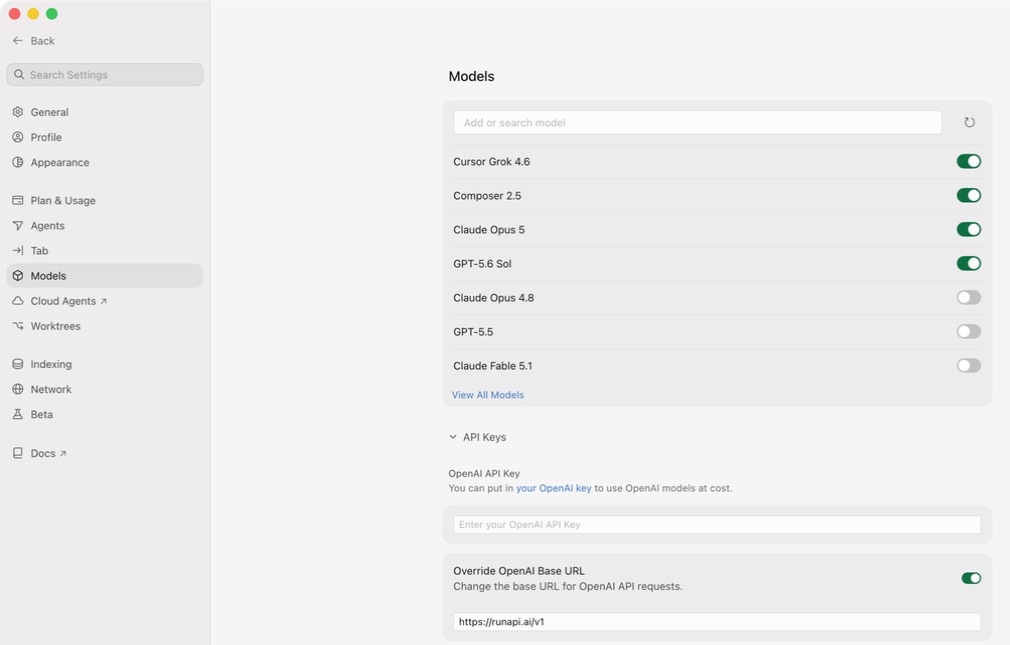
Yes. Cursor lets you add your own API key on the free plan — you do not need Cursor Pro. Go to Settings > Models, scroll to the OpenAI section, and fill in two fields: the OpenAI Base URL (https://runapi.ai/v1) and the OpenAI API Key (your RunAPI key). RunAPI gives you access to Claude 3.5 Sonnet, GPT-4o, Gemini, and other models at 50% of what Anthropic and OpenAI charge directly. The most common setup error — the 'unauthorized user api key' message — means the base URL field is empty, so Cursor is sending your key to the wrong endpoint.
You do not need a Pro subscription to use your own API key. BYOK works on the free Cursor tier and on Pro.
RunAPI uses the same request and response format as the OpenAI API. Cursor's OpenAI API Key field accepts it without any code changes.
RunAPI 以提供商定價的一半計費。透過 RunAPI 使用 Claude 3.5 Sonnet 輸入費用為每百萬 Token $1.50,而直接透過 Anthropic 則為 $3.00。
This error almost always means the OpenAI Base URL field is empty. Set it to https://runapi.ai/v1 alongside your key and the error clears.
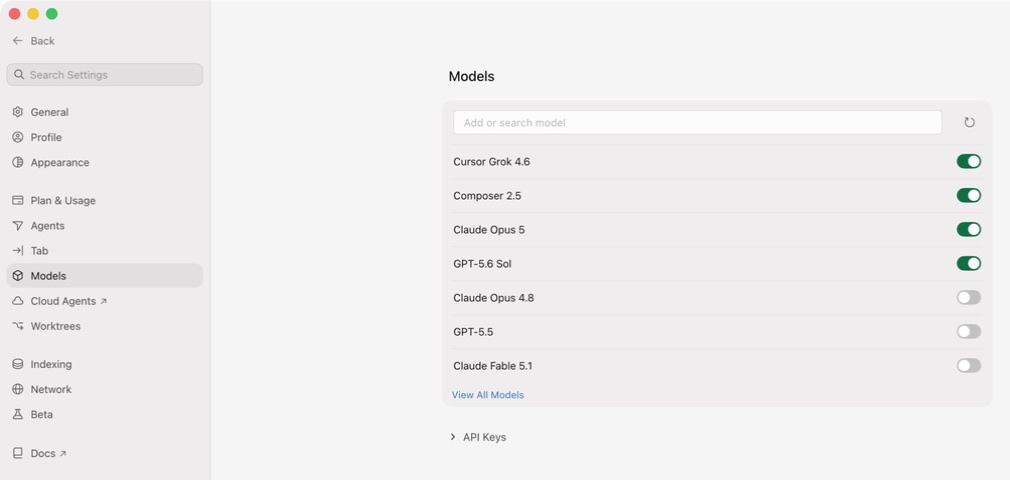
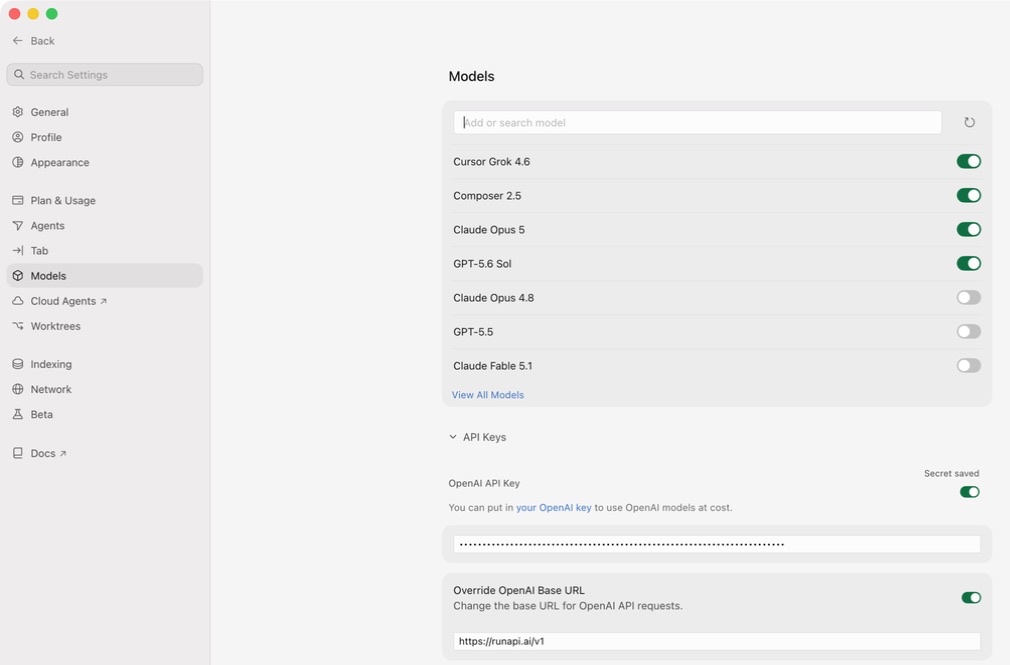
Cursor keeps all model configuration in one place. Open Cursor, press Cmd+Shift+J (Mac) or Ctrl+Shift+J (Windows/Linux) to open Settings, then click the Models tab on the left. Find the OpenAI section — you need to fill in two fields there. The OpenAI Base URL tells Cursor to send requests to RunAPI instead of OpenAI directly. The OpenAI API Key field is where you paste your RunAPI key. Both fields must be set. If you leave the base URL blank, Cursor sends your key to api.openai.com, which will reject it every time.
The 'unauthorized user api key' message from Cursor means one of three things. First, the OpenAI Base URL field is empty, so Cursor sends your RunAPI key to api.openai.com, which rejects it — this is the most common cause. Second, the key was copied with a leading or trailing space. Third, the key was revoked or regenerated and the old value is stale. RunAPI keys start with 'rp-' and are not standard OpenAI keys — they will always fail if Cursor tries to authenticate them against openai.com. Always set the base URL alongside the key. If a specific model still returns an error after the key and URL are correct, double-check the model name matches the exact slug shown at runapi.ai/pricing — a mismatch returns a different error than an auth failure.
最常見的原因。若 OpenAI Base URL 為空,Cursor 會將您的 RunAPI 金鑰發送至 api.openai.com,而後者會拒絕驗證。將 Base URL 設為 https://runapi.ai/v1 即可解決錯誤。
Paste the key and look for a leading or trailing space. Some terminals and browsers add invisible whitespace when you copy. Delete the field and paste again if in doubt.
RunAPI 金鑰可從儀表板撤銷。若您最近重新生成了金鑰,舊值將返回 401 錯誤。請從 Dashboard > API Keys 複製新金鑰。
若金鑰和 URL 均正確,但特定模型返回錯誤,則模型名稱可能與 RunAPI 目錄不符。請在 runapi.ai/pricing 確認確切的模型識別碼,並貼入 Cursor 的模型欄位。
Cursor Pro gives you a fixed monthly allowance of fast-model requests. Once you hit the cap, Cursor slows you down or stops until the month resets. BYOK with RunAPI has no cap — you pay per token at 50% of official rates. For most developers, the break-even point is around 8–12 hours of heavy AI coding per month. Below that, RunAPI costs less. Above that, a subscription becomes more predictable but not necessarily cheaper.
前往 runapi.ai 並註冊。無需信用卡。您將獲得少量免費額度來測試連線。
In the RunAPI dashboard, go to API Keys and generate a key. Copy it right away and note the base URL — it is https://runapi.ai/v1.
In Cursor, press Cmd+Shift+J (Mac) or Ctrl+Shift+J (Windows/Linux) to open Settings. Click the Models tab on the left sidebar.
Scroll to the OpenAI section. Paste https://runapi.ai/v1 into the OpenAI Base URL field. Most guides skip this step — without it, Cursor sends all requests to OpenAI and rejects your key.
Paste your RunAPI key into the OpenAI API Key field. Check that there is no leading or trailing whitespace. Toggle the OpenAI section on if it is off, then click Verify or Enable.
In the Cursor chat bar, choose a model such as gpt-5.4. Send a test message. A response confirms the connection works. Check your RunAPI dashboard under Usage to see the request logged.
此錯誤出現時,代表 Cursor 無法向目標端點驗證您的金鑰。最常見的原因是 OpenAI Base URL 欄位為空,導致 Cursor 將您的 RunAPI 金鑰發送至 api.openai.com,而後者拒絕驗證。請在金鑰旁同時設定 Base URL 為 https://runapi.ai/v1 即可修復。
No — you do not need a Pro subscription to use your own API key. Cursor lets you add custom API keys on the free plan. Go to Settings > Models, paste your key into the OpenAI API Key field, set the base URL, and you are done. Cursor's own built-in model requests have separate limits, but those do not apply when you supply your own key.
RunAPI 目錄中所有提供聊天補全端點的模型皆可使用——包括 Claude 3.5 Sonnet、Claude 3.7 Sonnet、GPT-4o、GPT-4.1、Gemini 1.5 Pro 和 Llama 3.1。請在 runapi.ai/pricing 找到確切的模型識別碼,並填入 Cursor 的模型欄位。圖片和音訊模型在 Cursor 的聊天介面中不適用。
對於輕度到中度使用者,是的。Cursor Pro 每月 $20 適合想要固定費用的開發者。RunAPI 按 Token 計費,價格為提供商定價的 50%——Claude 3.5 Sonnet 輸入成本為每百萬 Token $1.50。重度使用者若能維持在 Pro 配額內,訂閱方案可能更可預測,但 RunAPI 沒有流量限制。
是的。一個 RunAPI 金鑰可跨 Cursor、Windsurf、Claude Code、Codex 及任何接受自訂 OpenAI 相容端點的工具使用。使用量和費用統一在一個 RunAPI 儀表板中,無需為每個工具管理各自的金鑰或餘額。
設定為 https://runapi.ai/v1。當 OpenAI 區段啟用時,Cursor 將此 URL 用於所有模型請求。沒有此欄位,Cursor 會將您的請求發送至 api.openai.com,後者每次都會拒絕 RunAPI 金鑰並返回未授權錯誤。
不會。Cursor 的自動補全、差異檢視和代理功能仍可正常運作。BYOK 只改變 Cursor 聊天和行內補全所使用的模型和端點。若您設定的模型未出現在 Cursor 的預設清單中,請直接在模型選擇器中輸入識別碼。
在 Cursor 聊天中發送一則簡短訊息,然後在 RunAPI 儀表板的使用量下確認。每次請求後數秒內,應出現包含模型名稱、Token 數量和費用的新記錄。若沒有記錄,代表 Base URL 或金鑰未能到達 RunAPI。
RunAPI gives you an OpenAI-compatible API key for Claude, GPT-4o, Gemini, and more at 50% off official rates. Paste it into Cursor's OpenAI API Key field in under two minutes and pay only for what you use.