Cat Recognition Result Screen
Cat Recognition Result Screen

Eingabeaufforderung

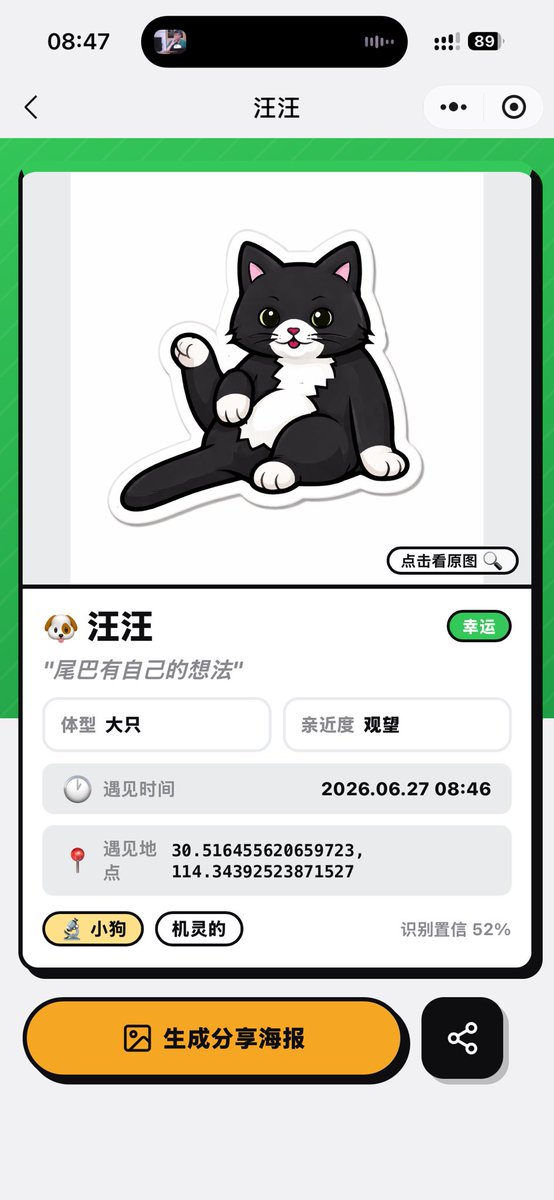
Using the provided reference image as the source cat and app context, transform the camera recognition screen into a completed pet-profile result screen for a mini app. Replace the live camera view with a clean card-style analysis page: show a cute sticker-like cartoon illustration of the same black-and-white cat sitting with its tail raised on a white preview area, with a small button labeled “点击看原图” and a magnifying-glass icon. Keep the mobile screenshot aspect ratio and iOS-style top chrome, but change the page title to 汪汪. Layout: Create one large rounded rectangular result card on a bright green patterned background. Under the illustration, add a profile section with exactly these visible data elements: 1) name row with a dog emoji and 汪汪, plus a green badge labeled “幸运”; 2) quote text 尾巴有自己的想法; 3) two small info boxes labeled “体型 大只” and “亲近度 观望”; 4) a gray row labeled “遇见时间” with 2026.06.27 08:46; 5) a gray row labeled “遇见地点” with 30.516455620659723, 114.34392523871527; 6) two pill tags labeled “小狗” and “机灵的”; 7) confidence text “识别置信 52%”. Bottom actions: Add two bottom buttons below the card: a large yellow rounded button with an image icon and text “生成分享海报”, and a smaller black rounded square share button with a share-network icon. Style: playful polished Chinese mini-program UI, thick black outlines, rounded cards, soft shadows, yellow accent color, clean vector-like illustration. Do not keep the original camera scanning brackets, zoom controls, shutter button, or live street background.

Läuft auf 21 Modellen

  • Flux
  • Flux 2
  • Flux Kontext
  • GPT-4o Image
  • GPT Image
  • GPT Image 2
  • GPT Image 2.5
  • GPT Image 2.6
  • Grok Imagine
  • Ideogram V3
  • Imagen 4
  • Kling
  • +9 mehr

Was dieser Prompt erzeugt

Using the face from the attached photo, recreate a... Nicht angegeben Nicht angegeben
Seedream 5 prompt: cosplay Nicht angegeben v2
Seedream 5 prompt: photography, portrait of contrast, profile silhoue... Nicht angegeben seedream-5-pro
Hero prompt: natural blond polish woman, 30 years, slim, no mak... Nicht angegeben 1.0
Hero prompt: natural blond swedish woman, 30 years, no make up,... Nicht angegeben 1.0
Hero prompt: 
Take the face and natural body proportions from t... Nicht angegeben 1.0

Führen Sie diese Eingabeaufforderung mit der API aus

Die folgende Anforderung sendet diese Eingabeaufforderung mit den ausgefüllten Standardwerten an das erste Modell, auf dem sie ausgeführt wird. Tauschen Sie den Modellnamen gegen ein anderes oben aufgeführtes Modell aus.

Prompt API-Dokumente
/api/v1/gpt_image_2/text_to_image
curl -X POST https://runapi.ai/api/v1/gpt_image_2/text_to_image \
  -H "Authorization: Bearer $RUNAPI_API_KEY" \
  -H "Content-Type: application/json" \
  --data-binary @- <<'JSON'
{
  "model": "gpt-image-2",
  "prompt": "Using the provided reference image as the source cat and app context, transform the camera recognition screen into a completed pet-profile result screen for a mini app. Replace the live camera view with a clean card-style analysis page: show a cute sticker-like cartoon illustration of the same black-and-white cat sitting with its tail raised on a white preview area, with a small button labeled “点击看原图” and a magnifying-glass icon. Keep the mobile screenshot aspect ratio and iOS-style top chrome, but change the page title to 汪汪.\n\nLayout: Create one large rounded rectangular result card on a bright green patterned background. Under the illustration, add a profile section with exactly these visible data elements: 1) name row with a dog emoji and 汪汪, plus a green badge labeled “幸运”; 2) quote text 尾巴有自己的想法; 3) two small info boxes labeled “体型 大只” and “亲近度 观望”; 4) a gray row labeled “遇见时间” with 2026.06.27 08:46; 5) a gray row labeled “遇见地点” with 30.516455620659723, 114.34392523871527; 6) two pill tags labeled “小狗” and “机灵的”; 7) confidence text “识别置信 52%”.\n\nBottom actions: Add two bottom buttons below the card: a large yellow rounded button with an image icon and text “生成分享海报”, and a smaller black rounded square share button with a share-network icon.\n\nStyle: playful polished Chinese mini-program UI, thick black outlines, rounded cards, soft shadows, yellow accent color, clean vector-like illustration. Do not keep the original camera scanning brackets, zoom controls, shutter button, or live street background."
}
JSON

Probier‘s mal mit einer Anfrage