Dark Japanese Recipe App UI
Dark Japanese Recipe App UI

Eingabeaufforderung

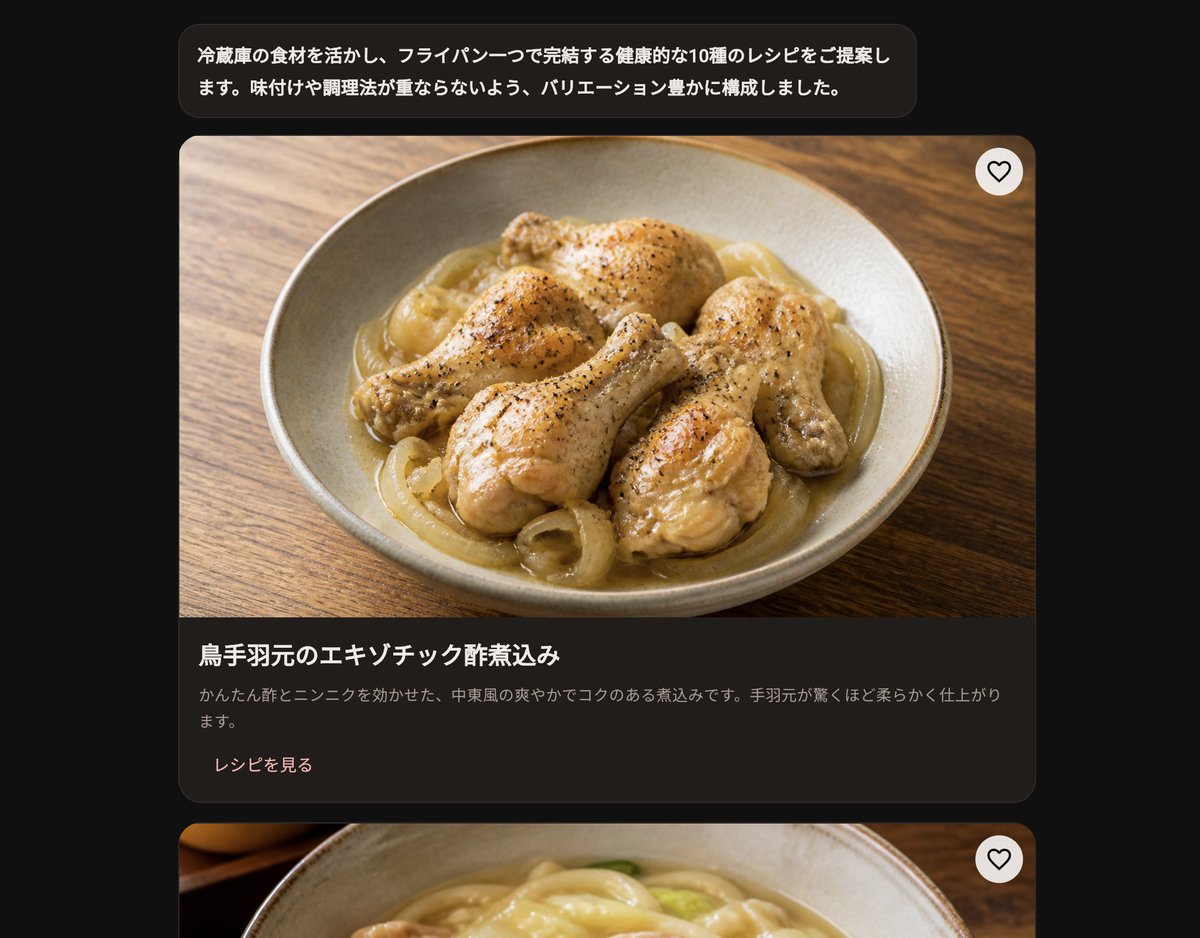
Goal: Create a realistic dark-mode mobile cooking AI assistant interface showing recipe suggestions generated from fridge ingredients, in Japanese. Canvas: Vertical smartphone screenshot, approximately 4:5 crop, black outer background with a centered app feed column. Use rounded corners, soft shadows, and a premium food-app aesthetic. Layout: At the top, place one rounded dark charcoal chat bubble containing Japanese assistant text. Below it, show a vertically scrolling list of recipe cards. Exactly 2 recipe cards are visible: the first card is fully visible, the second card is only partially visible at the bottom. Text content: The top chat bubble says: 「冷蔵庫の食材を活かし、フライパン一つで完結する健康的な10種のレシピをご提案します。味付けや調理法が重ならないよう、バリエーション豊かに構成しました。」 The first recipe card title says: 「鳥手羽元のエキゾチック酢煮込み」. Its description says: 「かんたん酢とニンニクを効かせた、中東風の爽やかでコクのある煮込みです。手羽元が驚くほど柔らかく仕上がります。」 The link text says: 「レシピを見る」. Card details: Recipe card 1 has a large food photo on top and a dark information panel underneath. The photo shows braised chicken drumettes with sliced onions in a light brown sauce served in a shallow beige ceramic bowl on a warm wooden table, photographed from a slightly overhead angle with natural restaurant lighting. Add black pepper specks on the chicken, glossy sauce, and soft depth of field. Place exactly 1 circular white heart-outline favorite button at the upper-right corner of the image area. The information panel below is very dark brown-black with the title in bold white, description in muted gray, and the recipe link in pale pink. Second card: Show only the top portion of a second recipe card beneath the first, separated by vertical spacing. It should include a large cropped food photo showing a bowl of creamy pale-yellow noodles or soup on a wooden table, with exactly 1 circular white heart-outline favorite button at the upper-right corner. Do not show its title in the crop. Visual style: Modern Japanese recipe app UI, dark theme, rounded 18–22 px cards, subtle borders, soft shadows, high-resolution food photography, clean sans-serif typography. Use warm browns, beige ceramic, black charcoal panels, and muted pink accent text. Constraints: Include exactly 1 top chat bubble, exactly 2 visible recipe cards, and exactly 2 heart favorite buttons total. Keep the interface realistic and uncluttered, with no extra icons, navigation bars, watermarks, or English UI text.

Läuft auf 20 Modellen

  • Flux
  • Flux 2
  • Flux Kontext
  • GPT-4o Image
  • GPT Image
  • GPT Image 2
  • GPT Image 2.5
  • GPT Image 2.6
  • Grok Imagine
  • Ideogram V3
  • Imagen 4
  • Kling
  • +8 mehr

Was dieser Prompt erzeugt

Split-Page Coffee Shop Travel Journal Nicht angegeben gpt-image-2
Cute Chibi Characters in a Sweet Playful Moment Nicht angegeben gpt-image-2
Underground Train Yard Clash Anime Development Board Nicht angegeben gpt-image-2
Realistic Group Selfie with Smartphone Flash Effect Nicht angegeben nano-banana-pro
Exploded-View Structural Cutaway for Food Photography Nicht angegeben nano-banana-pro
Four Seasons Portrait Collage Nicht angegeben nano-banana-pro

Führen Sie diese Eingabeaufforderung mit der API aus

Die folgende Anforderung sendet diese Eingabeaufforderung mit den ausgefüllten Standardwerten an das erste Modell, auf dem sie ausgeführt wird. Tauschen Sie den Modellnamen gegen ein anderes oben aufgeführtes Modell aus.

Prompt API-Dokumente
/api/v1/gpt_image_2/text_to_image
curl -X POST https://runapi.ai/api/v1/gpt_image_2/text_to_image \
  -H "Authorization: Bearer $RUNAPI_API_KEY" \
  -H "Content-Type: application/json" \
  --data-binary @- <<'JSON'
{
  "model": "gpt-image-2",
  "prompt": "Goal: Create a realistic dark-mode mobile cooking AI assistant interface showing recipe suggestions generated from fridge ingredients, in Japanese.\n\nCanvas: Vertical smartphone screenshot, approximately 4:5 crop, black outer background with a centered app feed column. Use rounded corners, soft shadows, and a premium food-app aesthetic.\n\nLayout: At the top, place one rounded dark charcoal chat bubble containing Japanese assistant text. Below it, show a vertically scrolling list of recipe cards. Exactly 2 recipe cards are visible: the first card is fully visible, the second card is only partially visible at the bottom.\n\nText content: The top chat bubble says: 「冷蔵庫の食材を活かし、フライパン一つで完結する健康的な10種のレシピをご提案します。味付けや調理法が重ならないよう、バリエーション豊かに構成しました。」 The first recipe card title says: 「鳥手羽元のエキゾチック酢煮込み」. Its description says: 「かんたん酢とニンニクを効かせた、中東風の爽やかでコクのある煮込みです。手羽元が驚くほど柔らかく仕上がります。」 The link text says: 「レシピを見る」.\n\nCard details: Recipe card 1 has a large food photo on top and a dark information panel underneath. The photo shows braised chicken drumettes with sliced onions in a light brown sauce served in a shallow beige ceramic bowl on a warm wooden table, photographed from a slightly overhead angle with natural restaurant lighting. Add black pepper specks on the chicken, glossy sauce, and soft depth of field. Place exactly 1 circular white heart-outline favorite button at the upper-right corner of the image area. The information panel below is very dark brown-black with the title in bold white, description in muted gray, and the recipe link in pale pink.\n\nSecond card: Show only the top portion of a second recipe card beneath the first, separated by vertical spacing. It should include a large cropped food photo showing a bowl of creamy pale-yellow noodles or soup on a wooden table, with exactly 1 circular white heart-outline favorite button at the upper-right corner. Do not show its title in the crop.\n\nVisual style: Modern Japanese recipe app UI, dark theme, rounded 18–22 px cards, subtle borders, soft shadows, high-resolution food photography, clean sans-serif typography. Use warm browns, beige ceramic, black charcoal panels, and muted pink accent text.\n\nConstraints: Include exactly 1 top chat bubble, exactly 2 visible recipe cards, and exactly 2 heart favorite buttons total. Keep the interface realistic and uncluttered, with no extra icons, navigation bars, watermarks, or English UI text."
}
JSON

Probier‘s mal mit einer Anfrage

Geschätzt: $0.04 / Bild

Zum Generieren mit RunAPI einloggen.

Anmelden zum Generieren

Melde dich an, um mit deinen verfügbaren Sprachmodellen zu beginnen.

















