Dark Japanese Recipe App UI
Dark Japanese Recipe App UI

翻訳: Prompt

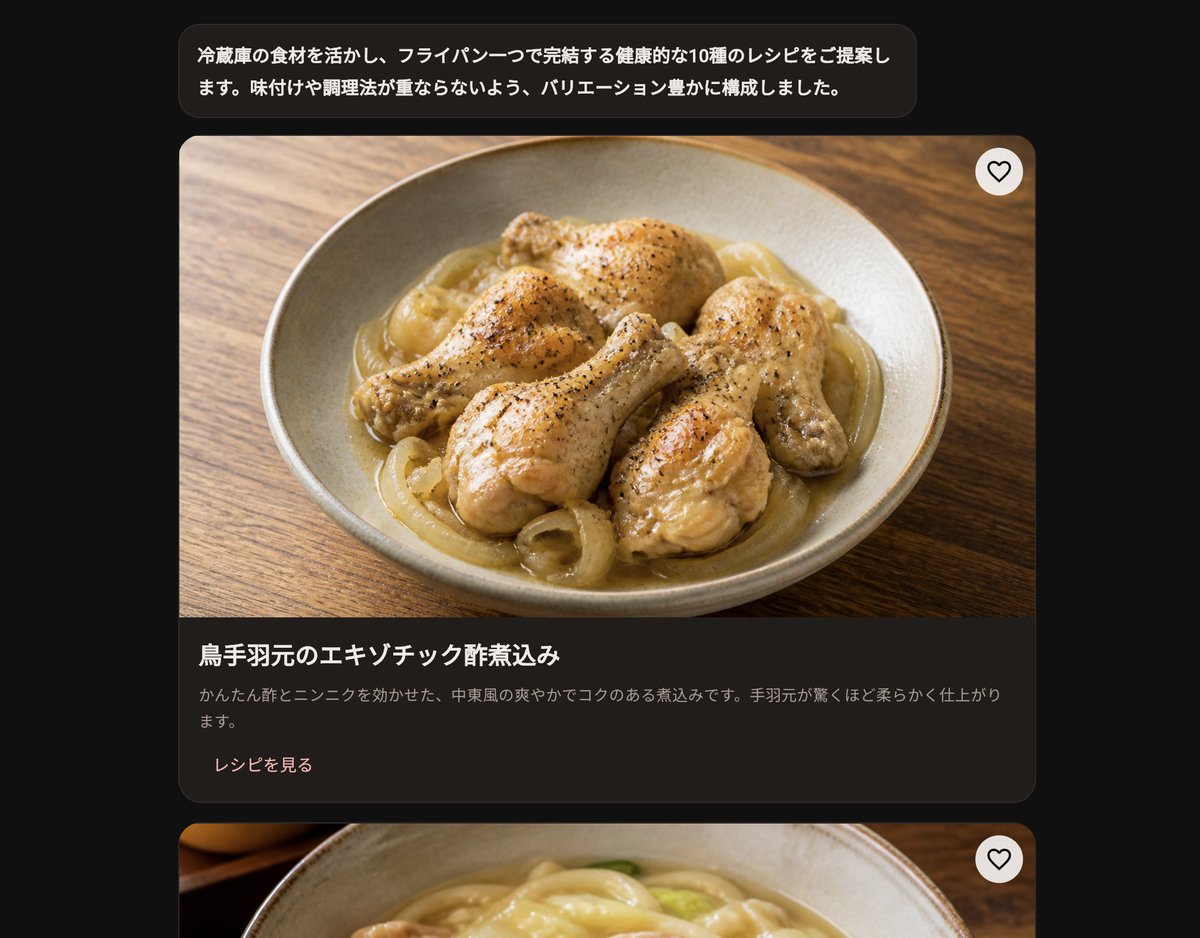
Goal: Create a realistic dark-mode mobile cooking AI assistant interface showing recipe suggestions generated from fridge ingredients, in Japanese. Canvas: Vertical smartphone screenshot, approximately 4:5 crop, black outer background with a centered app feed column. Use rounded corners, soft shadows, and a premium food-app aesthetic. Layout: At the top, place one rounded dark charcoal chat bubble containing Japanese assistant text. Below it, show a vertically scrolling list of recipe cards. Exactly 2 recipe cards are visible: the first card is fully visible, the second card is only partially visible at the bottom. Text content: The top chat bubble says: 「冷蔵庫の食材を活かし、フライパン一つで完結する健康的な10種のレシピをご提案します。味付けや調理法が重ならないよう、バリエーション豊かに構成しました。」 The first recipe card title says: 「鳥手羽元のエキゾチック酢煮込み」. Its description says: 「かんたん酢とニンニクを効かせた、中東風の爽やかでコクのある煮込みです。手羽元が驚くほど柔らかく仕上がります。」 The link text says: 「レシピを見る」. Card details: Recipe card 1 has a large food photo on top and a dark information panel underneath. The photo shows braised chicken drumettes with sliced onions in a light brown sauce served in a shallow beige ceramic bowl on a warm wooden table, photographed from a slightly overhead angle with natural restaurant lighting. Add black pepper specks on the chicken, glossy sauce, and soft depth of field. Place exactly 1 circular white heart-outline favorite button at the upper-right corner of the image area. The information panel below is very dark brown-black with the title in bold white, description in muted gray, and the recipe link in pale pink. Second card: Show only the top portion of a second recipe card beneath the first, separated by vertical spacing. It should include a large cropped food photo showing a bowl of creamy pale-yellow noodles or soup on a wooden table, with exactly 1 circular white heart-outline favorite button at the upper-right corner. Do not show its title in the crop. Visual style: Modern Japanese recipe app UI, dark theme, rounded 18–22 px cards, subtle borders, soft shadows, high-resolution food photography, clean sans-serif typography. Use warm browns, beige ceramic, black charcoal panels, and muted pink accent text. Constraints: Include exactly 1 top chat bubble, exactly 2 visible recipe cards, and exactly 2 heart favorite buttons total. Keep the interface realistic and uncluttered, with no extra icons, navigation bars, watermarks, or English UI text.

翻訳: Runs on 20 models

  • Flux
  • Flux 2
  • Flux Kontext
  • GPT-4o Image
  • GPT Image
  • GPT Image 2
  • GPT Image 2.5
  • GPT Image 2.6
  • Grok Imagine
  • Ideogram V3
  • Imagen 4
  • Kling
  • 翻訳: +8 more

このプロンプトの生成結果

Split-Page Coffee Shop Travel Journal 未指定 gpt-image-2
Cute Chibi Characters in a Sweet Playful Moment 未指定 gpt-image-2
Underground Train Yard Clash Anime Development Board 未指定 gpt-image-2
Realistic Group Selfie with Smartphone Flash Effect 未指定 nano-banana-pro
Exploded-View Structural Cutaway for Food Photography 未指定 nano-banana-pro
Four Seasons Portrait Collage 未指定 nano-banana-pro

翻訳: Run this prompt with the API

翻訳: The request below sends this prompt, with its default values filled in, to the first model it runs on. Swap the model name for any other model listed above.

翻訳: Prompt API docs
/api/v1/gpt_image_2/text_to_image
curl -X POST https://runapi.ai/api/v1/gpt_image_2/text_to_image \
  -H "Authorization: Bearer $RUNAPI_API_KEY" \
  -H "Content-Type: application/json" \
  --data-binary @- <<'JSON'
{
  "model": "gpt-image-2",
  "prompt": "Goal: Create a realistic dark-mode mobile cooking AI assistant interface showing recipe suggestions generated from fridge ingredients, in Japanese.\n\nCanvas: Vertical smartphone screenshot, approximately 4:5 crop, black outer background with a centered app feed column. Use rounded corners, soft shadows, and a premium food-app aesthetic.\n\nLayout: At the top, place one rounded dark charcoal chat bubble containing Japanese assistant text. Below it, show a vertically scrolling list of recipe cards. Exactly 2 recipe cards are visible: the first card is fully visible, the second card is only partially visible at the bottom.\n\nText content: The top chat bubble says: 「冷蔵庫の食材を活かし、フライパン一つで完結する健康的な10種のレシピをご提案します。味付けや調理法が重ならないよう、バリエーション豊かに構成しました。」 The first recipe card title says: 「鳥手羽元のエキゾチック酢煮込み」. Its description says: 「かんたん酢とニンニクを効かせた、中東風の爽やかでコクのある煮込みです。手羽元が驚くほど柔らかく仕上がります。」 The link text says: 「レシピを見る」.\n\nCard details: Recipe card 1 has a large food photo on top and a dark information panel underneath. The photo shows braised chicken drumettes with sliced onions in a light brown sauce served in a shallow beige ceramic bowl on a warm wooden table, photographed from a slightly overhead angle with natural restaurant lighting. Add black pepper specks on the chicken, glossy sauce, and soft depth of field. Place exactly 1 circular white heart-outline favorite button at the upper-right corner of the image area. The information panel below is very dark brown-black with the title in bold white, description in muted gray, and the recipe link in pale pink.\n\nSecond card: Show only the top portion of a second recipe card beneath the first, separated by vertical spacing. It should include a large cropped food photo showing a bowl of creamy pale-yellow noodles or soup on a wooden table, with exactly 1 circular white heart-outline favorite button at the upper-right corner. Do not show its title in the crop.\n\nVisual style: Modern Japanese recipe app UI, dark theme, rounded 18–22 px cards, subtle borders, soft shadows, high-resolution food photography, clean sans-serif typography. Use warm browns, beige ceramic, black charcoal panels, and muted pink accent text.\n\nConstraints: Include exactly 1 top chat bubble, exactly 2 visible recipe cards, and exactly 2 heart favorite buttons total. Keep the interface realistic and uncluttered, with no extra icons, navigation bars, watermarks, or English UI text."
}
JSON

翻訳: Try a prompt

概算: $0.04 / 枚

RunAPI で生成するにはサインインしてください。

ログインして生成

ログインして、利用可能な言語モデルで生成を開始してください。

















