Taiki Shuttle Anime Conversion
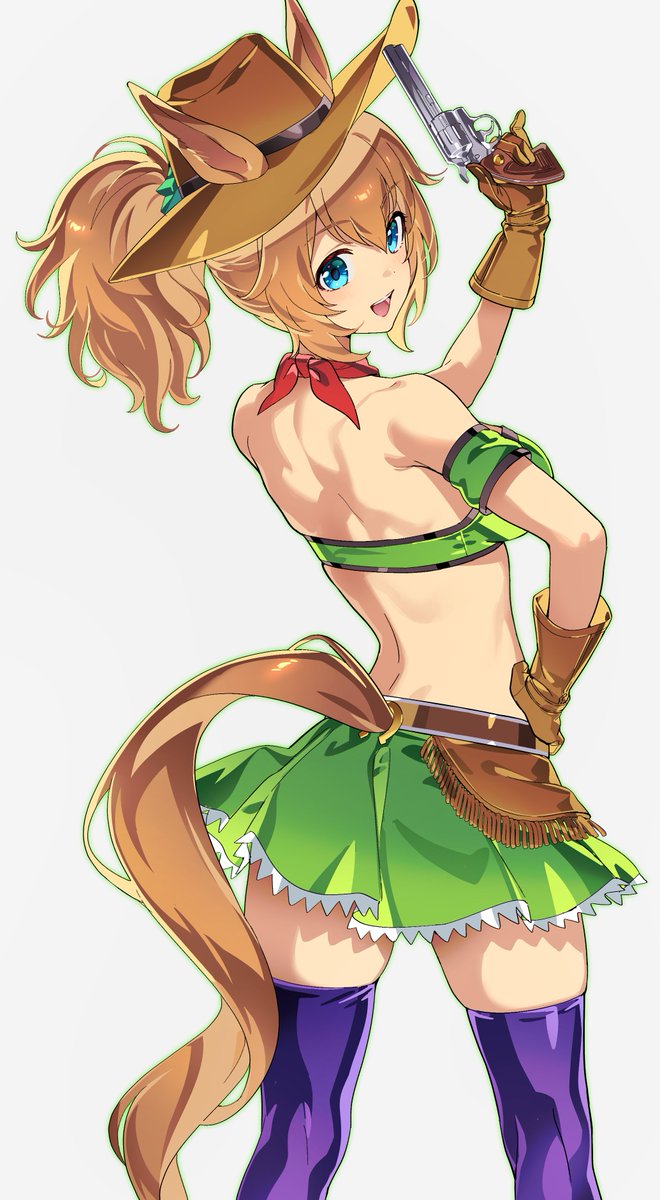
Taiki Shuttle Anime Conversion

Eingabeaufforderung

Using the provided reference image as the character and outfit base, transform the cosplay photo into a polished full-body anime illustration in the official Uma Musume-style fan art look. Keep the same cowgirl horse-girl identity, hat with horse ears, blonde ponytail, blue eyes, red neck scarf, green-and-black backless outfit, brown gloves and belt pouch, green skirt with white trim, long tail, and purple thigh-high boots. Change the camera angle into a clean full-body rear three-quarter pose on a plain white background, with the character smiling back over her shoulder. Add one new prop: a silver revolver held upright in her raised right hand near the hat. Make the anatomy stylized and dynamic, with crisp cel shading, glossy highlights, clean line art, vibrant colors, and no photorealism. Character identity: Taiki Shuttle from Uma Musume. Art style: high-quality anime game character illustration. Background: plain white studio background. Prop: silver revolver. Pose: full-body rear three-quarter pose, smiling back with one arm raised.

Läuft auf 21 Modellen

  • Flux
  • Flux 2
  • Flux Kontext
  • GPT-4o Image
  • GPT Image
  • GPT Image 2
  • GPT Image 2.5
  • GPT Image 2.6
  • Grok Imagine
  • Ideogram V3
  • Imagen 4
  • Kling
  • +9 mehr

Was dieser Prompt erzeugt

Seedream 5 prompt: Hot dress Nicht angegeben v2
Nano Banana prompt: Match the same pose from the 1st image Nicht angegeben nano-banana-2.1
Seedream 5 prompt: Modern minimalist mobile app icon logo design for ... Nicht angegeben seedream-5-pro
FLUX prompt: Enchanted Victorian villages Nicht angegeben flux-2-pro
Hunyuan  prompt: субстанция Nicht angegeben hunyuan-3
ChatGPT Image prompt: A single cohesive Instagram Feed Portrait (4:5) so... Nicht angegeben v1

Führen Sie diese Eingabeaufforderung mit der API aus

Die folgende Anforderung sendet diese Eingabeaufforderung mit den ausgefüllten Standardwerten an das erste Modell, auf dem sie ausgeführt wird. Tauschen Sie den Modellnamen gegen ein anderes oben aufgeführtes Modell aus.

Prompt API-Dokumente
/api/v1/gpt_image_2/text_to_image
curl -X POST https://runapi.ai/api/v1/gpt_image_2/text_to_image \
  -H "Authorization: Bearer $RUNAPI_API_KEY" \
  -H "Content-Type: application/json" \
  --data-binary @- <<'JSON'
{
  "model": "gpt-image-2",
  "prompt": "Using the provided reference image as the character and outfit base, transform the cosplay photo into a polished full-body anime illustration in the official Uma Musume-style fan art look. Keep the same cowgirl horse-girl identity, hat with horse ears, blonde ponytail, blue eyes, red neck scarf, green-and-black backless outfit, brown gloves and belt pouch, green skirt with white trim, long tail, and purple thigh-high boots. Change the camera angle into a clean full-body rear three-quarter pose on a plain white background, with the character smiling back over her shoulder. Add one new prop: a silver revolver held upright in her raised right hand near the hat. Make the anatomy stylized and dynamic, with crisp cel shading, glossy highlights, clean line art, vibrant colors, and no photorealism. Character identity: Taiki Shuttle from Uma Musume. Art style: high-quality anime game character illustration. Background: plain white studio background. Prop: silver revolver. Pose: full-body rear three-quarter pose, smiling back with one arm raised."
}
JSON

Probier‘s mal mit einer Anfrage