GPT Image 2 Prompt Length Comparison
GPT Image 2 Prompt Length Comparison

Eingabeaufforderung

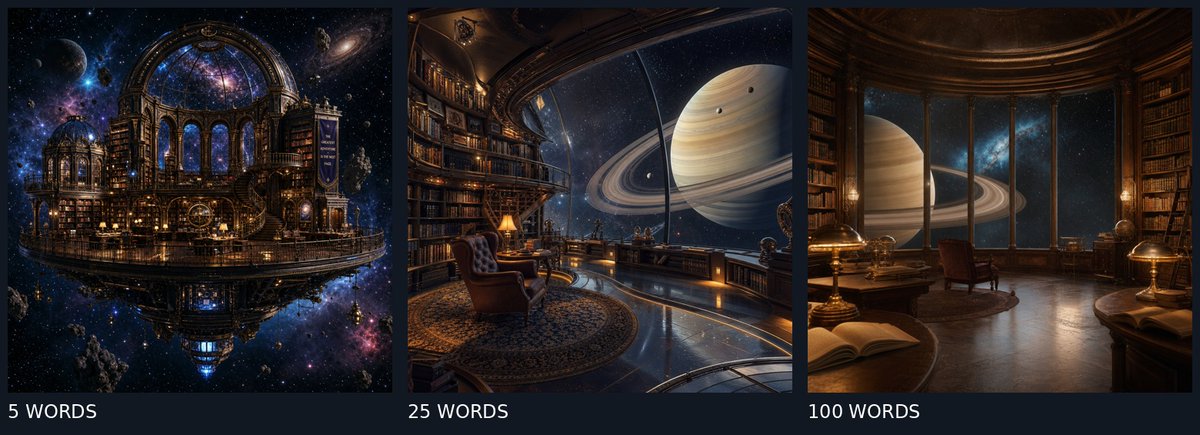
A horizontal triptych comparison image with a dark navy background, divided into three equal vertical panels. Each panel displays a photorealistic 3D render of a fantastical 'Space Library' scene, illustrating the difference in prompt complexity. Left Panel: Labeled "5 WORDS" at the bottom in white sans-serif text. The image shows an exterior wide shot of a grand, ornate library building floating in deep space. It features a large glass dome revealing a galaxy interior, surrounded by nebulae and stars, with a reflection on a water-like surface below. Center Panel: Labeled "25 WORDS" at the bottom. The image is an interior perspective looking out through a massive curved window at a giant ringed planet (resembling Saturn). Inside, there are tall wooden bookshelves lining the walls, a cozy leather armchair, a small table with a lamp, and a patterned rug on a polished floor. Right Panel: Labeled "100 WORDS" at the bottom. The image is a close-up interior detail shot featuring a wooden desk with an open book, a brass banker's lamp, and a globe. Behind it, large arched windows look out onto the same ringed planet and starry sky, with warm lighting contrasting against the cool blue space background.

Läuft auf 20 Modellen

  • Flux
  • Flux 2
  • Flux Kontext
  • GPT-4o Image
  • GPT Image
  • GPT Image 2
  • GPT Image 2.5
  • GPT Image 2.6
  • Grok Imagine
  • Ideogram V3
  • Imagen 4
  • Kling
  • +8 mehr

Was dieser Prompt erzeugt

GPT Image 2 Prompt: Garden Dappled Light Nicht angegeben gpt-image-2
Cinematic Portrait of Man in Suit Nicht angegeben gpt-image-2
Elegant South Asian Woman Portrait Nicht angegeben gpt-image-2
GPT Image 2 Cyan Backlit Portrait Prompt Nicht angegeben gpt-image-2
Dubai Skyline Golden Hour Portrait Nicht angegeben gpt-image-2
GPT Image 2 Nostalgic Editorial Scrapbook Transformation Nicht angegeben gpt-image-2

Führen Sie diese Eingabeaufforderung mit der API aus

Die folgende Anforderung sendet diese Eingabeaufforderung mit den ausgefüllten Standardwerten an das erste Modell, auf dem sie ausgeführt wird. Tauschen Sie den Modellnamen gegen ein anderes oben aufgeführtes Modell aus.

Prompt API-Dokumente
/api/v1/gpt_image_2/text_to_image
curl -X POST https://runapi.ai/api/v1/gpt_image_2/text_to_image \
  -H "Authorization: Bearer $RUNAPI_API_KEY" \
  -H "Content-Type: application/json" \
  --data-binary @- <<'JSON'
{
  "model": "gpt-image-2",
  "prompt": "A horizontal triptych comparison image with a dark navy background, divided into three equal vertical panels. Each panel displays a photorealistic 3D render of a fantastical 'Space Library' scene, illustrating the difference in prompt complexity.\n\nLeft Panel: Labeled \"5 WORDS\" at the bottom in white sans-serif text. The image shows an exterior wide shot of a grand, ornate library building floating in deep space. It features a large glass dome revealing a galaxy interior, surrounded by nebulae and stars, with a reflection on a water-like surface below.\n\nCenter Panel: Labeled \"25 WORDS\" at the bottom. The image is an interior perspective looking out through a massive curved window at a giant ringed planet (resembling Saturn). Inside, there are tall wooden bookshelves lining the walls, a cozy leather armchair, a small table with a lamp, and a patterned rug on a polished floor.\n\nRight Panel: Labeled \"100 WORDS\" at the bottom. The image is a close-up interior detail shot featuring a wooden desk with an open book, a brass banker's lamp, and a globe. Behind it, large arched windows look out onto the same ringed planet and starry sky, with warm lighting contrasting against the cool blue space background."
}
JSON

Probier‘s mal mit einer Anfrage