Japanese Egg Cooking Flowchart UI
Japanese Egg Cooking Flowchart UI

翻訳: Prompt

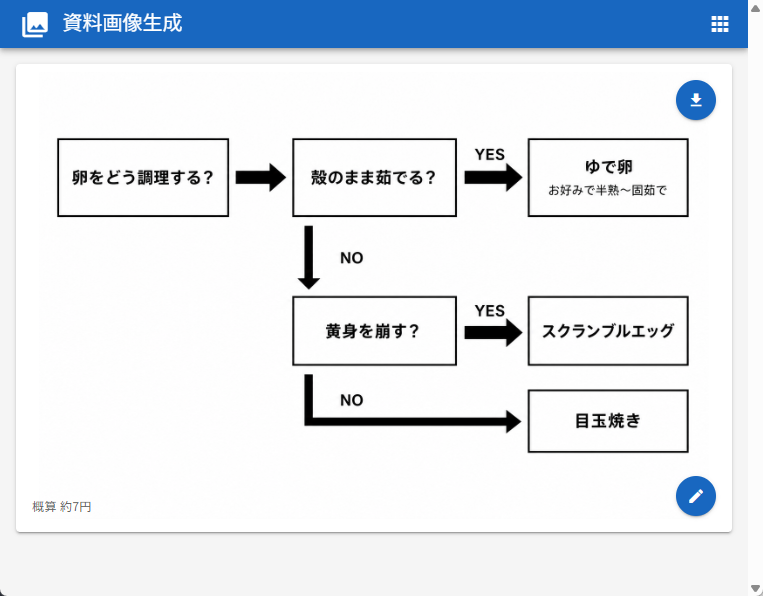
Goal: Create a clean web-app screenshot showing a generated document image: a simple Japanese decision flowchart for how to cook eggs. Canvas: 762×596 px desktop browser/app view. Light gray page background with a bright blue top app bar spanning the full width. The app bar contains a small white image icon at far left, the Japanese title 資料画像生成 in white, and a small white grid/menu icon at the far right. A subtle scrollbar is visible on the right edge. Main card layout: Center a large white rounded rectangle card with a faint drop shadow, about 718×468 px, starting below the blue header. Inside the card is a black-and-white flowchart on a white field, leaving generous margins. Add two floating circular blue action buttons on the right side of the card: one near the upper-right with a white download arrow icon, and one near the lower-right with a white pencil/edit icon. Flowchart elements: Use exactly 6 rectangular outlined boxes with white fill and black borders, connected by exactly 5 thick black arrows. All text is Japanese and bold black unless noted. 1. Left box: 「卵をどう調理する?」 2. Top middle box: 「殻のまま茹でる?」 3. Top right box: main text 「ゆで卵」 with smaller subtitle 「お好みで半熟〜固茹で」 4. Middle lower box: 「黄身を崩す?」 5. Middle right box: 「スクランブルエッグ」 6. Bottom right box: 「目玉焼き」 Flowchart connections and labels: A right-pointing arrow connects box 1 to box 2. From box 2, a right-pointing arrow labeled 「YES」 above it connects to box 3. From box 2, a downward arrow labeled 「NO」 to the right descends to box 4. From box 4, a right-pointing arrow labeled 「YES」 above it connects to box 5. From box 4, a thick path goes downward then right, labeled 「NO」 near the turn, ending with a right-pointing arrow into box 6. Footer text: At the lower-left inside the card, add small gray Japanese text 概算 約7円. Visual style: Minimal monochrome flowchart, clean sans-serif Japanese UI font, thick black arrows, crisp rectangular outlines, lots of white space, realistic screenshot-like UI rendering. Avoid extra boxes, extra icons, decorative colors inside the chart, watermarks, or additional explanatory text.

翻訳: Runs on 21 models

  • Flux
  • Flux 2
  • Flux Kontext
  • GPT-4o Image
  • GPT Image
  • GPT Image 2
  • GPT Image 2.5
  • GPT Image 2.6
  • Grok Imagine
  • Ideogram V3
  • Imagen 4
  • Kling
  • 翻訳: +9 more

このプロンプトの生成結果

Seedream 5 prompt: Je veut une photo de moi prise par quelqu’un d’aut... 未指定 v2
Hero prompt: es domāju par zēnu  no skolas. 未指定 1.0
Hunyuan  prompt: birthday 未指定 hunyuan-3
Seedream 5 prompt: secretary 未指定 v2
ChatGPT Image prompt: Made horror movie poster. Silent Night, Deadly Nig... 未指定 v1
FLUX prompt: spartan stick man 未指定 flux-2-pro

翻訳: Run this prompt with the API

翻訳: The request below sends this prompt, with its default values filled in, to the first model it runs on. Swap the model name for any other model listed above.

翻訳: Prompt API docs
/api/v1/gpt_image_2/text_to_image
curl -X POST https://runapi.ai/api/v1/gpt_image_2/text_to_image \
  -H "Authorization: Bearer $RUNAPI_API_KEY" \
  -H "Content-Type: application/json" \
  --data-binary @- <<'JSON'
{
  "model": "gpt-image-2",
  "prompt": "Goal: Create a clean web-app screenshot showing a generated document image: a simple Japanese decision flowchart for how to cook eggs.\n\nCanvas: 762×596 px desktop browser/app view. Light gray page background with a bright blue top app bar spanning the full width. The app bar contains a small white image icon at far left, the Japanese title 資料画像生成 in white, and a small white grid/menu icon at the far right. A subtle scrollbar is visible on the right edge.\n\nMain card layout: Center a large white rounded rectangle card with a faint drop shadow, about 718×468 px, starting below the blue header. Inside the card is a black-and-white flowchart on a white field, leaving generous margins. Add two floating circular blue action buttons on the right side of the card: one near the upper-right with a white download arrow icon, and one near the lower-right with a white pencil/edit icon.\n\nFlowchart elements: Use exactly 6 rectangular outlined boxes with white fill and black borders, connected by exactly 5 thick black arrows. All text is Japanese and bold black unless noted.\n1. Left box: 「卵をどう調理する?」\n2. Top middle box: 「殻のまま茹でる?」\n3. Top right box: main text 「ゆで卵」 with smaller subtitle 「お好みで半熟〜固茹で」\n4. Middle lower box: 「黄身を崩す?」\n5. Middle right box: 「スクランブルエッグ」\n6. Bottom right box: 「目玉焼き」\n\nFlowchart connections and labels: A right-pointing arrow connects box 1 to box 2. From box 2, a right-pointing arrow labeled 「YES」 above it connects to box 3. From box 2, a downward arrow labeled 「NO」 to the right descends to box 4. From box 4, a right-pointing arrow labeled 「YES」 above it connects to box 5. From box 4, a thick path goes downward then right, labeled 「NO」 near the turn, ending with a right-pointing arrow into box 6.\n\nFooter text: At the lower-left inside the card, add small gray Japanese text 概算 約7円.\n\nVisual style: Minimal monochrome flowchart, clean sans-serif Japanese UI font, thick black arrows, crisp rectangular outlines, lots of white space, realistic screenshot-like UI rendering. Avoid extra boxes, extra icons, decorative colors inside the chart, watermarks, or additional explanatory text."
}
JSON

翻訳: Try a prompt