Japanese AI Report Correction App Mockup
Japanese AI Report Correction App Mockup

翻訳: Prompt

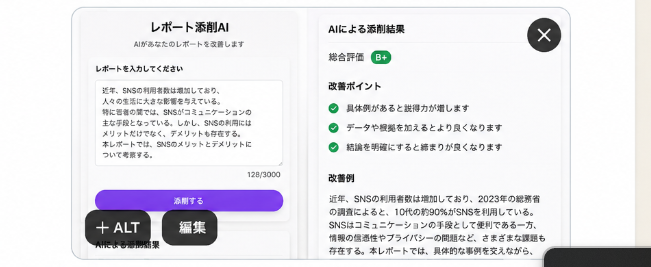
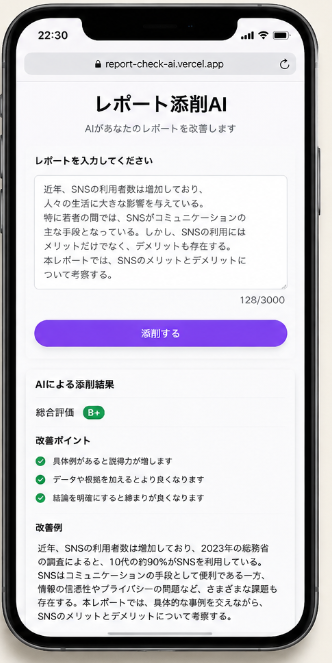
Goal: Create a clean, realistic mobile app mockup for a Japanese AI report-checking app, shown as a rounded white modal card on a light gray background, suitable for testing demand on social media. The app name should be レポート添削AI and the screen should look like a finished product UI. Canvas: Wide horizontal image, approximately 16:7 aspect ratio. Center a large rounded rectangle app window with a soft shadow, thin light-gray border, and bright white background. Add subtle vertical divider lines and very light gradients to make it feel like a polished SaaS/mobile web interface. Layout: Use exactly 2 main content panels inside the app window. Left panel is the report input area. Right panel is the AI correction results area. Place a dark circular close button with a white “×” in the top-right corner of the modal. Add two floating dark pill buttons near the bottom-left overlapping the modal: one labeled “+ ALT” and one labeled “編集”. A partial dark rounded bar is barely visible at the bottom-right edge, cropped by the image frame. Left panel details: At the top center, show the heading “レポート添削AI” and a smaller subtitle “AIがあなたのレポートを改善します”. Below, add the section label “レポートを入力してください”. Show a large textarea card with a sample Japanese report paragraph about SNS usage among young people; include a small character counter “128/3000” at the lower right of the textarea. Under the textarea, place one prominent purple rounded button labeled “添削する”. Beneath the button, add a tiny caption “AIによる添削開始”. Right panel details: Add the title “AIによる添削結果”. Show a rating row with label “総合評価” and a small green rounded badge labeled “B+”. Then create an “改善ポイント” section containing exactly 3 checklist items, each preceded by a green circular check icon: 1) “具体例があると説得力が増します”, 2) “データや根拠を加えるとより良くなります”, 3) “結論を明確にすると締まりが良くなります”. Below that, add an “改善例” section with a paragraph of Japanese corrected text beginning with “近年、SNSの利用者数は増加しており、2023年の総務省の調査によると、10代の約90%がSNSを利用している。” and continuing in small readable Japanese body text. Visual style: Minimal Japanese product UI, Apple-like rounded corners, crisp sans-serif Japanese typography, black and dark-gray text, green success accents, purple primary CTA button with slight gradient, generous whitespace, realistic soft shadows, high-resolution screenshot aesthetic. Constraints: Keep the UI text in Japanese exactly where specified, use no extra panels beyond the 2 main panels, include exactly 3 checklist improvement items, no people, no illustrations, no watermark, no browser chrome, no phone frame.

翻訳: Runs on 20 models

  • Flux
  • Flux 2
  • Flux Kontext
  • GPT-4o Image
  • GPT Image
  • GPT Image 2
  • GPT Image 2.5
  • GPT Image 2.6
  • Grok Imagine
  • Ideogram V3
  • Imagen 4
  • Kling
  • 翻訳: +8 more

このプロンプトの生成結果

Seedream 5 prompt: Conductor 未指定 v2
FLUX prompt: oil painting 未指定 flux-2-pro
ChatGPT Image prompt: vytvor fotorealistycke študio quality s viacerimi ... 未指定 v1
Hunyuan  prompt: Dogs 未指定 hunyuan-3
FLUX prompt: pastel character sticker 未指定 flux-2-pro
Seedream 5 prompt: full  character bobs burger style natural pose. 未指定 seedream-5-pro

翻訳: Run this prompt with the API

翻訳: The request below sends this prompt, with its default values filled in, to the first model it runs on. Swap the model name for any other model listed above.

翻訳: Prompt API docs
/api/v1/gpt_image_2/text_to_image
curl -X POST https://runapi.ai/api/v1/gpt_image_2/text_to_image \
  -H "Authorization: Bearer $RUNAPI_API_KEY" \
  -H "Content-Type: application/json" \
  --data-binary @- <<'JSON'
{
  "model": "gpt-image-2",
  "prompt": "Goal: Create a clean, realistic mobile app mockup for a Japanese AI report-checking app, shown as a rounded white modal card on a light gray background, suitable for testing demand on social media. The app name should be レポート添削AI and the screen should look like a finished product UI.\n\nCanvas: Wide horizontal image, approximately 16:7 aspect ratio. Center a large rounded rectangle app window with a soft shadow, thin light-gray border, and bright white background. Add subtle vertical divider lines and very light gradients to make it feel like a polished SaaS/mobile web interface.\n\nLayout: Use exactly 2 main content panels inside the app window. Left panel is the report input area. Right panel is the AI correction results area. Place a dark circular close button with a white “×” in the top-right corner of the modal. Add two floating dark pill buttons near the bottom-left overlapping the modal: one labeled “+ ALT” and one labeled “編集”. A partial dark rounded bar is barely visible at the bottom-right edge, cropped by the image frame.\n\nLeft panel details: At the top center, show the heading “レポート添削AI” and a smaller subtitle “AIがあなたのレポートを改善します”. Below, add the section label “レポートを入力してください”. Show a large textarea card with a sample Japanese report paragraph about SNS usage among young people; include a small character counter “128/3000” at the lower right of the textarea. Under the textarea, place one prominent purple rounded button labeled “添削する”. Beneath the button, add a tiny caption “AIによる添削開始”.\n\nRight panel details: Add the title “AIによる添削結果”. Show a rating row with label “総合評価” and a small green rounded badge labeled “B+”. Then create an “改善ポイント” section containing exactly 3 checklist items, each preceded by a green circular check icon: 1) “具体例があると説得力が増します”, 2) “データや根拠を加えるとより良くなります”, 3) “結論を明確にすると締まりが良くなります”. Below that, add an “改善例” section with a paragraph of Japanese corrected text beginning with “近年、SNSの利用者数は増加しており、2023年の総務省の調査によると、10代の約90%がSNSを利用している。” and continuing in small readable Japanese body text.\n\nVisual style: Minimal Japanese product UI, Apple-like rounded corners, crisp sans-serif Japanese typography, black and dark-gray text, green success accents, purple primary CTA button with slight gradient, generous whitespace, realistic soft shadows, high-resolution screenshot aesthetic.\n\nConstraints: Keep the UI text in Japanese exactly where specified, use no extra panels beyond the 2 main panels, include exactly 3 checklist improvement items, no people, no illustrations, no watermark, no browser chrome, no phone frame."
}
JSON

翻訳: Try a prompt

概算: $0.04 / 枚

RunAPI で生成するにはサインインしてください。

ログインして生成

ログインして、利用可能な言語モデルで生成を開始してください。