Software Workflow Infographic

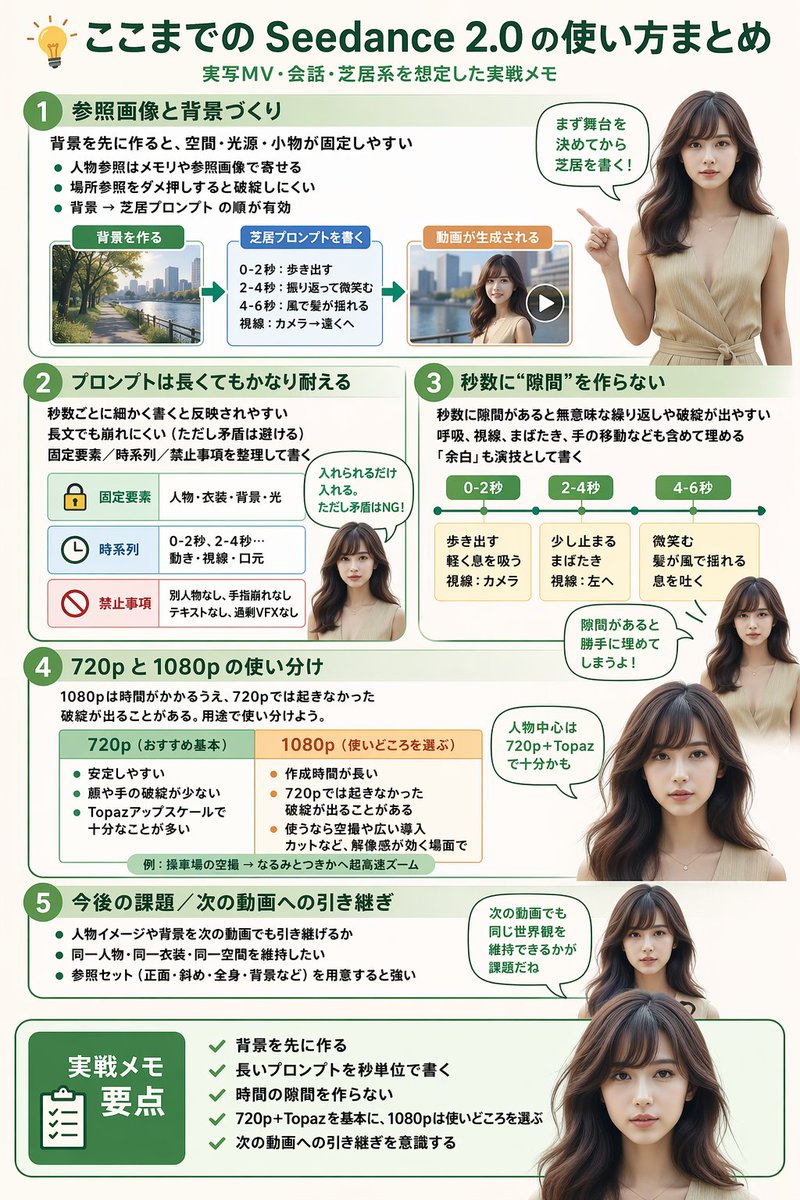
Generates a highly structured, multi-section infographic featuring a photorealistic human guide, ideal for software tutorials, workflow summaries, or best-practice guides.
Software Workflow Infographic

翻訳: Prompt

{ "type": "infographic", "style": "clean, modern, professional, soft green and beige color palette, photorealistic character integration", "header": { "icon": "lightbulb", "title": "ここまでの Seedance 2.0 の使い方まとめ", "subtitle": "実写MV・会話・芝居系を想定した実践メモ" }, "presenter_character": "photorealistic young Japanese woman with long dark brown hair wearing a beige sleeveless top", "total_presenter_cutouts": 6, "layout": { "sections": [ { "number": 1, "title": "参照画像と背景づくり", "elements": "3 bullet points, 1 horizontal 3-step flowchart with thumbnail images (cityscape, text box, video player)", "presenter_pose": "pointing left towards the flowchart, with a speech bubble" }, { "number": 2, "title": "プロンプトは長くてもかなり耐える", "elements": "2 bullet points, 1 table with 3 rows featuring icons (lock, clock, prohibition sign)", "presenter_pose": "neutral expression, looking forward, with a speech bubble" }, { "number": 3, "title": "秒数に“隙間”を作らない", "elements": "2 bullet points, 1 horizontal timeline graphic with 3 segments", "presenter_pose": "pointing up, looking slightly left, with a speech bubble" }, { "number": 4, "title": "720p と 1080p の使い分け", "elements": "text description, 1 two-column comparison table (green column, orange column)", "presenter_pose": "looking forward, with a speech bubble" }, { "number": 5, "title": "今後の課題 / 次の動画への引き継ぎ", "elements": "4 bullet points", "presenter_pose": "looking slightly right, with a speech bubble" }, { "type": "summary_box", "title": "実践メモ 要点", "elements": "clipboard icon, 5 checklist items with green checkmarks", "presenter_pose": "large portrait from chest up, looking directly at viewer" } ] } }

翻訳: Runs on 18 models

  • Flux
  • Flux 2
  • Flux Kontext
  • GPT-4o Image
  • GPT Image
  • GPT Image 2
  • GPT Image 2.5
  • Grok Imagine
  • Ideogram V3
  • Imagen 4
  • Midjourney
  • Nano Banana
  • 翻訳: +6 more

このプロンプトの生成結果

Realistic Group Selfie with Smartphone Flash Effect 未指定 nano-banana-pro
Four Seasons Portrait Collage 未指定 nano-banana-pro
Minimalist Dog Sketch Clipart 未指定 nano-banana-pro
Mecha Girl figure concept generated by Nano Banana Pro 未指定 nano-banana-pro
Candid Flash Photography: Chaotic Holiday Party (Duplicate) 未指定 nano-banana-pro
Ethereal Floral Studio Portrait 未指定 nano-banana-pro

翻訳: Run this prompt with the API

翻訳: The request below sends this prompt, with its default values filled in, to the first model it runs on. Swap the model name for any other model listed above.

翻訳: Prompt API docs
/api/v1/gpt_image_2/text_to_image
curl -X POST https://runapi.ai/api/v1/gpt_image_2/text_to_image \
  -H "Authorization: Bearer $RUNAPI_API_KEY" \
  -H "Content-Type: application/json" \
  --data-binary @- <<'JSON'
{
  "model": "gpt-image-2",
  "prompt": "{\n  \"type\": \"infographic\",\n  \"style\": \"clean, modern, professional, soft green and beige color palette, photorealistic character integration\",\n  \"header\": {\n    \"icon\": \"lightbulb\",\n    \"title\": \"ここまでの Seedance 2.0 の使い方まとめ\",\n    \"subtitle\": \"実写MV・会話・芝居系を想定した実践メモ\"\n  },\n  \"presenter_character\": \"photorealistic young Japanese woman with long dark brown hair wearing a beige sleeveless top\",\n  \"total_presenter_cutouts\": 6,\n  \"layout\": {\n    \"sections\": [\n      {\n        \"number\": 1,\n        \"title\": \"参照画像と背景づくり\",\n        \"elements\": \"3 bullet points, 1 horizontal 3-step flowchart with thumbnail images (cityscape, text box, video player)\",\n        \"presenter_pose\": \"pointing left towards the flowchart, with a speech bubble\"\n      },\n      {\n        \"number\": 2,\n        \"title\": \"プロンプトは長くてもかなり耐える\",\n        \"elements\": \"2 bullet points, 1 table with 3 rows featuring icons (lock, clock, prohibition sign)\",\n        \"presenter_pose\": \"neutral expression, looking forward, with a speech bubble\"\n      },\n      {\n        \"number\": 3,\n        \"title\": \"秒数に“隙間”を作らない\",\n        \"elements\": \"2 bullet points, 1 horizontal timeline graphic with 3 segments\",\n        \"presenter_pose\": \"pointing up, looking slightly left, with a speech bubble\"\n      },\n      {\n        \"number\": 4,\n        \"title\": \"720p と 1080p の使い分け\",\n        \"elements\": \"text description, 1 two-column comparison table (green column, orange column)\",\n        \"presenter_pose\": \"looking forward, with a speech bubble\"\n      },\n      {\n        \"number\": 5,\n        \"title\": \"今後の課題 / 次の動画への引き継ぎ\",\n        \"elements\": \"4 bullet points\",\n        \"presenter_pose\": \"looking slightly right, with a speech bubble\"\n      },\n      {\n        \"type\": \"summary_box\",\n        \"title\": \"実践メモ 要点\",\n        \"elements\": \"clipboard icon, 5 checklist items with green checkmarks\",\n        \"presenter_pose\": \"large portrait from chest up, looking directly at viewer\"\n      }\n    ]\n  }\n}"
}
JSON

翻訳: Try a prompt

概算: $0.04 / 枚

RunAPI で生成するにはサインインしてください。

ログインして生成

ログインして、利用可能な言語モデルで生成を開始してください。