Bad vs Good Slide Design Infographic

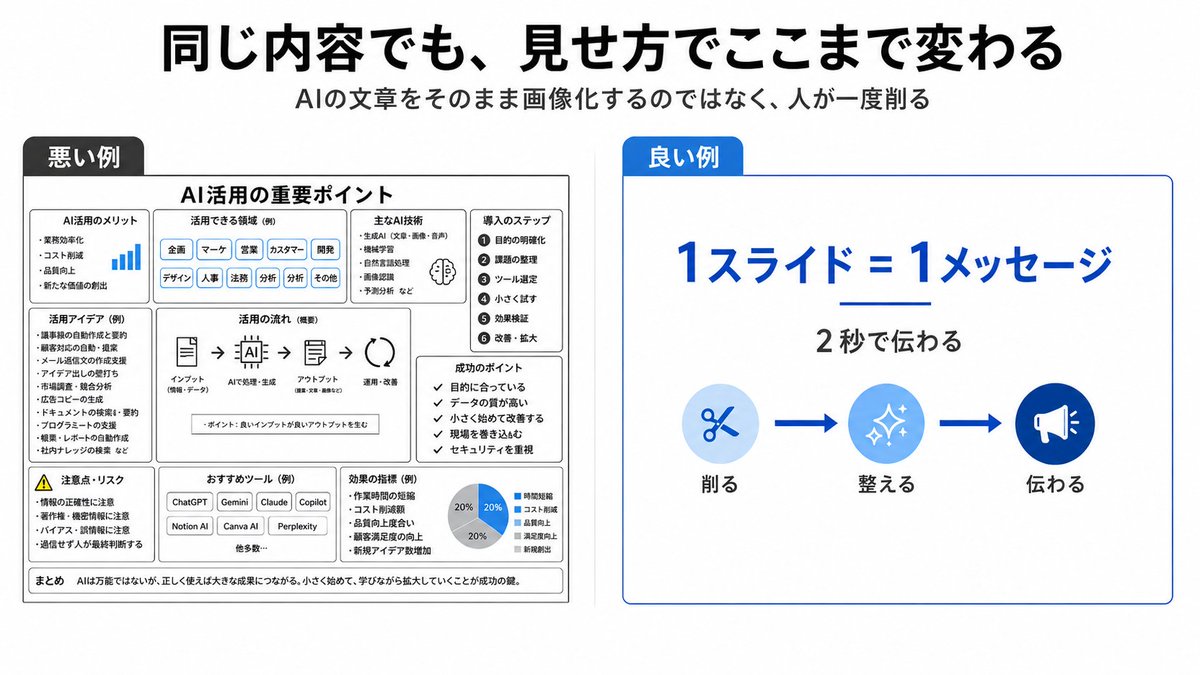
Generates a Japanese comparison slide showing how simplifying AI-generated text into one clear message makes a presentation easier to understand.
Bad vs Good Slide Design Infographic

翻訳: Prompt

{"type":"clean Japanese presentation infographic comparing bad and good slide design","format":"wide 16:9 slide, white background, minimalist corporate style","headline":"同じ内容でも、見せ方でここまで変わる","subtitle":"AIの文章をそのまま画像化するのではなく、人が一度削る","layout":{"top":"large bold black Japanese headline centered, smaller gray subtitle centered underneath","comparison_panels":[{"title":"悪い例","position":"left half","style":"dense monochrome black and gray boxed slide with many tiny sections, intentionally cluttered and hard to read","main_heading":"AI活用の重要ポイント","section_count":9,"sections":[{"label":"AI活用のメリット","description":"small list with a tiny blue bar chart icon"},{"label":"活用できる領域(例)","description":"row of many pill tags such as 企画, マーケ, 営業, カスタマー, 開発, デザイン, 人事, 法務, 分析, その他"},{"label":"主なAI技術","description":"compact bullet list with a small brain icon"},{"label":"導入のステップ","description":"numbered vertical list of 6 steps: 1 目的の明確化, 2 課題の整理, 3 ツール選定, 4 小さく試す, 5 効果検証, 6 改善・拡大"},{"label":"活用アイデア(例)","description":"dense bullet list of use cases"},{"label":"活用の流れ(概要)","description":"horizontal process diagram with 5 icons connected by arrows: インプット, AIで処理・生成, アウトプット, 活用・改善"},{"label":"成功のポイント","description":"checklist of 5 short items"},{"label":"注意点・リスク","description":"warning triangle and risk bullet list"},{"label":"おすすめツール(例)","description":"small buttons for ChatGPT, Gemini, Claude, Copilot, Notion AI, Canva AI, Perplexity plus 他多数"}],"bottom_note":"まとめ AIは万能ではないが、正しく使えば大きな成果につながる。小さく始めて、学びながら拡大していくことが成功の鍵。"},{"title":"良い例","position":"right half","style":"simple spacious white card with thin blue border and a blue title tab","main_message":"1スライド=1メッセージ","sub_message":"2秒で伝わる","visual_flow":{"count":3,"items":[{"label":"削る","icon":"scissors in pale blue circle"},{"label":"整える","icon":"sparkles in medium blue circle"},{"label":"伝わる","icon":"megaphone in dark blue circle"}],"connectors":"two thick blue arrows between the three icons"}}]},"colors":{"primary_blue":"#0057d8","light_blue":"#d6ebff","black":"#111111","gray":"#555555"},"typography":"bold modern Japanese sans-serif, strong hierarchy, right side very readable, left side deliberately overloaded","composition":"clear side-by-side contrast: cluttered bad example on the left and simplified good example on the right, with generous margins and crisp vector graphics"}

翻訳: Runs on 18 models

  • Flux
  • Flux 2
  • Flux Kontext
  • GPT-4o Image
  • GPT Image
  • GPT Image 2
  • GPT Image 2.5
  • Grok Imagine
  • Ideogram V3
  • Imagen 4
  • Midjourney
  • Nano Banana
  • 翻訳: +6 more

このプロンプトの生成結果

Realistic Group Selfie with Smartphone Flash Effect 未指定 nano-banana-pro
Four Seasons Portrait Collage 未指定 nano-banana-pro
Minimalist Dog Sketch Clipart 未指定 nano-banana-pro
Mecha Girl figure concept generated by Nano Banana Pro 未指定 nano-banana-pro
Candid Flash Photography: Chaotic Holiday Party (Duplicate) 未指定 nano-banana-pro
Ethereal Floral Studio Portrait 未指定 nano-banana-pro

翻訳: Run this prompt with the API

翻訳: The request below sends this prompt, with its default values filled in, to the first model it runs on. Swap the model name for any other model listed above.

翻訳: Prompt API docs
/api/v1/gpt_image_2/text_to_image
curl -X POST https://runapi.ai/api/v1/gpt_image_2/text_to_image \
  -H "Authorization: Bearer $RUNAPI_API_KEY" \
  -H "Content-Type: application/json" \
  --data-binary @- <<'JSON'
{
  "model": "gpt-image-2",
  "prompt": "{\"type\":\"clean Japanese presentation infographic comparing bad and good slide design\",\"format\":\"wide 16:9 slide, white background, minimalist corporate style\",\"headline\":\"同じ内容でも、見せ方でここまで変わる\",\"subtitle\":\"AIの文章をそのまま画像化するのではなく、人が一度削る\",\"layout\":{\"top\":\"large bold black Japanese headline centered, smaller gray subtitle centered underneath\",\"comparison_panels\":[{\"title\":\"悪い例\",\"position\":\"left half\",\"style\":\"dense monochrome black and gray boxed slide with many tiny sections, intentionally cluttered and hard to read\",\"main_heading\":\"AI活用の重要ポイント\",\"section_count\":9,\"sections\":[{\"label\":\"AI活用のメリット\",\"description\":\"small list with a tiny blue bar chart icon\"},{\"label\":\"活用できる領域(例)\",\"description\":\"row of many pill tags such as 企画, マーケ, 営業, カスタマー, 開発, デザイン, 人事, 法務, 分析, その他\"},{\"label\":\"主なAI技術\",\"description\":\"compact bullet list with a small brain icon\"},{\"label\":\"導入のステップ\",\"description\":\"numbered vertical list of 6 steps: 1 目的の明確化, 2 課題の整理, 3 ツール選定, 4 小さく試す, 5 効果検証, 6 改善・拡大\"},{\"label\":\"活用アイデア(例)\",\"description\":\"dense bullet list of use cases\"},{\"label\":\"活用の流れ(概要)\",\"description\":\"horizontal process diagram with 5 icons connected by arrows: インプット, AIで処理・生成, アウトプット, 活用・改善\"},{\"label\":\"成功のポイント\",\"description\":\"checklist of 5 short items\"},{\"label\":\"注意点・リスク\",\"description\":\"warning triangle and risk bullet list\"},{\"label\":\"おすすめツール(例)\",\"description\":\"small buttons for ChatGPT, Gemini, Claude, Copilot, Notion AI, Canva AI, Perplexity plus 他多数\"}],\"bottom_note\":\"まとめ AIは万能ではないが、正しく使えば大きな成果につながる。小さく始めて、学びながら拡大していくことが成功の鍵。\"},{\"title\":\"良い例\",\"position\":\"right half\",\"style\":\"simple spacious white card with thin blue border and a blue title tab\",\"main_message\":\"1スライド=1メッセージ\",\"sub_message\":\"2秒で伝わる\",\"visual_flow\":{\"count\":3,\"items\":[{\"label\":\"削る\",\"icon\":\"scissors in pale blue circle\"},{\"label\":\"整える\",\"icon\":\"sparkles in medium blue circle\"},{\"label\":\"伝わる\",\"icon\":\"megaphone in dark blue circle\"}],\"connectors\":\"two thick blue arrows between the three icons\"}}]},\"colors\":{\"primary_blue\":\"#0057d8\",\"light_blue\":\"#d6ebff\",\"black\":\"#111111\",\"gray\":\"#555555\"},\"typography\":\"bold modern Japanese sans-serif, strong hierarchy, right side very readable, left side deliberately overloaded\",\"composition\":\"clear side-by-side contrast: cluttered bad example on the left and simplified good example on the right, with generous margins and crisp vector graphics\"}"
}
JSON

翻訳: Try a prompt

概算: $0.04 / 枚

RunAPI で生成するにはサインインしてください。

ログインして生成

ログインして、利用可能な言語モデルで生成を開始してください。