ChatGPT Image Generation Guide Infographic

A structured, multi-section infographic outlining best practices for generating and editing images, featuring icons, example graphics, and step-by-step tips.
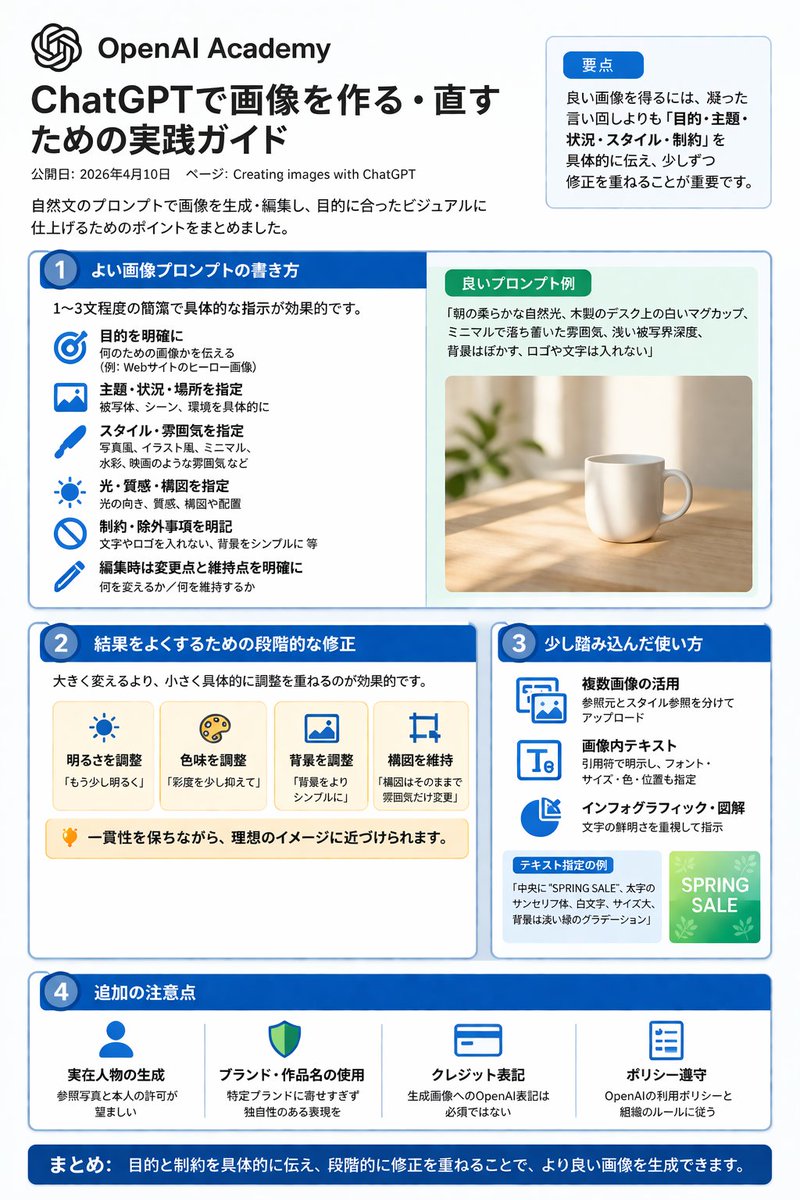
ChatGPT Image Generation Guide Infographic

翻訳: Prompt

{"type":"infographic","style":"clean, corporate, flat design, pastel accents, dark blue primary color","header":{"logo":"swirl icon","academy_name":"OpenAI Academy","main_title":"ChatGPTで画像を作る・直すための実践ガイド","metadata":"date and page info","summary_box":{"title":"要点","content":"paragraph about key points"}},"layout":{"sections":[{"number":1,"title":"よい画像プロンプトの書き方","layout":"two columns","left_column":{"count":6,"items":[{"icon":"target","label":"目的を明確に"},{"icon":"landscape","label":"主題・状況・場所を指定"},{"icon":"brush","label":"スタイル・雰囲気を指定"},{"icon":"sun","label":"光・質感・構図を指定"},{"icon":"prohibition","label":"制約・除外事項を明記"},{"icon":"pencil","label":"編集時は変更点と維持点を明確に"}]},"right_column":{"box_title":"良いプロンプト例","image":"white mug on a wooden desk"}},{"number":2,"title":"結果をよくするための段階的な修正","cards":{"count":4,"items":[{"icon":"sun","label":"明るさを調整"},{"icon":"palette","label":"色味を調整"},{"icon":"landscape","label":"背景を調整"},{"icon":"crop","label":"構図を維持"}]},"bottom_banner":"lightbulb icon with text"},{"number":3,"title":"少し踏み込んだ使い方","list":{"count":3,"items":[{"icon":"multiple images","label":"複数画像の活用"},{"icon":"text 'Te'","label":"画像内テキスト"},{"icon":"pie chart","label":"インフォグラフィック・図解"}]},"example_box":{"title":"テキスト指定の例","graphic":"green box with 'SPRING SALE'"}},{"number":4,"title":"追加の注意点","items":{"count":4,"items":[{"icon":"person","label":"実在人物の生成"},{"icon":"shield","label":"ブランド・作品名の使用"},{"icon":"id card","label":"クレジット表記"},{"icon":"checklist","label":"ポリシー遵守"}]}}],"footer":{"style":"dark blue banner","text":"まとめ: 目的と制約を具体的に伝え、段階的に修正を重ねることで、より良い画像を生成できます。"}}}

翻訳: Runs on 18 models

  • Flux
  • Flux 2
  • Flux Kontext
  • GPT-4o Image
  • GPT Image
  • GPT Image 2
  • GPT Image 2.5
  • Grok Imagine
  • Ideogram V3
  • Imagen 4
  • Midjourney
  • Nano Banana
  • 翻訳: +6 more

このプロンプトの生成結果

Realistic Group Selfie with Smartphone Flash Effect 未指定 nano-banana-pro
Four Seasons Portrait Collage 未指定 nano-banana-pro
Minimalist Dog Sketch Clipart 未指定 nano-banana-pro
Mecha Girl figure concept generated by Nano Banana Pro 未指定 nano-banana-pro
Candid Flash Photography: Chaotic Holiday Party (Duplicate) 未指定 nano-banana-pro
Ethereal Floral Studio Portrait 未指定 nano-banana-pro

翻訳: Run this prompt with the API

翻訳: The request below sends this prompt, with its default values filled in, to the first model it runs on. Swap the model name for any other model listed above.

翻訳: Prompt API docs
/api/v1/gpt_image_2/text_to_image
curl -X POST https://runapi.ai/api/v1/gpt_image_2/text_to_image \
  -H "Authorization: Bearer $RUNAPI_API_KEY" \
  -H "Content-Type: application/json" \
  --data-binary @- <<'JSON'
{
  "model": "gpt-image-2",
  "prompt": "{\"type\":\"infographic\",\"style\":\"clean, corporate, flat design, pastel accents, dark blue primary color\",\"header\":{\"logo\":\"swirl icon\",\"academy_name\":\"OpenAI Academy\",\"main_title\":\"ChatGPTで画像を作る・直すための実践ガイド\",\"metadata\":\"date and page info\",\"summary_box\":{\"title\":\"要点\",\"content\":\"paragraph about key points\"}},\"layout\":{\"sections\":[{\"number\":1,\"title\":\"よい画像プロンプトの書き方\",\"layout\":\"two columns\",\"left_column\":{\"count\":6,\"items\":[{\"icon\":\"target\",\"label\":\"目的を明確に\"},{\"icon\":\"landscape\",\"label\":\"主題・状況・場所を指定\"},{\"icon\":\"brush\",\"label\":\"スタイル・雰囲気を指定\"},{\"icon\":\"sun\",\"label\":\"光・質感・構図を指定\"},{\"icon\":\"prohibition\",\"label\":\"制約・除外事項を明記\"},{\"icon\":\"pencil\",\"label\":\"編集時は変更点と維持点を明確に\"}]},\"right_column\":{\"box_title\":\"良いプロンプト例\",\"image\":\"white mug on a wooden desk\"}},{\"number\":2,\"title\":\"結果をよくするための段階的な修正\",\"cards\":{\"count\":4,\"items\":[{\"icon\":\"sun\",\"label\":\"明るさを調整\"},{\"icon\":\"palette\",\"label\":\"色味を調整\"},{\"icon\":\"landscape\",\"label\":\"背景を調整\"},{\"icon\":\"crop\",\"label\":\"構図を維持\"}]},\"bottom_banner\":\"lightbulb icon with text\"},{\"number\":3,\"title\":\"少し踏み込んだ使い方\",\"list\":{\"count\":3,\"items\":[{\"icon\":\"multiple images\",\"label\":\"複数画像の活用\"},{\"icon\":\"text 'Te'\",\"label\":\"画像内テキスト\"},{\"icon\":\"pie chart\",\"label\":\"インフォグラフィック・図解\"}]},\"example_box\":{\"title\":\"テキスト指定の例\",\"graphic\":\"green box with 'SPRING SALE'\"}},{\"number\":4,\"title\":\"追加の注意点\",\"items\":{\"count\":4,\"items\":[{\"icon\":\"person\",\"label\":\"実在人物の生成\"},{\"icon\":\"shield\",\"label\":\"ブランド・作品名の使用\"},{\"icon\":\"id card\",\"label\":\"クレジット表記\"},{\"icon\":\"checklist\",\"label\":\"ポリシー遵守\"}]}}],\"footer\":{\"style\":\"dark blue banner\",\"text\":\"まとめ: 目的と制約を具体的に伝え、段階的に修正を重ねることで、より良い画像を生成できます。\"}}}"
}
JSON

翻訳: Try a prompt

概算: $0.04 / 枚

RunAPI で生成するにはサインインしてください。

ログインして生成

ログインして、利用可能な言語モデルで生成を開始してください。