Japanese Manga Creation App Screenshot
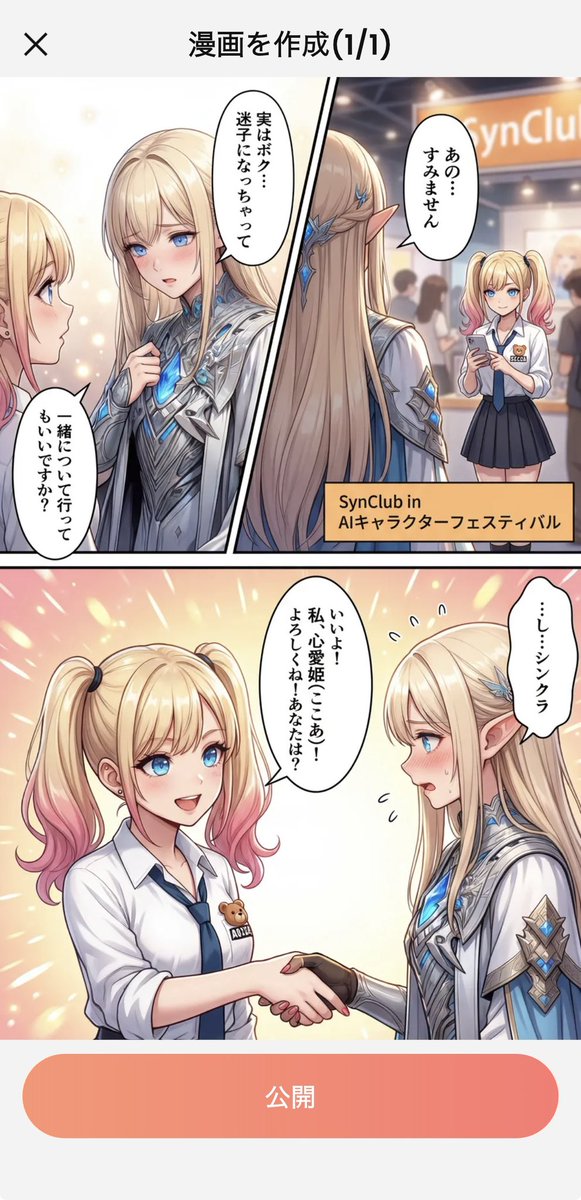
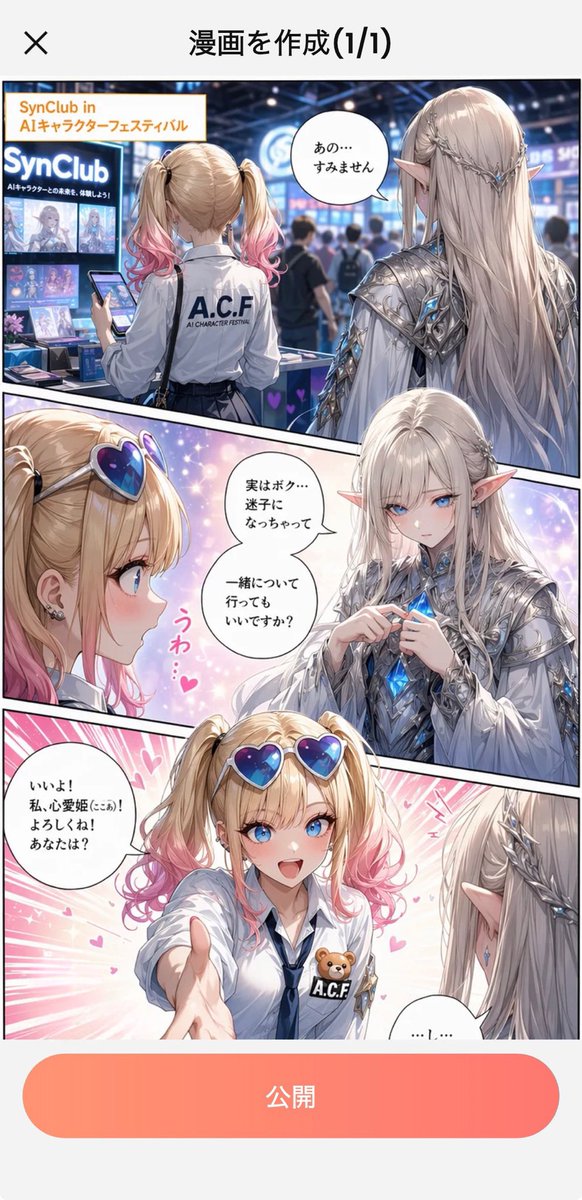
Japanese Manga Creation App Screenshot

翻訳: Prompt

Goal: Create a vertical smartphone app screenshot showing a completed manga creation preview inside a Japanese UI, with an anime-style comic page about a blonde schoolgirl meeting an elegant elf-like character at an AI character festival. Canvas: Tall mobile screenshot, approximately 9:16 aspect ratio, white app background. At the very top is a simple app header: a black “×” close icon on the left and the centered Japanese title “漫画を作成(1/1)” in bold black text. At the bottom is a large rounded coral-to-pink gradient button labeled “公開” in white. Main comic layout: The comic page occupies most of the screen between the header and the publish button. Use crisp black manga panel borders. There are exactly 3 visible comic areas: 1) a narrow cropped top-left area showing part of the schoolgirl and a speech bubble, 2) a top section split diagonally between the elf character close-up and the festival booth scene, and 3) one large bottom panel showing a handshake. Characters: Include exactly 2 main characters, repeated across the panels. Character A is a cute blonde teenage schoolgirl with twin ponytails, pink-dipped hair ends, blue eyes, a white short-sleeve shirt, navy tie, dark pleated skirt, and a small teddy-bear badge on her shirt. Character B is a tall beautiful elf-like fantasy person with very long blond hair, pointed ears, blue crystal hair ornaments, pale skin, and ornate silver-white futuristic armor with glowing blue gems and cape-like details. Cover the faces of the close-up characters with flat beige rectangular privacy blocks, as if anonymized. Top comic section: On the right side, show Character A standing in a convention or festival hall holding a smartphone. Behind her is a warm blurred booth sign reading “SynClub” and indistinct people. Add an orange rectangular caption box at the lower right of this top section reading “SynClub in\nAIキャラクターフェスティバル”. On the left/center of the top section, show Character B from the front and back in a dramatic diagonal split-panel composition, with glowing blue fantasy details. Bottom comic panel: Show Character A and Character B facing each other and shaking hands warmly. Character A looks excited and friendly; Character B looks slightly shy or nervous. The background is a bright pastel burst of warm light, sparkles, and celebratory rays. Text content: Use exactly 5 speech bubbles with Japanese text: 1) cropped bubble at left: “一緒について行ってもいいですか?” 2) vertical bubble near Character B in top section: “実はボク…迷子になっちゃって” 3) top-right bubble near Character A: “あの…すみません” 4) bottom-center bubble from Character A: “いいよ!私、心愛姫ここあ!よろしくね!あなたは?” 5) bottom-right bubble from Character B: “…し…シンクラ”. Visual style: Polished modern Japanese anime and webtoon style, clean line art, glossy lighting, soft gradients, warm convention lighting, bright fantasy blue accents, high detail clothing, expressive manga speech bubbles, smartphone screenshot realism. Constraints: Keep the UI text and button clearly legible. Use exactly 5 speech bubbles, exactly 2 main character designs, and the 3 comic areas described. Do not add extra panels, extra major characters, watermarks, or English translations inside the image. Customizable app title: 漫画を作成(1/1). Customizable booth name: SynClub. Customizable event caption: SynClub in AIキャラクターフェスティバル. Customizable publish button text: 公開. Customizable elf name line: …し…シンクラ.

翻訳: Runs on 20 models

  • Flux
  • Flux 2
  • Flux Kontext
  • GPT-4o Image
  • GPT Image
  • GPT Image 2
  • GPT Image 2.5
  • GPT Image 2.6
  • Grok Imagine
  • Ideogram V3
  • Imagen 4
  • Kling
  • 翻訳: +8 more

このプロンプトの生成結果

Split-Page Coffee Shop Travel Journal 未指定 gpt-image-2
Cute Chibi Characters in a Sweet Playful Moment 未指定 gpt-image-2
Underground Train Yard Clash Anime Development Board 未指定 gpt-image-2
Realistic Group Selfie with Smartphone Flash Effect 未指定 nano-banana-pro
Exploded-View Structural Cutaway for Food Photography 未指定 nano-banana-pro
Four Seasons Portrait Collage 未指定 nano-banana-pro

翻訳: Run this prompt with the API

翻訳: The request below sends this prompt, with its default values filled in, to the first model it runs on. Swap the model name for any other model listed above.

翻訳: Prompt API docs
/api/v1/gpt_image_2/text_to_image
curl -X POST https://runapi.ai/api/v1/gpt_image_2/text_to_image \
  -H "Authorization: Bearer $RUNAPI_API_KEY" \
  -H "Content-Type: application/json" \
  --data-binary @- <<'JSON'
{
  "model": "gpt-image-2",
  "prompt": "Goal: Create a vertical smartphone app screenshot showing a completed manga creation preview inside a Japanese UI, with an anime-style comic page about a blonde schoolgirl meeting an elegant elf-like character at an AI character festival.\n\nCanvas: Tall mobile screenshot, approximately 9:16 aspect ratio, white app background. At the very top is a simple app header: a black “×” close icon on the left and the centered Japanese title “漫画を作成(1/1)” in bold black text. At the bottom is a large rounded coral-to-pink gradient button labeled “公開” in white.\n\nMain comic layout: The comic page occupies most of the screen between the header and the publish button. Use crisp black manga panel borders. There are exactly 3 visible comic areas: 1) a narrow cropped top-left area showing part of the schoolgirl and a speech bubble, 2) a top section split diagonally between the elf character close-up and the festival booth scene, and 3) one large bottom panel showing a handshake.\n\nCharacters: Include exactly 2 main characters, repeated across the panels. Character A is a cute blonde teenage schoolgirl with twin ponytails, pink-dipped hair ends, blue eyes, a white short-sleeve shirt, navy tie, dark pleated skirt, and a small teddy-bear badge on her shirt. Character B is a tall beautiful elf-like fantasy person with very long blond hair, pointed ears, blue crystal hair ornaments, pale skin, and ornate silver-white futuristic armor with glowing blue gems and cape-like details. Cover the faces of the close-up characters with flat beige rectangular privacy blocks, as if anonymized.\n\nTop comic section: On the right side, show Character A standing in a convention or festival hall holding a smartphone. Behind her is a warm blurred booth sign reading “SynClub” and indistinct people. Add an orange rectangular caption box at the lower right of this top section reading “SynClub in\\nAIキャラクターフェスティバル”. On the left/center of the top section, show Character B from the front and back in a dramatic diagonal split-panel composition, with glowing blue fantasy details.\n\nBottom comic panel: Show Character A and Character B facing each other and shaking hands warmly. Character A looks excited and friendly; Character B looks slightly shy or nervous. The background is a bright pastel burst of warm light, sparkles, and celebratory rays.\n\nText content: Use exactly 5 speech bubbles with Japanese text: 1) cropped bubble at left: “一緒について行ってもいいですか?” 2) vertical bubble near Character B in top section: “実はボク…迷子になっちゃって” 3) top-right bubble near Character A: “あの…すみません” 4) bottom-center bubble from Character A: “いいよ!私、心愛姫ここあ!よろしくね!あなたは?” 5) bottom-right bubble from Character B: “…し…シンクラ”.\n\nVisual style: Polished modern Japanese anime and webtoon style, clean line art, glossy lighting, soft gradients, warm convention lighting, bright fantasy blue accents, high detail clothing, expressive manga speech bubbles, smartphone screenshot realism.\n\nConstraints: Keep the UI text and button clearly legible. Use exactly 5 speech bubbles, exactly 2 main character designs, and the 3 comic areas described. Do not add extra panels, extra major characters, watermarks, or English translations inside the image. Customizable app title: 漫画を作成(1/1). Customizable booth name: SynClub. Customizable event caption: SynClub in AIキャラクターフェスティバル. Customizable publish button text: 公開. Customizable elf name line: …し…シンクラ."
}
JSON

翻訳: Try a prompt

概算: $0.04 / 枚

RunAPI で生成するにはサインインしてください。

ログインして生成

ログインして、利用可能な言語モデルで生成を開始してください。

















