Mint Anime Music Player Wallpaper
Mint Anime Music Player Wallpaper

翻訳: Prompt

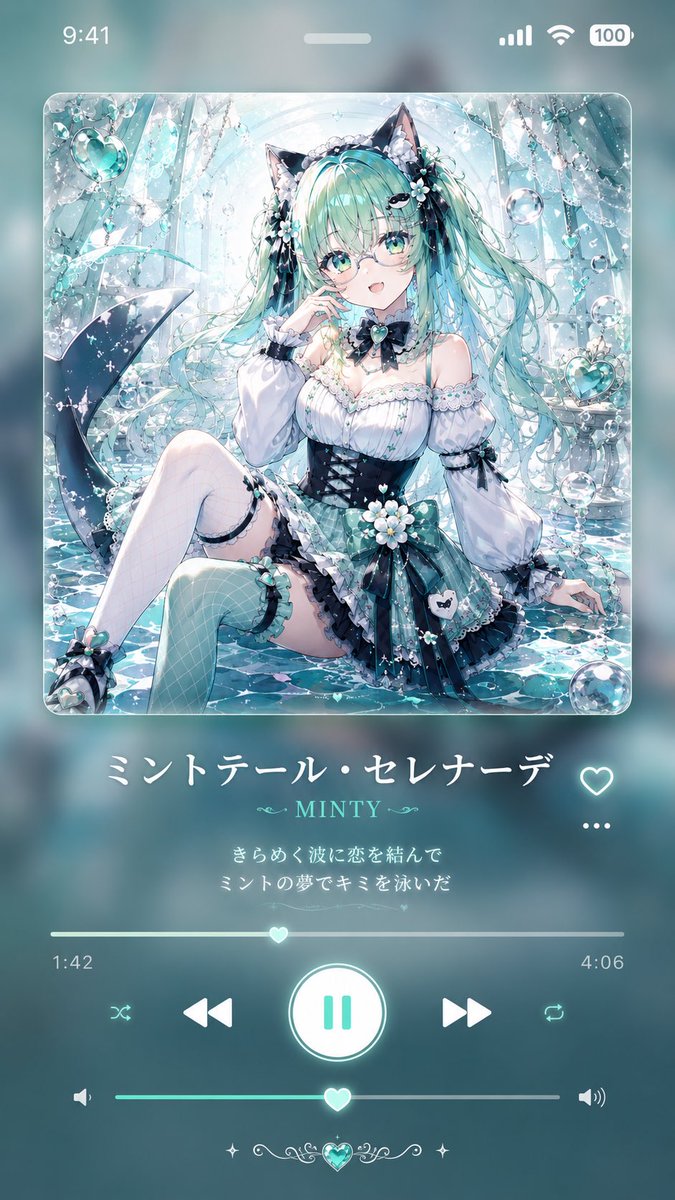
Goal: Create a vertical 9:16 smartphone wallpaper styled like a dreamy music player screen, featuring an anime album-art illustration and a translucent teal audio UI. Canvas: 9:16 phone wallpaper, soft aqua and mint color palette, blurred glassmorphism background, iPhone-like status bar at the top showing 9:41 on the left and signal, Wi‑Fi, and 100% battery on the right, with a small white home-indicator pill near the top center. Main album art: A large rounded-square album cover centered in the upper half, with glossy glass edges and subtle glow. Inside the cover, illustrate Minty Serenade as a beautiful anime cat-girl mermaid-idol sitting in sparkling shallow water inside an ornate crystalline underwater palace. She has very long flowing mint turquoise twin-tail hair, black cat ears, large aqua eyes, delicate round glasses, a shy open-mouth expression, and pale skin. Her outfit is a frilly white-and-black gothic lolita swimsuit dress with mint plaid accents, black corset waist, lace sleeves, ribbons, flower ornaments, pearl details, thigh-high stockings, and small teal bows. Include a dark mermaid tail curling behind her on the left. Surround her with bubbles, dangling crystal chains, heart-shaped aqua jewels, white flowers, shimmering water reflections, sparkles, and luminous cyan highlights. The illustration should be highly detailed, romantic, glossy, and ethereal. Music player layout below album art: Center the song title in large elegant white Japanese text: ミントテール・セレナーデ. To the right of the title line place one outlined heart favorite icon. Below it, show the artist name in smaller mint serif text with decorative flourishes: MINTY. Under that, include exactly 2 centered Japanese lyric lines in small glowing white text: 1) きらめく波に恋を結んで 2) ミントの夢でキミを泳いだ. To the right of the lyric area place a horizontal three-dot menu icon. Playback controls: Add one thin progress bar with a glowing heart-shaped scrubber near the center; show elapsed time 1:42 on the left and total time 4:06 on the right. Beneath it, place exactly 5 playback icons in a row: shuffle, previous track, large circular pause button in the center, next track, repeat. The central pause button should be a glowing white circle with mint pause bars. Below that, add a volume slider with speaker icon on the left, louder speaker icon on the right, and another heart-shaped knob. At the bottom center, add a small decorative aqua heart gem with symmetrical filigree and tiny star sparkles. Visual style: Soft glow, translucent frosted glass UI, crisp anime rendering, pastel mint/cyan highlights, white typography, romantic underwater fantasy mood, no harsh shadows, no watermark, no extra app branding. Keep all interface elements aligned and readable like a polished music playback screen.

翻訳: Runs on 21 models

  • Flux
  • Flux 2
  • Flux Kontext
  • GPT-4o Image
  • GPT Image
  • GPT Image 2
  • GPT Image 2.5
  • GPT Image 2.6
  • Grok Imagine
  • Ideogram V3
  • Imagen 4
  • Kling
  • 翻訳: +9 more

このプロンプトの生成結果

Seedream 5 prompt: f smiling middle aged woman in nice home wrapped i... 未指定 v2
Create an extreme close-up underwater portrait, ca... 未指定 未指定
Using the face from the attached photograph, recre... 未指定 未指定
Using the face from the attached photo, recreate a... 未指定 未指定
Seedream 5 prompt: cosplay 未指定 v2
Seedream 5 prompt: photography, portrait of contrast, profile silhoue... 未指定 seedream-5-pro

翻訳: Run this prompt with the API

翻訳: The request below sends this prompt, with its default values filled in, to the first model it runs on. Swap the model name for any other model listed above.

翻訳: Prompt API docs
/api/v1/gpt_image_2/text_to_image
curl -X POST https://runapi.ai/api/v1/gpt_image_2/text_to_image \
  -H "Authorization: Bearer $RUNAPI_API_KEY" \
  -H "Content-Type: application/json" \
  --data-binary @- <<'JSON'
{
  "model": "gpt-image-2",
  "prompt": "Goal: Create a vertical 9:16 smartphone wallpaper styled like a dreamy music player screen, featuring an anime album-art illustration and a translucent teal audio UI.\n\nCanvas: 9:16 phone wallpaper, soft aqua and mint color palette, blurred glassmorphism background, iPhone-like status bar at the top showing 9:41 on the left and signal, Wi‑Fi, and 100% battery on the right, with a small white home-indicator pill near the top center.\n\nMain album art: A large rounded-square album cover centered in the upper half, with glossy glass edges and subtle glow. Inside the cover, illustrate Minty Serenade as a beautiful anime cat-girl mermaid-idol sitting in sparkling shallow water inside an ornate crystalline underwater palace. She has very long flowing mint turquoise twin-tail hair, black cat ears, large aqua eyes, delicate round glasses, a shy open-mouth expression, and pale skin. Her outfit is a frilly white-and-black gothic lolita swimsuit dress with mint plaid accents, black corset waist, lace sleeves, ribbons, flower ornaments, pearl details, thigh-high stockings, and small teal bows. Include a dark mermaid tail curling behind her on the left. Surround her with bubbles, dangling crystal chains, heart-shaped aqua jewels, white flowers, shimmering water reflections, sparkles, and luminous cyan highlights. The illustration should be highly detailed, romantic, glossy, and ethereal.\n\nMusic player layout below album art: Center the song title in large elegant white Japanese text: ミントテール・セレナーデ. To the right of the title line place one outlined heart favorite icon. Below it, show the artist name in smaller mint serif text with decorative flourishes: MINTY. Under that, include exactly 2 centered Japanese lyric lines in small glowing white text: 1) きらめく波に恋を結んで 2) ミントの夢でキミを泳いだ. To the right of the lyric area place a horizontal three-dot menu icon.\n\nPlayback controls: Add one thin progress bar with a glowing heart-shaped scrubber near the center; show elapsed time 1:42 on the left and total time 4:06 on the right. Beneath it, place exactly 5 playback icons in a row: shuffle, previous track, large circular pause button in the center, next track, repeat. The central pause button should be a glowing white circle with mint pause bars. Below that, add a volume slider with speaker icon on the left, louder speaker icon on the right, and another heart-shaped knob. At the bottom center, add a small decorative aqua heart gem with symmetrical filigree and tiny star sparkles.\n\nVisual style: Soft glow, translucent frosted glass UI, crisp anime rendering, pastel mint/cyan highlights, white typography, romantic underwater fantasy mood, no harsh shadows, no watermark, no extra app branding. Keep all interface elements aligned and readable like a polished music playback screen."
}
JSON

翻訳: Try a prompt