Realistic Mac Webcam Photo Edit
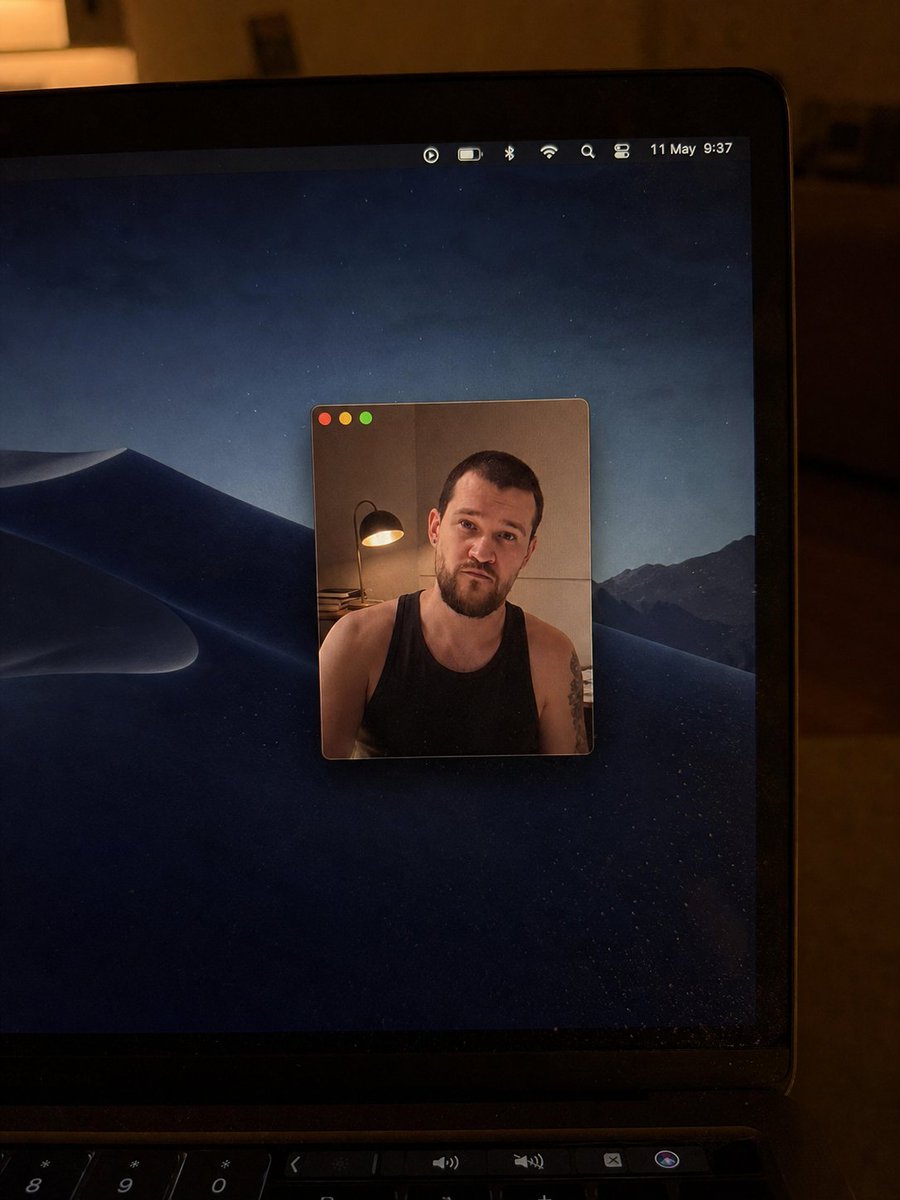
Realistic Mac Webcam Photo Edit

prompt

Using the provided reference image as the base, regenerate it as a cleaner, more realistic low-light phone photo of the same laptop screen. Keep the overall concept of a Mac desktop with a floating webcam window and the same anonymized square blur over the face, but change the scene as follows: crop in closer on the laptop so the right side of the screen and bezel dominate the frame, remove the bottom dock from view, and use a dark macOS desert-at-night wallpaper instead of the lake wallpaper. Make the webcam window much smaller and centered on the desktop, with only the three traffic-light buttons visible at the top left and no title text. Inside the webcam window, keep the same person as the subject but change the shirt to a black sleeveless tank top, show more shoulders/upper arms, and add a visible tattoo on the subject’s right upper arm. Reposition the desk lamp so it appears on the left side inside the webcam frame with warm light. Update the menu bar so it looks minimal and shows 11 May 9:37. Preserve the candid handheld camera look, warm room lighting, laptop bezel, keyboard edge at the bottom, mild screen dust/reflections, and natural photo imperfections; avoid adding extra UI windows, dock icons, or sharp studio-clean rendering.

Funciona em 20 modelos

  • Flux
  • Flux 2
  • Flux Kontext
  • GPT-4o Image
  • GPT Image
  • GPT Image 2
  • GPT Image 2.5
  • GPT Image 2.6
  • Grok Imagine
  • Ideogram V3
  • Imagen 4
  • Kling
  • +8 Mais

O que este prompt produz

Split-Page Coffee Shop Travel Journal Não especificado gpt-image-2
Cute Chibi Characters in a Sweet Playful Moment Não especificado gpt-image-2
Underground Train Yard Clash Anime Development Board Não especificado gpt-image-2
Realistic Group Selfie with Smartphone Flash Effect Não especificado nano-banana-pro
Exploded-View Structural Cutaway for Food Photography Não especificado nano-banana-pro
Four Seasons Portrait Collage Não especificado nano-banana-pro

Run este prompt com o API

A solicitação abaixo envia esse prompt, com seus valores padrão preenchidos, para o primeiro modelo em que é executado. Troque o nome do modelo por qualquer outro modelo listado acima.

Documentação da prompt API
/api/v1/gpt_image_2/text_to_image
curl -X POST https://runapi.ai/api/v1/gpt_image_2/text_to_image \
  -H "Authorization: Bearer $RUNAPI_API_KEY" \
  -H "Content-Type: application/json" \
  --data-binary @- <<'JSON'
{
  "model": "gpt-image-2",
  "prompt": "Using the provided reference image as the base, regenerate it as a cleaner, more realistic low-light phone photo of the same laptop screen. Keep the overall concept of a Mac desktop with a floating webcam window and the same anonymized square blur over the face, but change the scene as follows: crop in closer on the laptop so the right side of the screen and bezel dominate the frame, remove the bottom dock from view, and use a dark macOS desert-at-night wallpaper instead of the lake wallpaper. Make the webcam window much smaller and centered on the desktop, with only the three traffic-light buttons visible at the top left and no title text. Inside the webcam window, keep the same person as the subject but change the shirt to a black sleeveless tank top, show more shoulders/upper arms, and add a visible tattoo on the subject’s right upper arm. Reposition the desk lamp so it appears on the left side inside the webcam frame with warm light. Update the menu bar so it looks minimal and shows 11 May 9:37. Preserve the candid handheld camera look, warm room lighting, laptop bezel, keyboard edge at the bottom, mild screen dust/reflections, and natural photo imperfections; avoid adding extra UI windows, dock icons, or sharp studio-clean rendering."
}
JSON

Experimentar a prompt

Estimado: $0.04 / imagem

Entre para gerar com a RunAPI.

Faça login para gerar

Entre para começar a gerar com seus modelos de linguagem disponíveis.