Smart Doorbell Enclosure Product Render
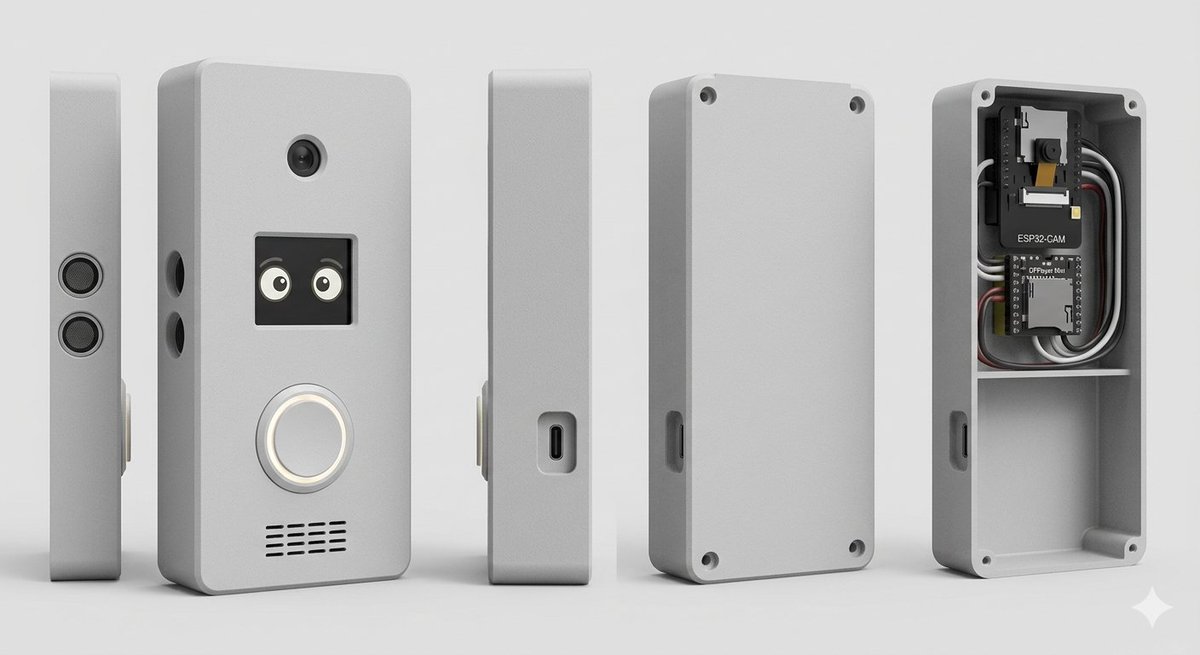
Smart Doorbell Enclosure Product Render

prompt

Goal: Create a clean studio product render of a custom DIY smart doorbell / intercom enclosure, shown as an exploded multi-view product lineup. Canvas: Wide horizontal 16:9 composition on a light gray seamless studio background, soft floor shadow, orthographic product-render look, no people, no branding watermark. Subject: A compact rectangular electronics enclosure with rounded corners, matte light gray plastic, slightly beveled edges, realistic 3D CAD rendering, subtle rough texture. Layout: Show exactly 5 discrete enclosure views arranged left to right with even spacing: 1) a very thin left side profile standing upright with two stacked circular speaker or sensor grilles; 2) the main front face standing upright, slightly angled, with visible functional details; 3) a narrow side profile with a recessed USB-C port; 4) the rear cover plate standing upright with four corner screw holes and a side cutout; 5) the open back housing/case interior showing electronics installed in the top compartment and an empty lower compartment. Front face details: On the main front view, include exactly 4 visible feature groups: a small round camera lens near the top center; a square black display/window below it showing two cute cartoon eyes; a large circular illuminated doorbell button below the display with a white glowing ring; and a horizontal speaker grille near the bottom made of short black slits in multiple rows. Add two small round side holes on the left edge of the main body. Interior electronics: In the open back housing, include exactly 2 circuit boards and visible wiring: the top board is labeled ESP32-CAM with a small camera module, and the lower board is labeled DFPlayer Mini. Add neatly routed black, white, gray, and red wires around the boards. The interior should have a horizontal divider shelf separating the electronics bay from a larger empty lower cavity. Add four corner screw posts/holes inside the open case. Style: Photorealistic 3D product visualization, high-detail industrial design concept, soft studio lighting from upper left, gentle ambient occlusion, crisp edges, realistic plastic material, neutral gray palette, shallow but clear shadows, centered composition. Constraints: Use exactly 5 product views, keep all objects upright, no hands, no extra text beyond the two board labels, no logos, no decorative background objects.

Funciona em 20 modelos

  • Flux
  • Flux 2
  • Flux Kontext
  • GPT-4o Image
  • GPT Image
  • GPT Image 2
  • GPT Image 2.5
  • GPT Image 2.6
  • Grok Imagine
  • Ideogram V3
  • Imagen 4
  • Kling
  • +8 Mais

O que este prompt produz

Split-Page Coffee Shop Travel Journal Não especificado gpt-image-2
Cute Chibi Characters in a Sweet Playful Moment Não especificado gpt-image-2
Underground Train Yard Clash Anime Development Board Não especificado gpt-image-2
Realistic Group Selfie with Smartphone Flash Effect Não especificado nano-banana-pro
Exploded-View Structural Cutaway for Food Photography Não especificado nano-banana-pro
Four Seasons Portrait Collage Não especificado nano-banana-pro

Run este prompt com o API

A solicitação abaixo envia esse prompt, com seus valores padrão preenchidos, para o primeiro modelo em que é executado. Troque o nome do modelo por qualquer outro modelo listado acima.

Documentação da prompt API
/api/v1/gpt_image_2/text_to_image
curl -X POST https://runapi.ai/api/v1/gpt_image_2/text_to_image \
  -H "Authorization: Bearer $RUNAPI_API_KEY" \
  -H "Content-Type: application/json" \
  --data-binary @- <<'JSON'
{
  "model": "gpt-image-2",
  "prompt": "Goal: Create a clean studio product render of a custom DIY smart doorbell / intercom enclosure, shown as an exploded multi-view product lineup.\n\nCanvas: Wide horizontal 16:9 composition on a light gray seamless studio background, soft floor shadow, orthographic product-render look, no people, no branding watermark.\n\nSubject: A compact rectangular electronics enclosure with rounded corners, matte light gray plastic, slightly beveled edges, realistic 3D CAD rendering, subtle rough texture.\n\nLayout: Show exactly 5 discrete enclosure views arranged left to right with even spacing: 1) a very thin left side profile standing upright with two stacked circular speaker or sensor grilles; 2) the main front face standing upright, slightly angled, with visible functional details; 3) a narrow side profile with a recessed USB-C port; 4) the rear cover plate standing upright with four corner screw holes and a side cutout; 5) the open back housing/case interior showing electronics installed in the top compartment and an empty lower compartment.\n\nFront face details: On the main front view, include exactly 4 visible feature groups: a small round camera lens near the top center; a square black display/window below it showing two cute cartoon eyes; a large circular illuminated doorbell button below the display with a white glowing ring; and a horizontal speaker grille near the bottom made of short black slits in multiple rows. Add two small round side holes on the left edge of the main body.\n\nInterior electronics: In the open back housing, include exactly 2 circuit boards and visible wiring: the top board is labeled ESP32-CAM with a small camera module, and the lower board is labeled DFPlayer Mini. Add neatly routed black, white, gray, and red wires around the boards. The interior should have a horizontal divider shelf separating the electronics bay from a larger empty lower cavity. Add four corner screw posts/holes inside the open case.\n\nStyle: Photorealistic 3D product visualization, high-detail industrial design concept, soft studio lighting from upper left, gentle ambient occlusion, crisp edges, realistic plastic material, neutral gray palette, shallow but clear shadows, centered composition.\n\nConstraints: Use exactly 5 product views, keep all objects upright, no hands, no extra text beyond the two board labels, no logos, no decorative background objects."
}
JSON

Experimentar a prompt

Estimado: $0.04 / imagem

Entre para gerar com a RunAPI.

Faça login para gerar

Entre para começar a gerar com seus modelos de linguagem disponíveis.