Three-Panel AI Image Quality Comparison
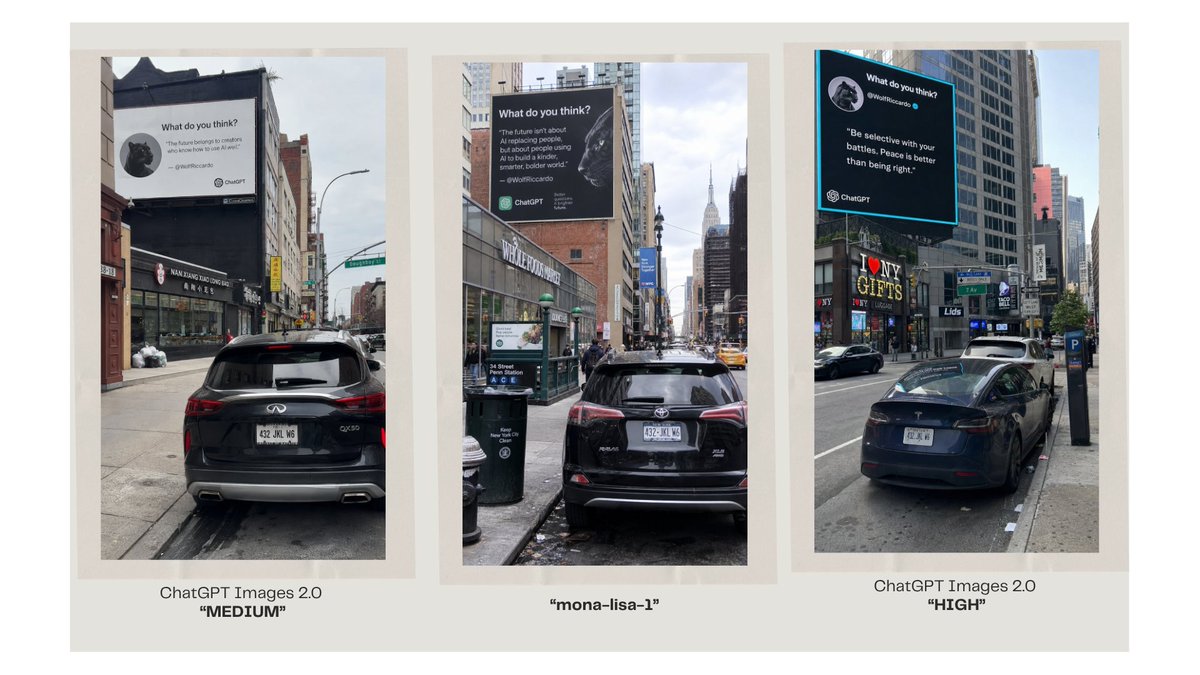
Three-Panel AI Image Quality Comparison

즉각적인

Goal: Create a clean side-by-side comparison graphic showing three generated street-photo samples of urban billboard ads, comparing ChatGPT Images 2.0 quality settings with a checkpoint named mona-lisa-1. Canvas: Wide 16:9 landscape canvas with an off-white/light warm gray background and generous margins. Arrange exactly 3 vertical photo panels in a row, each framed by a pale beige border like printed photographs on a presentation slide. Layout: Use three evenly spaced portrait-oriented image panels. Each panel contains a realistic New York City street scene photographed from sidewalk or curb level, with cloudy daylight, tall buildings, parked cars, traffic, storefront signage, and a large elevated billboard ad near the top of the scene. Beneath each panel, add a centered caption in dark gray/black sans-serif type. Panel count and captions: There are exactly 3 panels. Left caption: “ChatGPT Images 2.0” on the first line and “MEDIUM” in bold quotation marks on the second line. Center caption: “mona-lisa-1” in bold quotation marks only. Right caption: “ChatGPT Images 2.0” on the first line and “HIGH” in bold quotation marks on the second line. Photo panel details: Left panel shows a black SUV parked in the foreground on a city street, Chinatown-like storefronts on the left, and a large black-and-white billboard above the storefront. Center panel shows a black Toyota RAV4 parked at the curb, a midtown Manhattan avenue with the Empire State Building visible in the distance, and a dark billboard mounted above a brick building. Right panel shows a black sedan parked at the curb, Times Square-style commercial buildings and signs including a bright “I ♥ NY GIFTS” storefront, and a large dark billboard with a cyan glowing border. Billboard content: Each billboard should resemble a ChatGPT social quote card with a circular avatar, the heading “What do you think?”, a short quote, a small handle line, and a ChatGPT logo/wordmark near the bottom. Keep the billboard text mostly legible but natural for a photographed street ad. Use the quote theme opinions about AI and the future. The right billboard should have the clearest high-contrast look with a cyan outline, the center should look moderately realistic, and the left should look slightly softer/noisier to imply quality differences. Visual style: Realistic smartphone street photography embedded in a minimal presentation comparison slide. Natural perspective, mild lens distortion, urban clutter, overcast sky, authentic road grime, parked vehicles, and realistic shadows. The overall slide should look like a model evaluation screenshot rather than a polished advertisement. Constraints: Use exactly 3 image panels and exactly 3 captions. Do not add extra panels, charts, icons, watermarks, or explanatory paragraphs. Keep the captions clean and centered under the photos.

20 모델에서 실행됩니다.

  • Flux
  • Flux 2
  • Flux Kontext
  • GPT-4o Image
  • GPT Image
  • GPT Image 2
  • GPT Image 2.5
  • GPT Image 2.6
  • Grok Imagine
  • Ideogram V3
  • Imagen 4
  • Kling
  • +8 이상

이 프롬프트의 출력

Split-Page Coffee Shop Travel Journal 지정되지 않음 gpt-image-2
Cute Chibi Characters in a Sweet Playful Moment 지정되지 않음 gpt-image-2
Underground Train Yard Clash Anime Development Board 지정되지 않음 gpt-image-2
Realistic Group Selfie with Smartphone Flash Effect 지정되지 않음 nano-banana-pro
Exploded-View Structural Cutaway for Food Photography 지정되지 않음 nano-banana-pro
Four Seasons Portrait Collage 지정되지 않음 nano-banana-pro

API를 사용하여 이 프롬프트를 실행하세요.

아래 요청은 기본값이 채워진 이 프롬프트를 실행되는 첫 번째 모델로 보냅니다. 위에 나열된 다른 모델의 모델 이름을 바꾸십시오.

프롬프트 API 문서
/api/v1/gpt_image_2/text_to_image
curl -X POST https://runapi.ai/api/v1/gpt_image_2/text_to_image \
  -H "Authorization: Bearer $RUNAPI_API_KEY" \
  -H "Content-Type: application/json" \
  --data-binary @- <<'JSON'
{
  "model": "gpt-image-2",
  "prompt": "Goal: Create a clean side-by-side comparison graphic showing three generated street-photo samples of urban billboard ads, comparing ChatGPT Images 2.0 quality settings with a checkpoint named mona-lisa-1.\n\nCanvas: Wide 16:9 landscape canvas with an off-white/light warm gray background and generous margins. Arrange exactly 3 vertical photo panels in a row, each framed by a pale beige border like printed photographs on a presentation slide.\n\nLayout: Use three evenly spaced portrait-oriented image panels. Each panel contains a realistic New York City street scene photographed from sidewalk or curb level, with cloudy daylight, tall buildings, parked cars, traffic, storefront signage, and a large elevated billboard ad near the top of the scene. Beneath each panel, add a centered caption in dark gray/black sans-serif type.\n\nPanel count and captions: There are exactly 3 panels. Left caption: “ChatGPT Images 2.0” on the first line and “MEDIUM” in bold quotation marks on the second line. Center caption: “mona-lisa-1” in bold quotation marks only. Right caption: “ChatGPT Images 2.0” on the first line and “HIGH” in bold quotation marks on the second line.\n\nPhoto panel details: Left panel shows a black SUV parked in the foreground on a city street, Chinatown-like storefronts on the left, and a large black-and-white billboard above the storefront. Center panel shows a black Toyota RAV4 parked at the curb, a midtown Manhattan avenue with the Empire State Building visible in the distance, and a dark billboard mounted above a brick building. Right panel shows a black sedan parked at the curb, Times Square-style commercial buildings and signs including a bright “I ♥ NY GIFTS” storefront, and a large dark billboard with a cyan glowing border.\n\nBillboard content: Each billboard should resemble a ChatGPT social quote card with a circular avatar, the heading “What do you think?”, a short quote, a small handle line, and a ChatGPT logo/wordmark near the bottom. Keep the billboard text mostly legible but natural for a photographed street ad. Use the quote theme opinions about AI and the future. The right billboard should have the clearest high-contrast look with a cyan outline, the center should look moderately realistic, and the left should look slightly softer/noisier to imply quality differences.\n\nVisual style: Realistic smartphone street photography embedded in a minimal presentation comparison slide. Natural perspective, mild lens distortion, urban clutter, overcast sky, authentic road grime, parked vehicles, and realistic shadows. The overall slide should look like a model evaluation screenshot rather than a polished advertisement.\n\nConstraints: Use exactly 3 image panels and exactly 3 captions. Do not add extra panels, charts, icons, watermarks, or explanatory paragraphs. Keep the captions clean and centered under the photos."
}
JSON

메시지를 보내보세요

예상 금액: $0.04 / 이미지

RunAPI로 생성하려면 로그인하세요.

로그인 후 생성

로그인하여 사용 가능한 언어 모델로 생성을 시작하세요.