Technical Infographic Overlay on a Laptop Image
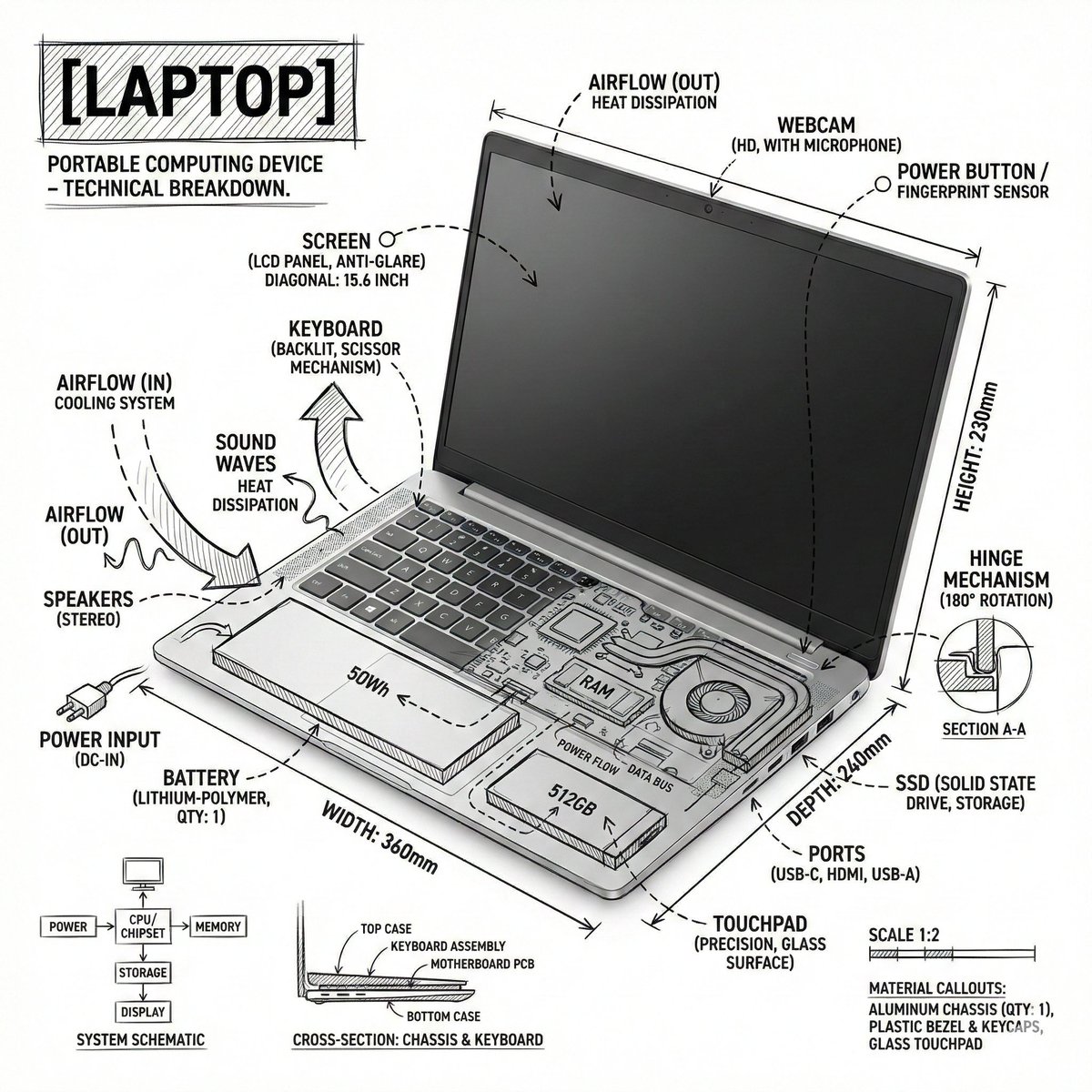
Technical Infographic Overlay on a Laptop Image

즉각적인

Create an infographic image of laptop ,combining a realistic photograph or photoreal render of the object with technical annotation overlays placed directly on top. Use black ink–style line drawings and text (technical pen / architectural sketch look) on a pure white studio background, including: •Key component labels •Internal cutaway or exploded-view outlines •Measurements, dimensions, and scale markers •Material callouts and quantities •Arrows indicating function, force, or flow (air, sound, power, pressure) •Simple schematic or sectional diagrams where relevant Place the title [OBJECT] inside a hand-drawn technical annotation box in one corner. Style & layout rules: •The real object remains clearly visible beneath the annotations •Annotations feel sketched, technical, and architectural •Clean composition with balanced negative space •Educational, museum-exhibit / engineering-manual vibe Visual style: Minimal technical illustration aesthetic, black linework over realistic imagery, precise but slightly hand-drawn feel. Color palette: White background, black annotation lines and text only. No colors. Output: 1080×1080, ultra-crisp, social-feed optimized, no watermark.”

20 모델에서 실행됩니다.

  • Flux
  • Flux 2
  • Flux Kontext
  • GPT-4o Image
  • GPT Image
  • GPT Image 2
  • GPT Image 2.5
  • GPT Image 2.6
  • Grok Imagine
  • Ideogram V3
  • Imagen 4
  • Kling
  • +8 이상

이 프롬프트의 출력

Split-Page Coffee Shop Travel Journal 지정되지 않음 gpt-image-2
Cute Chibi Characters in a Sweet Playful Moment 지정되지 않음 gpt-image-2
Underground Train Yard Clash Anime Development Board 지정되지 않음 gpt-image-2
Realistic Group Selfie with Smartphone Flash Effect 지정되지 않음 nano-banana-pro
Exploded-View Structural Cutaway for Food Photography 지정되지 않음 nano-banana-pro
Four Seasons Portrait Collage 지정되지 않음 nano-banana-pro

API를 사용하여 이 프롬프트를 실행하세요.

아래 요청은 기본값이 채워진 이 프롬프트를 실행되는 첫 번째 모델로 보냅니다. 위에 나열된 다른 모델의 모델 이름을 바꾸십시오.

프롬프트 API 문서
/api/v1/nano_banana/text_to_image
curl -X POST https://runapi.ai/api/v1/nano_banana/text_to_image \
  -H "Authorization: Bearer $RUNAPI_API_KEY" \
  -H "Content-Type: application/json" \
  --data-binary @- <<'JSON'
{
  "model": "nano-banana-pro",
  "prompt": "Create an infographic image of laptop ,combining a realistic photograph or photoreal render of the object with technical annotation overlays placed directly on top.\n\nUse black ink–style line drawings and text (technical pen / architectural sketch look) on a pure white studio background, including:\n•Key component labels\n•Internal cutaway or exploded-view outlines\n•Measurements, dimensions, and scale markers\n•Material callouts and quantities\n•Arrows indicating function, force, or flow (air, sound, power, pressure)\n•Simple schematic or sectional diagrams where relevant\n\nPlace the title [OBJECT] inside a hand-drawn technical annotation box in one corner.\n\nStyle & layout rules:\n•The real object remains clearly visible beneath the annotations\n•Annotations feel sketched, technical, and architectural\n•Clean composition with balanced negative space\n•Educational, museum-exhibit / engineering-manual vibe\n\nVisual style:\nMinimal technical illustration aesthetic, black linework over realistic imagery, precise but slightly hand-drawn feel.\n\nColor palette:\nWhite background, black annotation lines and text only. No colors.\n\nOutput:\n1080×1080, ultra-crisp, social-feed optimized, no watermark.”"
}
JSON

메시지를 보내보세요

예상 금액: $0.04 / 이미지

RunAPI로 생성하려면 로그인하세요.

로그인 후 생성

로그인하여 사용 가능한 언어 모델로 생성을 시작하세요.