Minecraft Night Plaza Transformation
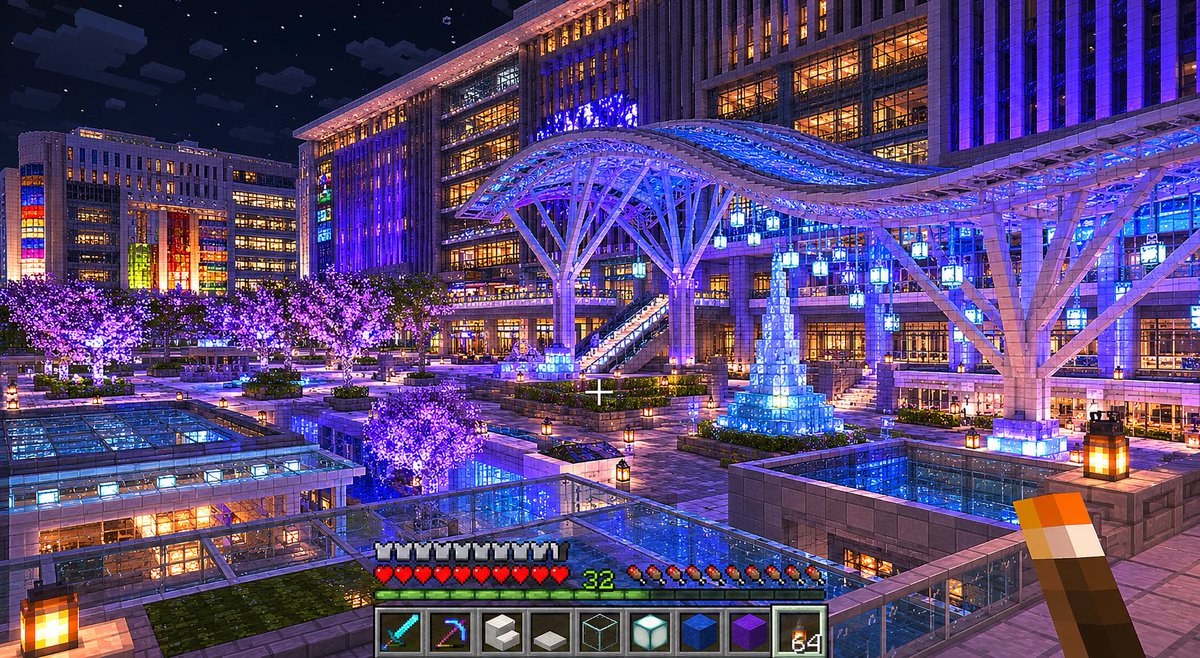
Minecraft Night Plaza Transformation

즉각적인

Using the provided reference image, reconstruct the scene as a high-quality vanilla Minecraft architectural screenshot. Do not make it photorealistic; make it look as if an expert Minecraft builder recreated this real night city plaza entirely inside Minecraft using only vanilla blocks. Preserve the main composition and landmarks from the reference: the nighttime urban plaza, the large station-like building, the sweeping illuminated canopy, the glass-roofed foreground structures, the crowds/market-like plaza activity, the glowing trees, and the central blue-lit tower decoration. Translate all geometry into block-built forms with crisp voxel edges, Minecraft lighting, and believable block materials. Add an in-game Minecraft screenshot presentation: first-person view with a centered crosshair, a torch held in the lower right hand, and the standard survival HUD along the bottom. Include exactly 9 hotbar slots showing these items from left to right: diamond sword, enchanted pickaxe, white block, gray slab/block, glass block, sea lantern, blue block, purple block, and torch stack. Show armor icons, red hearts, hunger icons, and green level number 32. Style and quality: vanilla Minecraft only, no mods, no shaders that look non-Minecraft, but use beautiful high-quality lighting, rich blue and purple illumination, warm window glow, starry night sky, reflective-looking glass surfaces, and detailed block placement. Keep the same wide landscape framing, around 1536x864, with a polished game screenshot feel.

21 모델에서 실행됩니다.

  • Flux
  • Flux 2
  • Flux Kontext
  • GPT-4o Image
  • GPT Image
  • GPT Image 2
  • GPT Image 2.5
  • GPT Image 2.6
  • Grok Imagine
  • Ideogram V3
  • Imagen 4
  • Kling
  • +9 이상

이 프롬프트의 출력

Hunyuan  prompt: dog pose 지정되지 않음 hunyuan-3
Wireless Doorbell Camera Instructions Prompt 지정되지 않음 gpt-image-2
Hunyuan  prompt: wine 지정되지 않음 hunyuan-3
Hunyuan  prompt: can beer 지정되지 않음 hunyuan-3
Hunyuan  prompt: ربات 지정되지 않음 hunyuan-3
Hero prompt: recreate image 1 (close up indoor portrait of a wo... 지정되지 않음 1.0

API를 사용하여 이 프롬프트를 실행하세요.

아래 요청은 기본값이 채워진 이 프롬프트를 실행되는 첫 번째 모델로 보냅니다. 위에 나열된 다른 모델의 모델 이름을 바꾸십시오.

프롬프트 API 문서
/api/v1/gpt_image_2/text_to_image
curl -X POST https://runapi.ai/api/v1/gpt_image_2/text_to_image \
  -H "Authorization: Bearer $RUNAPI_API_KEY" \
  -H "Content-Type: application/json" \
  --data-binary @- <<'JSON'
{
  "model": "gpt-image-2",
  "prompt": "Using the provided reference image, reconstruct the scene as a high-quality vanilla Minecraft architectural screenshot. Do not make it photorealistic; make it look as if an expert Minecraft builder recreated this real night city plaza entirely inside Minecraft using only vanilla blocks.\n\nPreserve the main composition and landmarks from the reference: the nighttime urban plaza, the large station-like building, the sweeping illuminated canopy, the glass-roofed foreground structures, the crowds/market-like plaza activity, the glowing trees, and the central blue-lit tower decoration. Translate all geometry into block-built forms with crisp voxel edges, Minecraft lighting, and believable block materials.\n\nAdd an in-game Minecraft screenshot presentation: first-person view with a centered crosshair, a torch held in the lower right hand, and the standard survival HUD along the bottom. Include exactly 9 hotbar slots showing these items from left to right: diamond sword, enchanted pickaxe, white block, gray slab/block, glass block, sea lantern, blue block, purple block, and torch stack. Show armor icons, red hearts, hunger icons, and green level number 32.\n\nStyle and quality: vanilla Minecraft only, no mods, no shaders that look non-Minecraft, but use beautiful high-quality lighting, rich blue and purple illumination, warm window glow, starry night sky, reflective-looking glass surfaces, and detailed block placement. Keep the same wide landscape framing, around 1536x864, with a polished game screenshot feel."
}
JSON

메시지를 보내보세요