Dramatic Border City YouTube Thumbnail
Dramatic Border City YouTube Thumbnail

즉각적인

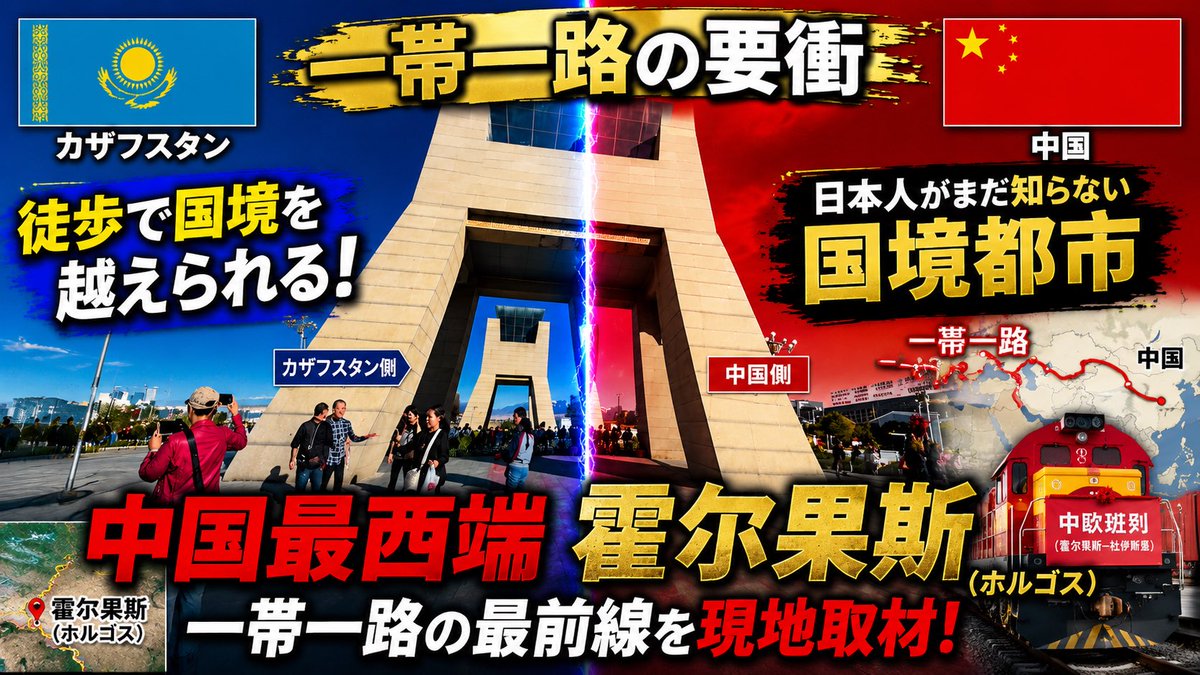
Using the provided reference image as the base photo, redesign it into a high-impact Japanese YouTube travel/news thumbnail. Keep the border-gate location recognizable, but crop tighter around the central monument, boost contrast and saturation, add dramatic blue-vs-red lighting split down the middle with a vertical lightning beam marking the border, and make the layout feel like an urgent documentary thumbnail. Reposition the Kazakhstan flag to the top left and the China flag to the top right inside bordered boxes with drop shadows. Add a black-and-gold brush-stroke banner across the top with the main title 一帯一路の要衝. Add large bold outlined Japanese typography with heavy shadows and color contrast; include exactly 16 visible text elements: 1) "カザフスタン", 2) "中国", 3) 徒歩で国境を越えられる!, 4) "カザフスタン側", 5) "中国側", 6) "日本人がまだ知らない", 7) 国境都市, 8) "一帯一路", 9) "中国", 10) 中国最西端, 11) 霍尔果斯, 12) "(ホルゴス)", 13) "一帯一路の最前線を", 14) "現地取材!", 15) "霍尔果斯 (ホルゴス)", 16) "中欧班列". Add a small satellite-map inset at bottom left with a red location pin and label for Horgos. Add a right-side map graphic showing a red Belt and Road route line and dots, partially behind the headline. Add a red freight train illustration/photo composite at the lower right with the "中欧班列" label on its front. Use explosive thumbnail styling: thick black outlines, yellow/red/white text hierarchy, lens flare, vignette, grunge brush backgrounds behind text, and strong drop shadows. Output as a 16:9 thumbnail composition.

21 모델에서 실행됩니다.

  • Flux
  • Flux 2
  • Flux Kontext
  • GPT-4o Image
  • GPT Image
  • GPT Image 2
  • GPT Image 2.5
  • GPT Image 2.6
  • Grok Imagine
  • Ideogram V3
  • Imagen 4
  • Kling
  • +9 이상

이 프롬프트의 출력

ChatGPT Image prompt: Made horror movie poster about snowman killer. Fro... 지정되지 않음 v1
Hunyuan  prompt: Minimalist product photo of a ceramic mug on a pas... 지정되지 않음 hunyuan-3
Hunyuan  prompt: Aikido 지정되지 않음 hunyuan-3
Seedream 5 prompt: f smiling middle aged woman in nice home wrapped i... 지정되지 않음 v2
Create an extreme close-up underwater portrait, ca... 지정되지 않음 지정되지 않음
Using the face from the attached photograph, recre... 지정되지 않음 지정되지 않음

API를 사용하여 이 프롬프트를 실행하세요.

아래 요청은 기본값이 채워진 이 프롬프트를 실행되는 첫 번째 모델로 보냅니다. 위에 나열된 다른 모델의 모델 이름을 바꾸십시오.

프롬프트 API 문서
/api/v1/gpt_image_2/text_to_image
curl -X POST https://runapi.ai/api/v1/gpt_image_2/text_to_image \
  -H "Authorization: Bearer $RUNAPI_API_KEY" \
  -H "Content-Type: application/json" \
  --data-binary @- <<'JSON'
{
  "model": "gpt-image-2",
  "prompt": "Using the provided reference image as the base photo, redesign it into a high-impact Japanese YouTube travel/news thumbnail. Keep the border-gate location recognizable, but crop tighter around the central monument, boost contrast and saturation, add dramatic blue-vs-red lighting split down the middle with a vertical lightning beam marking the border, and make the layout feel like an urgent documentary thumbnail. Reposition the Kazakhstan flag to the top left and the China flag to the top right inside bordered boxes with drop shadows. Add a black-and-gold brush-stroke banner across the top with the main title 一帯一路の要衝. Add large bold outlined Japanese typography with heavy shadows and color contrast; include exactly 16 visible text elements: 1) \"カザフスタン\", 2) \"中国\", 3) 徒歩で国境を越えられる!, 4) \"カザフスタン側\", 5) \"中国側\", 6) \"日本人がまだ知らない\", 7) 国境都市, 8) \"一帯一路\", 9) \"中国\", 10) 中国最西端, 11) 霍尔果斯, 12) \"(ホルゴス)\", 13) \"一帯一路の最前線を\", 14) \"現地取材!\", 15) \"霍尔果斯 (ホルゴス)\", 16) \"中欧班列\". Add a small satellite-map inset at bottom left with a red location pin and label for Horgos. Add a right-side map graphic showing a red Belt and Road route line and dots, partially behind the headline. Add a red freight train illustration/photo composite at the lower right with the \"中欧班列\" label on its front. Use explosive thumbnail styling: thick black outlines, yellow/red/white text hierarchy, lens flare, vignette, grunge brush backgrounds behind text, and strong drop shadows. Output as a 16:9 thumbnail composition."
}
JSON

메시지를 보내보세요