Parrot Paint-by-Numbers Worksheet
Parrot Paint-by-Numbers Worksheet

즉각적인

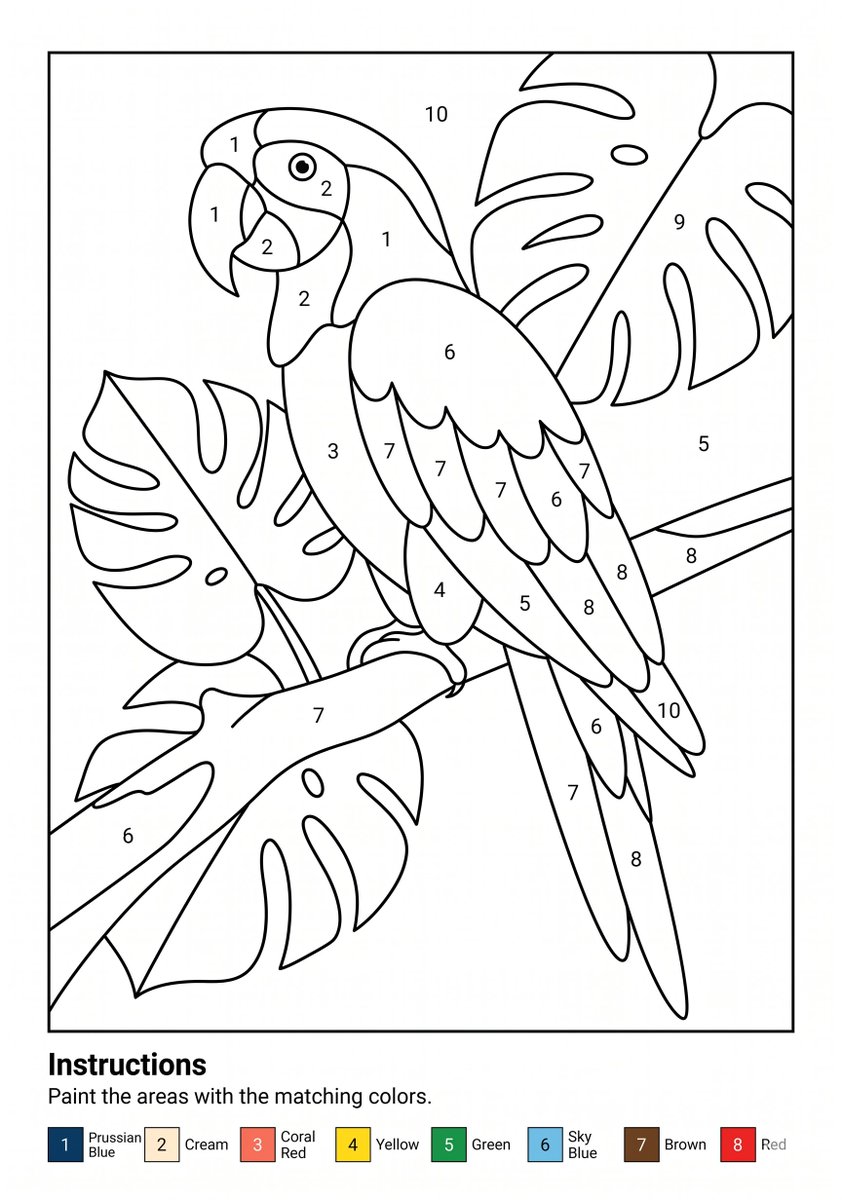
Goal: Create a printable paint-by-numbers worksheet featuring a tropical parrot perched among large monstera leaves. Canvas: A4 portrait page, clean white background, black-and-white line art, designed for printing at 300 DPI. Add a thin rectangular border around the main artwork, leaving a bottom instruction area. Main artwork: Inside the bordered frame, draw one large parrot in simple coloring-book style, facing left, perched diagonally on a branch. The parrot has a curved beak, round eye, layered wing feathers, long tail feathers, and visible feet gripping the branch. Surround it with large tropical monstera leaves in the background and foreground, with broad split-leaf shapes and simple vein lines. Use smooth, thick, consistent black outlines and no shading or grayscale fills. Numbered paint regions: Divide the illustration into many enclosed paint regions and place centered black numbers in the regions. Use exactly 10 numbered region labels across the artwork, numbered 1 through 10, with repeated numbers appearing in multiple areas. Make the labels small, clean, and readable, like a printable worksheet. Bottom instruction area: Below the artwork, add the bold heading "Instructions" aligned left, followed by the sentence "Paint the areas with the matching colors." Under the sentence, include a horizontal color legend with exactly 8 numbered color swatches: 1 Prussian Blue, 2 Cream, 3 Coral Red, 4 Yellow, 5 Green, 6 Sky Blue, 7 Brown, 8 Red. Each legend item should show a small colored square with the number inside or beside it, followed by the color name. Visual style: Minimal vector worksheet aesthetic, crisp black outlines, white fill areas, no texture, no shadows, no watermark, no extra decorative elements. The final image should look like a ready-to-print kids’ paint-by-numbers coloring page.

20 모델에서 실행됩니다.

  • Flux
  • Flux 2
  • Flux Kontext
  • GPT-4o Image
  • GPT Image
  • GPT Image 2
  • GPT Image 2.5
  • GPT Image 2.6
  • Grok Imagine
  • Ideogram V3
  • Imagen 4
  • Kling
  • +8 이상

이 프롬프트의 출력

Nano Banana prompt: Zeigt Ausschnitt 지정되지 않음 nano-banana-2.1
Hero prompt: a man sitting on top of a white cube, official jil... 지정되지 않음 1.0
Hunyuan  prompt: Ballroom 지정되지 않음 hunyuan-3
Seedream 5 prompt: 一辆家用小汽车内有三位人物,男性坐在驾驶位上,背景为移动的汽车,视角从前挡风玻璃往车内视角,可以看到... 지정되지 않음 v2
ChatGPT Image prompt: Sport stil 지정되지 않음 gpt-image-2.6-flare
Seedream 5 prompt: Have the man put his arm around the woman's should 지정되지 않음 seedream-5-pro

API를 사용하여 이 프롬프트를 실행하세요.

아래 요청은 기본값이 채워진 이 프롬프트를 실행되는 첫 번째 모델로 보냅니다. 위에 나열된 다른 모델의 모델 이름을 바꾸십시오.

프롬프트 API 문서
/api/v1/gpt_image_2/text_to_image
curl -X POST https://runapi.ai/api/v1/gpt_image_2/text_to_image \
  -H "Authorization: Bearer $RUNAPI_API_KEY" \
  -H "Content-Type: application/json" \
  --data-binary @- <<'JSON'
{
  "model": "gpt-image-2",
  "prompt": "Goal: Create a printable paint-by-numbers worksheet featuring a tropical parrot perched among large monstera leaves.\n\nCanvas: A4 portrait page, clean white background, black-and-white line art, designed for printing at 300 DPI. Add a thin rectangular border around the main artwork, leaving a bottom instruction area.\n\nMain artwork: Inside the bordered frame, draw one large parrot in simple coloring-book style, facing left, perched diagonally on a branch. The parrot has a curved beak, round eye, layered wing feathers, long tail feathers, and visible feet gripping the branch. Surround it with large tropical monstera leaves in the background and foreground, with broad split-leaf shapes and simple vein lines. Use smooth, thick, consistent black outlines and no shading or grayscale fills.\n\nNumbered paint regions: Divide the illustration into many enclosed paint regions and place centered black numbers in the regions. Use exactly 10 numbered region labels across the artwork, numbered 1 through 10, with repeated numbers appearing in multiple areas. Make the labels small, clean, and readable, like a printable worksheet.\n\nBottom instruction area: Below the artwork, add the bold heading \"Instructions\" aligned left, followed by the sentence \"Paint the areas with the matching colors.\" Under the sentence, include a horizontal color legend with exactly 8 numbered color swatches: 1 Prussian Blue, 2 Cream, 3 Coral Red, 4 Yellow, 5 Green, 6 Sky Blue, 7 Brown, 8 Red. Each legend item should show a small colored square with the number inside or beside it, followed by the color name.\n\nVisual style: Minimal vector worksheet aesthetic, crisp black outlines, white fill areas, no texture, no shadows, no watermark, no extra decorative elements. The final image should look like a ready-to-print kids’ paint-by-numbers coloring page."
}
JSON

메시지를 보내보세요

예상 금액: $0.04 / 이미지

RunAPI로 생성하려면 로그인하세요.

로그인 후 생성

로그인하여 사용 가능한 언어 모델로 생성을 시작하세요.