AI Image Realism Comparison
AI Image Realism Comparison

즉각적인

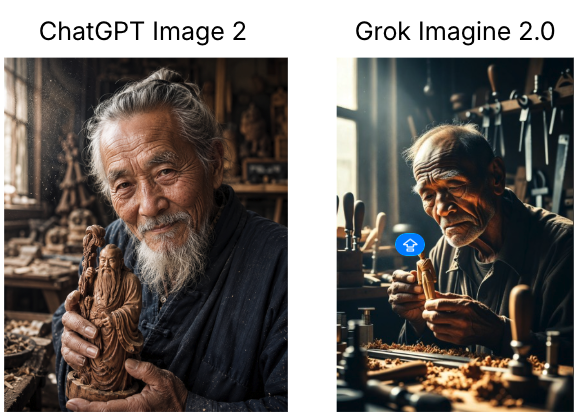
Create a side-by-side comparison graphic on a white background showing two AI image results from the same prompt. Canvas: landscape aspect ratio, approximately 580×420 px, clean white margins. Layout: two equal vertical image panels aligned horizontally with a narrow white gutter between them; each panel has a black sans-serif heading centered above it. Use exactly 2 headings: left heading “ChatGPT Image 2”, right heading “Grok Imagine 2.0”. Left panel: a highly realistic warm-toned portrait photo of an elderly East Asian woodcarver in a cluttered traditional workshop, gray hair tied back, long white beard and mustache, weathered face with fine wrinkles, wearing dark work clothes, holding a detailed carved wooden statue close to his chest with both hands, soft window light from the left, shelves and tools blurred in the background, dusty particles in the air, documentary realism. Right panel: a more cinematic but less natural portrait of an elderly East Asian craftsman seated at a workbench in a woodworking studio, balding gray hair, deeply wrinkled face, dark shirt, carving a small wooden figure with hand tools, strong dramatic sunlight from a window, many chisels and woodworking tools standing upright behind him, wood shavings scattered across the table, high contrast shadows, slightly artificial glossy look. Include exactly 1 small blue circular overlay icon near the center-left of the right panel, with a simple white symbol inside, resembling an interface marker. Overall style: realistic photographic comparison, left image more natural and detailed, right image more stylized and dramatic. No extra captions, no watermarks beyond the single blue overlay icon, no borders except the white page background.

20 모델에서 실행됩니다.

  • Flux
  • Flux 2
  • Flux Kontext
  • GPT-4o Image
  • GPT Image
  • GPT Image 2
  • GPT Image 2.5
  • GPT Image 2.6
  • Grok Imagine
  • Ideogram V3
  • Imagen 4
  • Kling
  • +8 이상

이 프롬프트의 출력

Split-Page Coffee Shop Travel Journal 지정되지 않음 gpt-image-2
Cute Chibi Characters in a Sweet Playful Moment 지정되지 않음 gpt-image-2
Underground Train Yard Clash Anime Development Board 지정되지 않음 gpt-image-2
Realistic Group Selfie with Smartphone Flash Effect 지정되지 않음 nano-banana-pro
Exploded-View Structural Cutaway for Food Photography 지정되지 않음 nano-banana-pro
Four Seasons Portrait Collage 지정되지 않음 nano-banana-pro

API를 사용하여 이 프롬프트를 실행하세요.

아래 요청은 기본값이 채워진 이 프롬프트를 실행되는 첫 번째 모델로 보냅니다. 위에 나열된 다른 모델의 모델 이름을 바꾸십시오.

프롬프트 API 문서
/api/v1/gpt_image_2/text_to_image
curl -X POST https://runapi.ai/api/v1/gpt_image_2/text_to_image \
  -H "Authorization: Bearer $RUNAPI_API_KEY" \
  -H "Content-Type: application/json" \
  --data-binary @- <<'JSON'
{
  "model": "gpt-image-2",
  "prompt": "Create a side-by-side comparison graphic on a white background showing two AI image results from the same prompt. Canvas: landscape aspect ratio, approximately 580×420 px, clean white margins. Layout: two equal vertical image panels aligned horizontally with a narrow white gutter between them; each panel has a black sans-serif heading centered above it. Use exactly 2 headings: left heading “ChatGPT Image 2”, right heading “Grok Imagine 2.0”. Left panel: a highly realistic warm-toned portrait photo of an elderly East Asian woodcarver in a cluttered traditional workshop, gray hair tied back, long white beard and mustache, weathered face with fine wrinkles, wearing dark work clothes, holding a detailed carved wooden statue close to his chest with both hands, soft window light from the left, shelves and tools blurred in the background, dusty particles in the air, documentary realism. Right panel: a more cinematic but less natural portrait of an elderly East Asian craftsman seated at a workbench in a woodworking studio, balding gray hair, deeply wrinkled face, dark shirt, carving a small wooden figure with hand tools, strong dramatic sunlight from a window, many chisels and woodworking tools standing upright behind him, wood shavings scattered across the table, high contrast shadows, slightly artificial glossy look. Include exactly 1 small blue circular overlay icon near the center-left of the right panel, with a simple white symbol inside, resembling an interface marker. Overall style: realistic photographic comparison, left image more natural and detailed, right image more stylized and dramatic. No extra captions, no watermarks beyond the single blue overlay icon, no borders except the white page background."
}
JSON

메시지를 보내보세요

예상 금액: $0.04 / 이미지

RunAPI로 생성하려면 로그인하세요.

로그인 후 생성

로그인하여 사용 가능한 언어 모델로 생성을 시작하세요.