Sketch to Controller Design Board
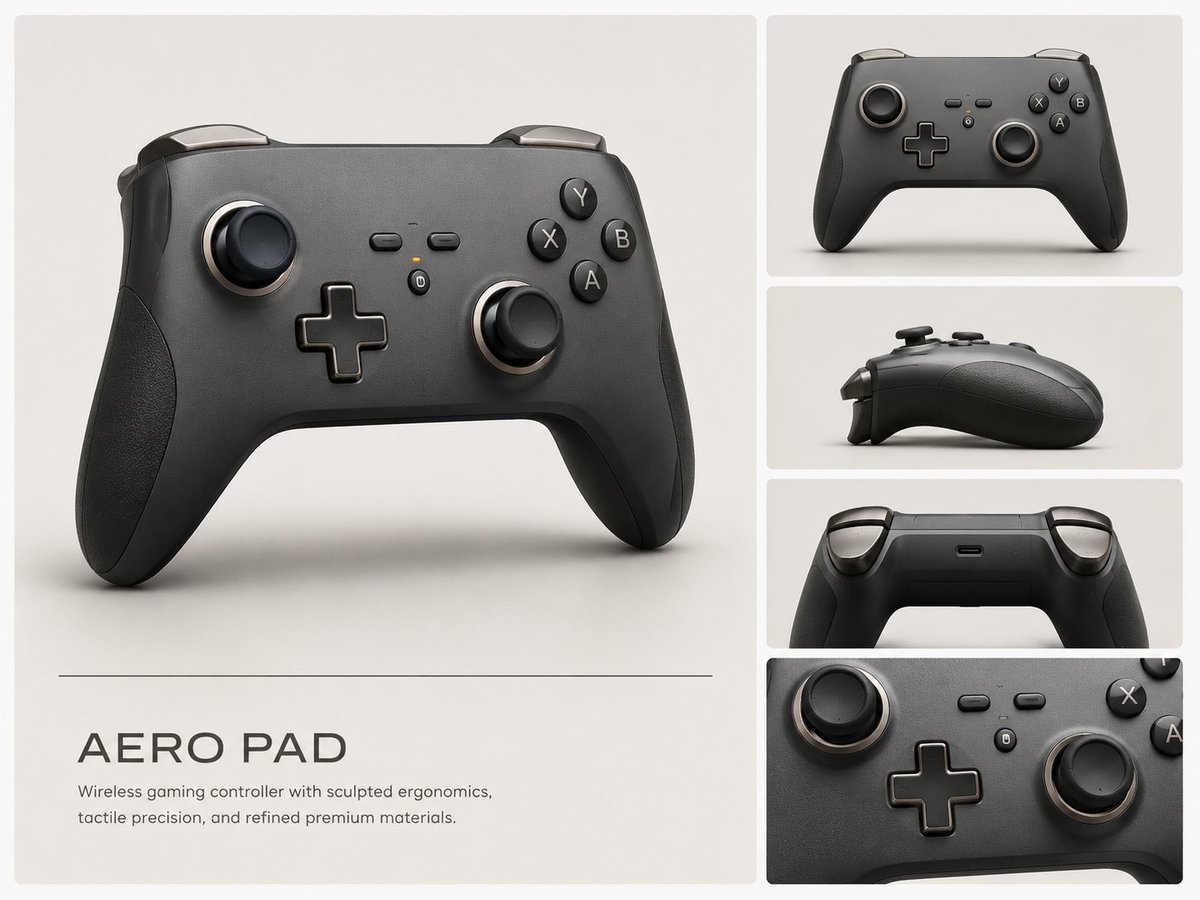
Sketch to Controller Design Board

즉각적인

Using REFERENCE_0 as the rough concept sketch, transform it into a polished professional industrial design presentation board for a premium wireless game controller. Preserve the overall controller silhouette and control layout from the sketch, but reinterpret it as a realistic matte black product with sculpted ergonomic grips, rounded shoulders, refined seams, tactile buttons, analog sticks, D-pad, shoulder triggers, subtle metallic rings, and premium material finishes. Canvas and layout: Create a clean 4:3 product concept board on a warm off-white studio background. Use exactly 5 rendered views: 1 large hero render on the left occupying most of the page, and 4 smaller stacked panels on the right showing: front view, side profile, rear/top view, and a close-up detail crop of the controls. Use thin white gutters between panels and soft studio shadows. Branding and text: Add a minimalist title block below the large hero render with the product name AERO PAD in spaced uppercase lettering, a thin horizontal divider line above it, and the description Wireless gaming controller with sculpted ergonomics, tactile precision, and refined premium materials. Style: High-end industrial design visualization, photorealistic 3D render, soft diffused lighting, matte graphite and black materials, subtle texture, clean Apple-like product presentation, no sketch lines remaining. Constraints: Do not add hands, people, packaging, logos, or extra accessories. Keep the design clearly derived from the reference sketch while making it look production-ready.

21 모델에서 실행됩니다.

  • Flux
  • Flux 2
  • Flux Kontext
  • GPT-4o Image
  • GPT Image
  • GPT Image 2
  • GPT Image 2.5
  • GPT Image 2.6
  • Grok Imagine
  • Ideogram V3
  • Imagen 4
  • Kling
  • +9 이상

이 프롬프트의 출력

Wireless Doorbell Camera Instructions Prompt 지정되지 않음 gpt-image-2
Hunyuan  prompt: wine 지정되지 않음 hunyuan-3
Hunyuan  prompt: can beer 지정되지 않음 hunyuan-3
Hunyuan  prompt: ربات 지정되지 않음 hunyuan-3
Hero prompt: recreate image 1 (close up indoor portrait of a wo... 지정되지 않음 1.0
Rainy French Street at Night 지정되지 않음 gpt-image-2

API를 사용하여 이 프롬프트를 실행하세요.

아래 요청은 기본값이 채워진 이 프롬프트를 실행되는 첫 번째 모델로 보냅니다. 위에 나열된 다른 모델의 모델 이름을 바꾸십시오.

프롬프트 API 문서
/api/v1/gpt_image_2/text_to_image
curl -X POST https://runapi.ai/api/v1/gpt_image_2/text_to_image \
  -H "Authorization: Bearer $RUNAPI_API_KEY" \
  -H "Content-Type: application/json" \
  --data-binary @- <<'JSON'
{
  "model": "gpt-image-2",
  "prompt": "Using REFERENCE_0 as the rough concept sketch, transform it into a polished professional industrial design presentation board for a premium wireless game controller. Preserve the overall controller silhouette and control layout from the sketch, but reinterpret it as a realistic matte black product with sculpted ergonomic grips, rounded shoulders, refined seams, tactile buttons, analog sticks, D-pad, shoulder triggers, subtle metallic rings, and premium material finishes.\n\nCanvas and layout: Create a clean 4:3 product concept board on a warm off-white studio background. Use exactly 5 rendered views: 1 large hero render on the left occupying most of the page, and 4 smaller stacked panels on the right showing: front view, side profile, rear/top view, and a close-up detail crop of the controls. Use thin white gutters between panels and soft studio shadows.\n\nBranding and text: Add a minimalist title block below the large hero render with the product name AERO PAD in spaced uppercase lettering, a thin horizontal divider line above it, and the description Wireless gaming controller with sculpted ergonomics, tactile precision, and refined premium materials.\n\nStyle: High-end industrial design visualization, photorealistic 3D render, soft diffused lighting, matte graphite and black materials, subtle texture, clean Apple-like product presentation, no sketch lines remaining.\n\nConstraints: Do not add hands, people, packaging, logos, or extra accessories. Keep the design clearly derived from the reference sketch while making it look production-ready."
}
JSON

메시지를 보내보세요