Japanese Fantasy RPG Battle UI
Japanese Fantasy RPG Battle UI

즉각적인

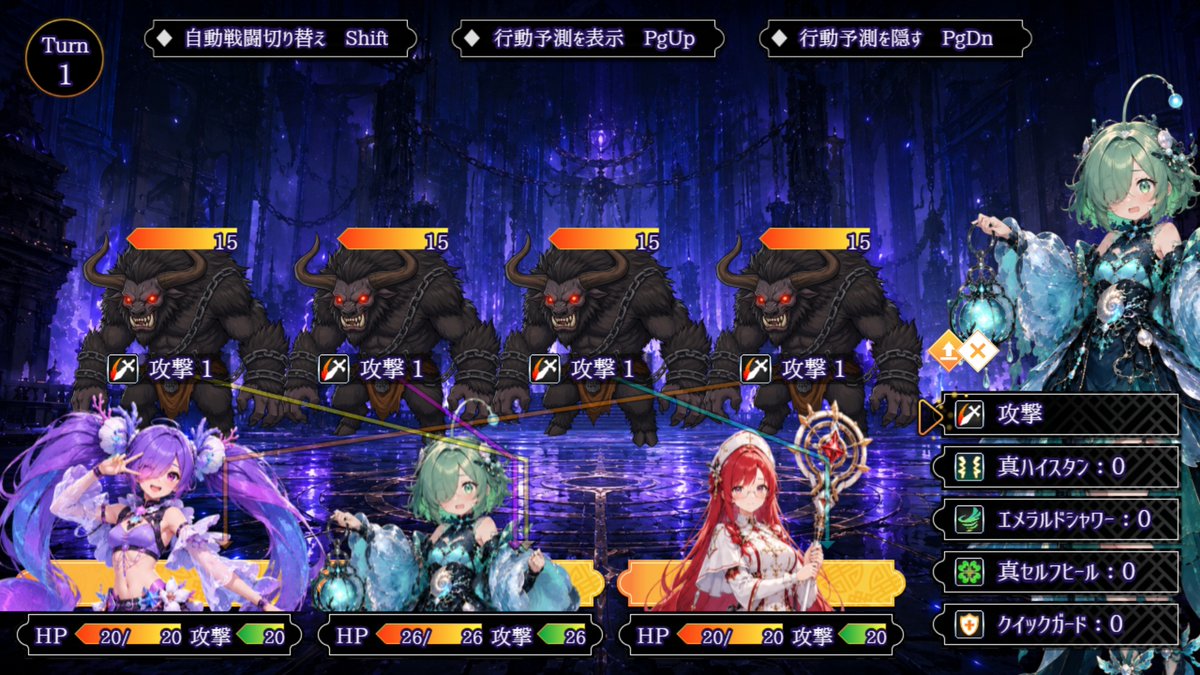
Goal: Create a 16:9 Japanese fantasy RPG battle screen UI for RPG Maker-style, showing a turn-based combat encounter in a dark magical dungeon. Canvas: 1200×675 widescreen game screenshot composition, crisp 2D anime game art, high-quality but not overly detailed, readable UI, no watermark. Background: A deep blue and violet ruined cathedral or underground temple with towering columns, dangling chains, glowing purple crystals, mist, and a reflective wet stone floor. The scene should feel dark, magical, and battle-ready. Layout: Top-left has a circular turn badge reading “Turn” above “1”. Across the top are exactly 3 black beveled control tabs with small diamond icons and Japanese labels: 1) 「自動戦闘切り替え」 with “Shift”, 2) 「行動予測を表示」 with “PgUp”, 3) 「行動予測を隠す」 with “PgDn”. Enemies: Place exactly 4 identical horned beast enemies in the midground, evenly spaced from left to right. Each enemy is a black-furred minotaur-like demon with curved horns, glowing red eyes, snarling mouth, muscular hunched body, chains around the shoulders, and clawed hands. Above each enemy is an orange-to-yellow HP bar with the number “15”. In front of each enemy is a small sword icon and the Japanese action label 「攻撃 1」. Thin colored targeting lines should connect enemies to party members. Player party: Along the bottom foreground place exactly 3 visible allied anime girls as character busts with UI status panels: 1) left ally is a purple-haired fairy-like girl in a revealing purple-and-white outfit with large fluffy ornaments and translucent purple wings, 2) center ally is a mint-green-haired aquatic/forest fairy girl wearing ornate teal and black clothing, holding a glowing blue lantern, with floral and shell-like accessories, 3) right ally is a red-haired priestess or mage in a white-and-red outfit holding a decorative staff. Each ally has a bottom HP/action panel: left shows “HP 20/20” and 「攻撃」 with “20”; center shows “HP 26/26” and 「攻撃」 with “26”; right shows “HP 20/20” and 「攻撃」 with “20”. Add yellow/orange selection bars behind the allies. Active character and command menu: On the right side, show a large portrait of the mint-green-haired ally cropped from mid-body upward, with face area softly blurred or obscured. Next to her are two small diamond buttons, one with an upward arrow and one with an X. Below is a vertical black command menu with exactly 5 selectable rows, each with an icon and Japanese text: 1) sword icon 「攻撃」 highlighted with an orange pointer, 2) green lightning icon 「真ハイスクタ:0」, 3) green feather/wind icon 「エメラルドシャワー:0」, 4) green clover icon 「真セルフヒール:0」, 5) shield icon 「クイックガード:0」. Visual style: Polished 2D anime fantasy RPG battle UI, luminous purple-blue lighting, ornate beveled black panels with gold trim, white and lavender text, colorful HP bars, strong contrast, readable Japanese UI labels, no extra characters, no extra enemies, no extra menu options.

21 모델에서 실행됩니다.

  • Flux
  • Flux 2
  • Flux Kontext
  • GPT-4o Image
  • GPT Image
  • GPT Image 2
  • GPT Image 2.5
  • GPT Image 2.6
  • Grok Imagine
  • Ideogram V3
  • Imagen 4
  • Kling
  • +9 이상

이 프롬프트의 출력

Hunyuan  prompt: feet 지정되지 않음 hunyuan-3
Hunyuan  prompt: Bathroom 지정되지 않음 hunyuan-3
Nano Banana prompt: She is wearing this outfit(white top ) given in im... 지정되지 않음 nano-banana-2.1
Seedream 5 prompt: woman 지정되지 않음 v2
Hero prompt: مع رجل اسود على شاطى البحر 지정되지 않음 1.0
FLUX prompt: می‌خوام برام یک مداد طلایی ته بنفش تیره رو که داره... 지정되지 않음 flux-2-pro

API를 사용하여 이 프롬프트를 실행하세요.

아래 요청은 기본값이 채워진 이 프롬프트를 실행되는 첫 번째 모델로 보냅니다. 위에 나열된 다른 모델의 모델 이름을 바꾸십시오.

프롬프트 API 문서
/api/v1/gpt_image_2/text_to_image
curl -X POST https://runapi.ai/api/v1/gpt_image_2/text_to_image \
  -H "Authorization: Bearer $RUNAPI_API_KEY" \
  -H "Content-Type: application/json" \
  --data-binary @- <<'JSON'
{
  "model": "gpt-image-2",
  "prompt": "Goal: Create a 16:9 Japanese fantasy RPG battle screen UI for RPG Maker-style, showing a turn-based combat encounter in a dark magical dungeon.\n\nCanvas: 1200×675 widescreen game screenshot composition, crisp 2D anime game art, high-quality but not overly detailed, readable UI, no watermark.\n\nBackground: A deep blue and violet ruined cathedral or underground temple with towering columns, dangling chains, glowing purple crystals, mist, and a reflective wet stone floor. The scene should feel dark, magical, and battle-ready.\n\nLayout: Top-left has a circular turn badge reading “Turn” above “1”. Across the top are exactly 3 black beveled control tabs with small diamond icons and Japanese labels: 1) 「自動戦闘切り替え」 with “Shift”, 2) 「行動予測を表示」 with “PgUp”, 3) 「行動予測を隠す」 with “PgDn”.\n\nEnemies: Place exactly 4 identical horned beast enemies in the midground, evenly spaced from left to right. Each enemy is a black-furred minotaur-like demon with curved horns, glowing red eyes, snarling mouth, muscular hunched body, chains around the shoulders, and clawed hands. Above each enemy is an orange-to-yellow HP bar with the number “15”. In front of each enemy is a small sword icon and the Japanese action label 「攻撃 1」. Thin colored targeting lines should connect enemies to party members.\n\nPlayer party: Along the bottom foreground place exactly 3 visible allied anime girls as character busts with UI status panels: 1) left ally is a purple-haired fairy-like girl in a revealing purple-and-white outfit with large fluffy ornaments and translucent purple wings, 2) center ally is a mint-green-haired aquatic/forest fairy girl wearing ornate teal and black clothing, holding a glowing blue lantern, with floral and shell-like accessories, 3) right ally is a red-haired priestess or mage in a white-and-red outfit holding a decorative staff. Each ally has a bottom HP/action panel: left shows “HP 20/20” and 「攻撃」 with “20”; center shows “HP 26/26” and 「攻撃」 with “26”; right shows “HP 20/20” and 「攻撃」 with “20”. Add yellow/orange selection bars behind the allies.\n\nActive character and command menu: On the right side, show a large portrait of the mint-green-haired ally cropped from mid-body upward, with face area softly blurred or obscured. Next to her are two small diamond buttons, one with an upward arrow and one with an X. Below is a vertical black command menu with exactly 5 selectable rows, each with an icon and Japanese text: 1) sword icon 「攻撃」 highlighted with an orange pointer, 2) green lightning icon 「真ハイスクタ:0」, 3) green feather/wind icon 「エメラルドシャワー:0」, 4) green clover icon 「真セルフヒール:0」, 5) shield icon 「クイックガード:0」.\n\nVisual style: Polished 2D anime fantasy RPG battle UI, luminous purple-blue lighting, ornate beveled black panels with gold trim, white and lavender text, colorful HP bars, strong contrast, readable Japanese UI labels, no extra characters, no extra enemies, no extra menu options."
}
JSON

메시지를 보내보세요