Cinematic Coffee Journey Storyboard
Cinematic Coffee Journey Storyboard

즉각적인

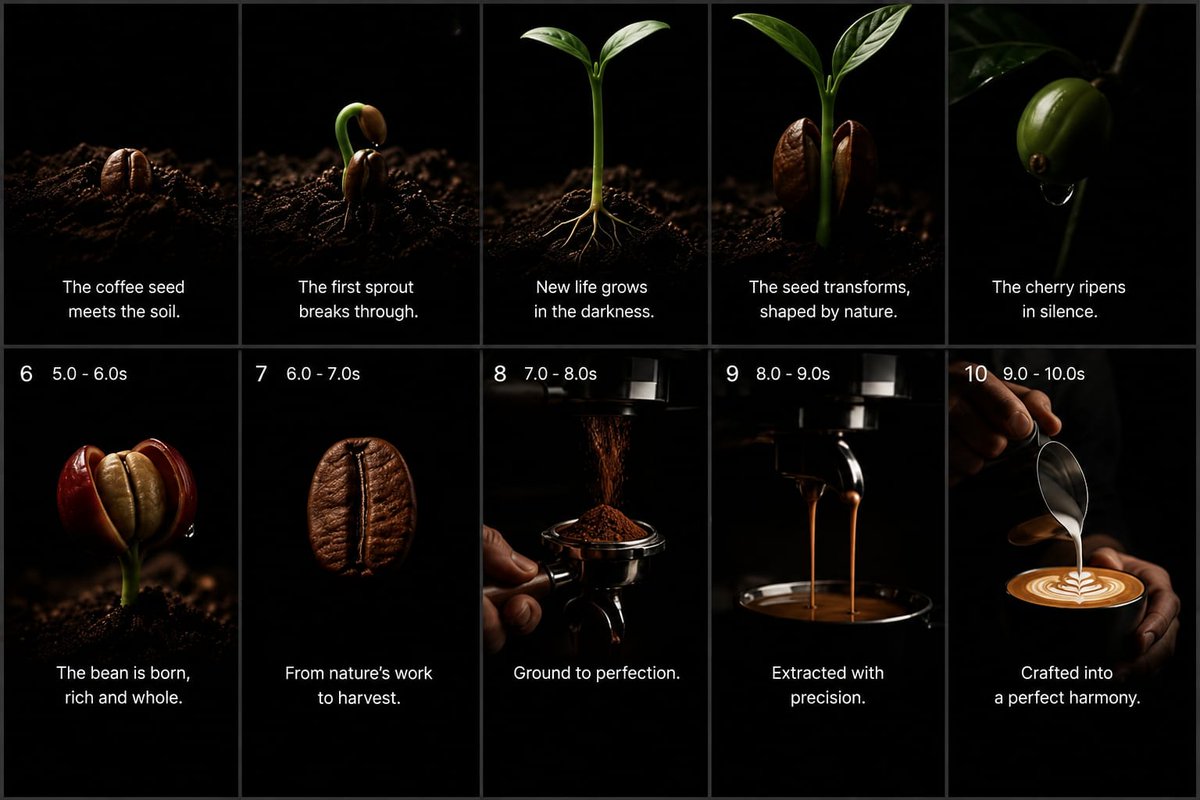
Goal: Create a premium cinematic coffee commercial storyboard as a single static image, showing the full journey from coffee seed to finished latte. Use a dark minimalist studio look with pure black backgrounds, dramatic low-key lighting, shallow depth of field, macro photography realism, rich brown coffee tones, glossy highlights, and elegant white captions. Canvas: 16:9 widescreen storyboard sheet, divided into exactly 10 vertical panels arranged in a 2-row by 5-column grid. Use thin dark gray dividers between panels. Each panel should feel like a high-end commercial still frame, with black negative space and a subject lit by a narrow soft spotlight. Layout: Top row contains panels 1–5 with centered white caption text near the lower third but no visible numbers. Bottom row contains panels 6–10 with small white timing labels at the top left of each panel and centered white caption text near the bottom. Keep all typography clean, modern, sans-serif, white, and unobtrusive. Storyboard panels, exactly 10: 1. A roasted-looking coffee seed partly embedded in dark soil, lit from the side, caption: “The coffee seed meets the soil.” 2. A coffee seed cracking open with a curved green sprout emerging upward from dark soil, caption: “The first sprout breaks through.” 3. A young coffee seedling with two fresh green leaves and thin pale roots visible in the soil, caption: “New life grows in the darkness.” 4. A taller green coffee sprout flanked by two split brown seed halves, caption: “The seed transforms, shaped by nature.” 5. A glossy green coffee cherry hanging from a thin branch in darkness, with a small droplet beneath it, caption: “The cherry ripens in silence.” 6. Bottom-left panel with top-left label “6 5.0 - 6.0s”; show a ripe red coffee cherry split open to reveal a pale bean inside, growing from dark soil, caption: “The bean is born, rich and whole.” 7. Top-left label “7 6.0 - 7.0s”; show a single roasted coffee bean floating or isolated against black, very close macro detail, caption: “From nature’s work to harvest.” 8. Top-left label “8 7.0 - 8.0s”; show finely ground coffee falling from a grinder into a portafilter held by a hand, caption: “Ground to perfection.” 9. Top-left label “9 8.0 - 9.0s”; show espresso extraction with two thin streams pouring from a portafilter into a dark cup below, caption: “Extracted with precision.” 10. Top-left label “10 9.0 - 10.0s”; show a barista hand pouring steamed milk from a metal pitcher into a cup of espresso, forming clean latte art, caption: “Crafted into a perfect harmony.” Text customization: Use premium cinematic coffee commercial styling. The main caption tone should be poetic and minimal. Optionally replace the final caption with Crafted into a perfect harmony. while preserving the same placement. Visual constraints: Keep exactly 10 panels, exactly 5 panels per row, and preserve the numbered timing labels only on panels 6 through 10. Do not add logos, watermarks, extra icons, extra panels, decorative borders, or unrelated text. Maintain realistic coffee textures, dark soil particles, deep blacks, warm highlights, and a luxurious commercial atmosphere.

20 모델에서 실행됩니다.

  • Flux
  • Flux 2
  • Flux Kontext
  • GPT-4o Image
  • GPT Image
  • GPT Image 2
  • GPT Image 2.5
  • GPT Image 2.6
  • Grok Imagine
  • Ideogram V3
  • Imagen 4
  • Kling
  • +8 이상

이 프롬프트의 출력

Split-Page Coffee Shop Travel Journal 지정되지 않음 gpt-image-2
Cute Chibi Characters in a Sweet Playful Moment 지정되지 않음 gpt-image-2
Underground Train Yard Clash Anime Development Board 지정되지 않음 gpt-image-2
Realistic Group Selfie with Smartphone Flash Effect 지정되지 않음 nano-banana-pro
Exploded-View Structural Cutaway for Food Photography 지정되지 않음 nano-banana-pro
Four Seasons Portrait Collage 지정되지 않음 nano-banana-pro

API를 사용하여 이 프롬프트를 실행하세요.

아래 요청은 기본값이 채워진 이 프롬프트를 실행되는 첫 번째 모델로 보냅니다. 위에 나열된 다른 모델의 모델 이름을 바꾸십시오.

프롬프트 API 문서
/api/v1/gpt_image_2/text_to_image
curl -X POST https://runapi.ai/api/v1/gpt_image_2/text_to_image \
  -H "Authorization: Bearer $RUNAPI_API_KEY" \
  -H "Content-Type: application/json" \
  --data-binary @- <<'JSON'
{
  "model": "gpt-image-2",
  "prompt": "Goal: Create a premium cinematic coffee commercial storyboard as a single static image, showing the full journey from coffee seed to finished latte. Use a dark minimalist studio look with pure black backgrounds, dramatic low-key lighting, shallow depth of field, macro photography realism, rich brown coffee tones, glossy highlights, and elegant white captions.\n\nCanvas: 16:9 widescreen storyboard sheet, divided into exactly 10 vertical panels arranged in a 2-row by 5-column grid. Use thin dark gray dividers between panels. Each panel should feel like a high-end commercial still frame, with black negative space and a subject lit by a narrow soft spotlight.\n\nLayout: Top row contains panels 1–5 with centered white caption text near the lower third but no visible numbers. Bottom row contains panels 6–10 with small white timing labels at the top left of each panel and centered white caption text near the bottom. Keep all typography clean, modern, sans-serif, white, and unobtrusive.\n\nStoryboard panels, exactly 10:\n1. A roasted-looking coffee seed partly embedded in dark soil, lit from the side, caption: “The coffee seed meets the soil.”\n2. A coffee seed cracking open with a curved green sprout emerging upward from dark soil, caption: “The first sprout breaks through.”\n3. A young coffee seedling with two fresh green leaves and thin pale roots visible in the soil, caption: “New life grows in the darkness.”\n4. A taller green coffee sprout flanked by two split brown seed halves, caption: “The seed transforms, shaped by nature.”\n5. A glossy green coffee cherry hanging from a thin branch in darkness, with a small droplet beneath it, caption: “The cherry ripens in silence.”\n6. Bottom-left panel with top-left label “6   5.0 - 6.0s”; show a ripe red coffee cherry split open to reveal a pale bean inside, growing from dark soil, caption: “The bean is born, rich and whole.”\n7. Top-left label “7   6.0 - 7.0s”; show a single roasted coffee bean floating or isolated against black, very close macro detail, caption: “From nature’s work to harvest.”\n8. Top-left label “8   7.0 - 8.0s”; show finely ground coffee falling from a grinder into a portafilter held by a hand, caption: “Ground to perfection.”\n9. Top-left label “9   8.0 - 9.0s”; show espresso extraction with two thin streams pouring from a portafilter into a dark cup below, caption: “Extracted with precision.”\n10. Top-left label “10   9.0 - 10.0s”; show a barista hand pouring steamed milk from a metal pitcher into a cup of espresso, forming clean latte art, caption: “Crafted into a perfect harmony.”\n\nText customization: Use premium cinematic coffee commercial styling. The main caption tone should be poetic and minimal. Optionally replace the final caption with Crafted into a perfect harmony. while preserving the same placement.\n\nVisual constraints: Keep exactly 10 panels, exactly 5 panels per row, and preserve the numbered timing labels only on panels 6 through 10. Do not add logos, watermarks, extra icons, extra panels, decorative borders, or unrelated text. Maintain realistic coffee textures, dark soil particles, deep blacks, warm highlights, and a luxurious commercial atmosphere."
}
JSON

메시지를 보내보세요

예상 금액: $0.04 / 이미지

RunAPI로 생성하려면 로그인하세요.

로그인 후 생성

로그인하여 사용 가능한 언어 모델로 생성을 시작하세요.