AI Nike-chan Drawing Song Manga
AI Nike-chan Drawing Song Manga

즉각적인

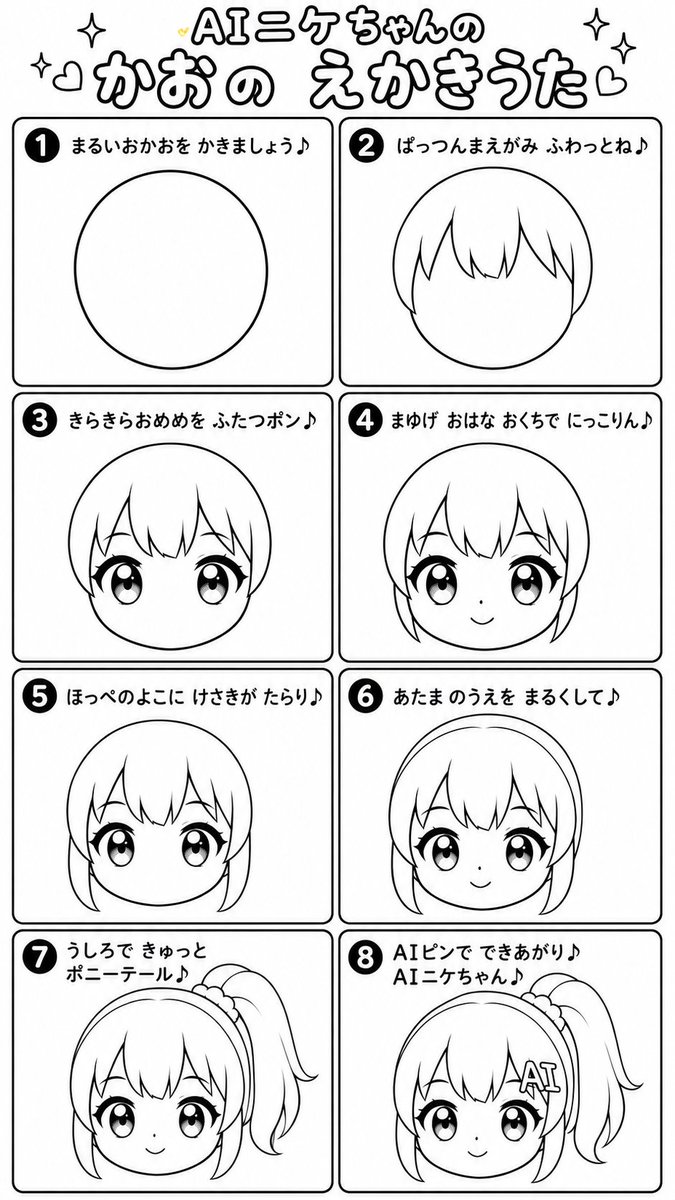
Goal: Create a black-and-white Japanese chibi drawing-song manga worksheet titled AIニケちゃんの かおの えかきうた, showing a step-by-step guide for drawing a cute simplified anime girl face. Canvas: Tall vertical poster, approximately 2:3 aspect ratio, white background, clean monochrome line art. Use thick rounded black outlines, playful handwritten Japanese typography, and a kawaii instructional-comic style. Add small decorative sparkles, hearts, and tiny yellow accent hearts around the title. Layout: Top title area, then an 8-panel grid arranged as 2 columns by 4 rows. Each panel has a rounded rectangle border, a black circular step number badge in the upper-left corner, and a short Japanese lyric caption across the top. The drawing inside each panel gradually becomes more complete. Text content: Use exactly 8 numbered captions: 1. まるいおかおを かきましょう♪ 2. ぱっつんまえがみ ふわっとね♪ 3. きらきらおめめを ふたつポン♪ 4. まゆげ おはな おくちで にっこりん♪ 5. ほっぺのよこに けさきが たらり♪ 6. あたまのうえを まるくして♪ 7. うしろで きゅっと ポニーテール♪ 8. AIピンで できあがり♪ AIニケちゃん♪ Panel details: Panel 1 shows only a large simple oval/circle face outline centered. Panel 2 adds rounded bob-like hair with straight bangs and pointed locks over the face circle. Panel 3 adds two large sparkling anime eyes with heavy upper lashes and highlights. Panel 4 shows the same head but the lower central drawing area is covered by a large pale gray vertical rectangular blur, obscuring the facial details; only the upper head outline is visible behind it. Panel 5 shows the face with bangs, big eyes, and two side hair strands falling beside the cheeks. Panel 6 adds a rounded outer head/hair outline above the face plus small eyebrows, tiny nose, and smiling mouth. Panel 7 adds a high side ponytail on the upper right with a scrunchie-like band, but the center and lower face are obscured by a large gray gradient rectangle. Panel 8 shows the near-final head with side ponytail and scrunchie, but the central face/lower area is obscured by a similar large gray gradient rectangle. Visual style: crisp manga coloring-book line art, no color fills except black outlines and minimal yellow heart accents near the title; thick friendly strokes, rounded corners, cute educational worksheet look. Keep the drawings simple, deformed, and childlike, as if for a drawing-song tutorial. Constraints: Use exactly 8 panels and exactly one step number per panel. Preserve the Japanese text as written. Do not add extra panels, extra characters, background scenery, watermarks, or realistic shading.

20 모델에서 실행됩니다.

  • Flux
  • Flux 2
  • Flux Kontext
  • GPT-4o Image
  • GPT Image
  • GPT Image 2
  • GPT Image 2.5
  • GPT Image 2.6
  • Grok Imagine
  • Ideogram V3
  • Imagen 4
  • Kling
  • +8 이상

이 프롬프트의 출력

Split-Page Coffee Shop Travel Journal 지정되지 않음 gpt-image-2
Cute Chibi Characters in a Sweet Playful Moment 지정되지 않음 gpt-image-2
Underground Train Yard Clash Anime Development Board 지정되지 않음 gpt-image-2
Realistic Group Selfie with Smartphone Flash Effect 지정되지 않음 nano-banana-pro
Exploded-View Structural Cutaway for Food Photography 지정되지 않음 nano-banana-pro
Four Seasons Portrait Collage 지정되지 않음 nano-banana-pro

API를 사용하여 이 프롬프트를 실행하세요.

아래 요청은 기본값이 채워진 이 프롬프트를 실행되는 첫 번째 모델로 보냅니다. 위에 나열된 다른 모델의 모델 이름을 바꾸십시오.

프롬프트 API 문서
/api/v1/gpt_image_2/text_to_image
curl -X POST https://runapi.ai/api/v1/gpt_image_2/text_to_image \
  -H "Authorization: Bearer $RUNAPI_API_KEY" \
  -H "Content-Type: application/json" \
  --data-binary @- <<'JSON'
{
  "model": "gpt-image-2",
  "prompt": "Goal: Create a black-and-white Japanese chibi drawing-song manga worksheet titled AIニケちゃんの かおの えかきうた, showing a step-by-step guide for drawing a cute simplified anime girl face.\n\nCanvas: Tall vertical poster, approximately 2:3 aspect ratio, white background, clean monochrome line art. Use thick rounded black outlines, playful handwritten Japanese typography, and a kawaii instructional-comic style. Add small decorative sparkles, hearts, and tiny yellow accent hearts around the title.\n\nLayout: Top title area, then an 8-panel grid arranged as 2 columns by 4 rows. Each panel has a rounded rectangle border, a black circular step number badge in the upper-left corner, and a short Japanese lyric caption across the top. The drawing inside each panel gradually becomes more complete.\n\nText content: Use exactly 8 numbered captions:\n1. まるいおかおを かきましょう♪\n2. ぱっつんまえがみ ふわっとね♪\n3. きらきらおめめを ふたつポン♪\n4. まゆげ おはな おくちで にっこりん♪\n5. ほっぺのよこに けさきが たらり♪\n6. あたまのうえを まるくして♪\n7. うしろで きゅっと ポニーテール♪\n8. AIピンで できあがり♪ AIニケちゃん♪\n\nPanel details: Panel 1 shows only a large simple oval/circle face outline centered. Panel 2 adds rounded bob-like hair with straight bangs and pointed locks over the face circle. Panel 3 adds two large sparkling anime eyes with heavy upper lashes and highlights. Panel 4 shows the same head but the lower central drawing area is covered by a large pale gray vertical rectangular blur, obscuring the facial details; only the upper head outline is visible behind it. Panel 5 shows the face with bangs, big eyes, and two side hair strands falling beside the cheeks. Panel 6 adds a rounded outer head/hair outline above the face plus small eyebrows, tiny nose, and smiling mouth. Panel 7 adds a high side ponytail on the upper right with a scrunchie-like band, but the center and lower face are obscured by a large gray gradient rectangle. Panel 8 shows the near-final head with side ponytail and scrunchie, but the central face/lower area is obscured by a similar large gray gradient rectangle.\n\nVisual style: crisp manga coloring-book line art, no color fills except black outlines and minimal yellow heart accents near the title; thick friendly strokes, rounded corners, cute educational worksheet look. Keep the drawings simple, deformed, and childlike, as if for a drawing-song tutorial.\n\nConstraints: Use exactly 8 panels and exactly one step number per panel. Preserve the Japanese text as written. Do not add extra panels, extra characters, background scenery, watermarks, or realistic shading."
}
JSON

메시지를 보내보세요

예상 금액: $0.04 / 이미지

RunAPI로 생성하려면 로그인하세요.

로그인 후 생성

로그인하여 사용 가능한 언어 모델로 생성을 시작하세요.