Castle Edit Markup Overlay
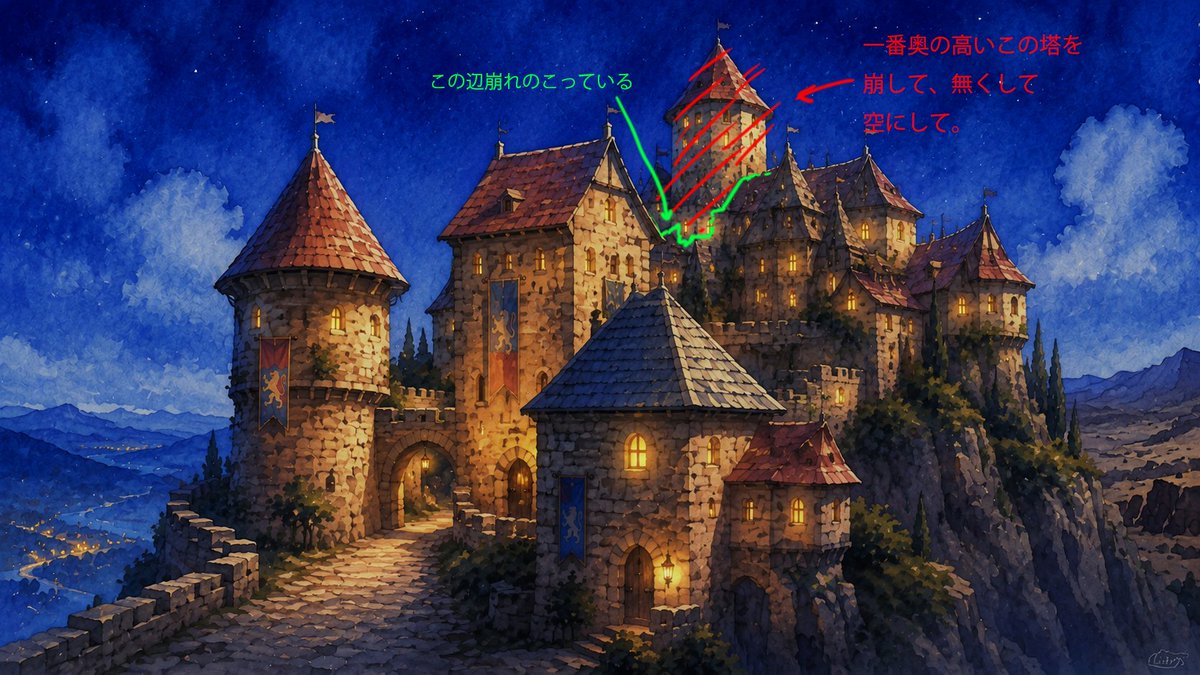
prompt
Using REFERENCE_0 as the base image, keep the castle artwork unchanged and overlay rough handwritten edit notes directly on top of it, as if marking areas for an image-editing revision. Add exactly 2 annotation groups: 1. Red annotation group on the tall rear tower near the upper-right center: draw red diagonal hatching across the tower, add a red arrow pointing toward it, and add the handwritten Japanese note 一番奥の高いこの塔を崩して、無くして空にして。 in the upper-right sky area. 2. Green annotation group around the crumbling edge/remaining structure near the middle top: draw a green irregular outline around the broken area, add a green arrow pointing down to it, and add the handwritten Japanese note この辺崩れのこっている in the upper-middle sky area. Style constraints: the annotations should look like quick digital pen markup, not integrated into the painting; keep the original watercolor fantasy castle image otherwise intact with no actual architectural removal yet.
Funciona con 21 modelos
- Flux
- Flux 2
- Flux Kontext
- GPT-4o Image
- GPT Image
- GPT Image 2
- GPT Image 2.5
- GPT Image 2.6
- Grok Imagine
- Ideogram V3
- Imagen 4
- Kling
- +9 Más