Blue Jays Broadcast Crowd Screenshot
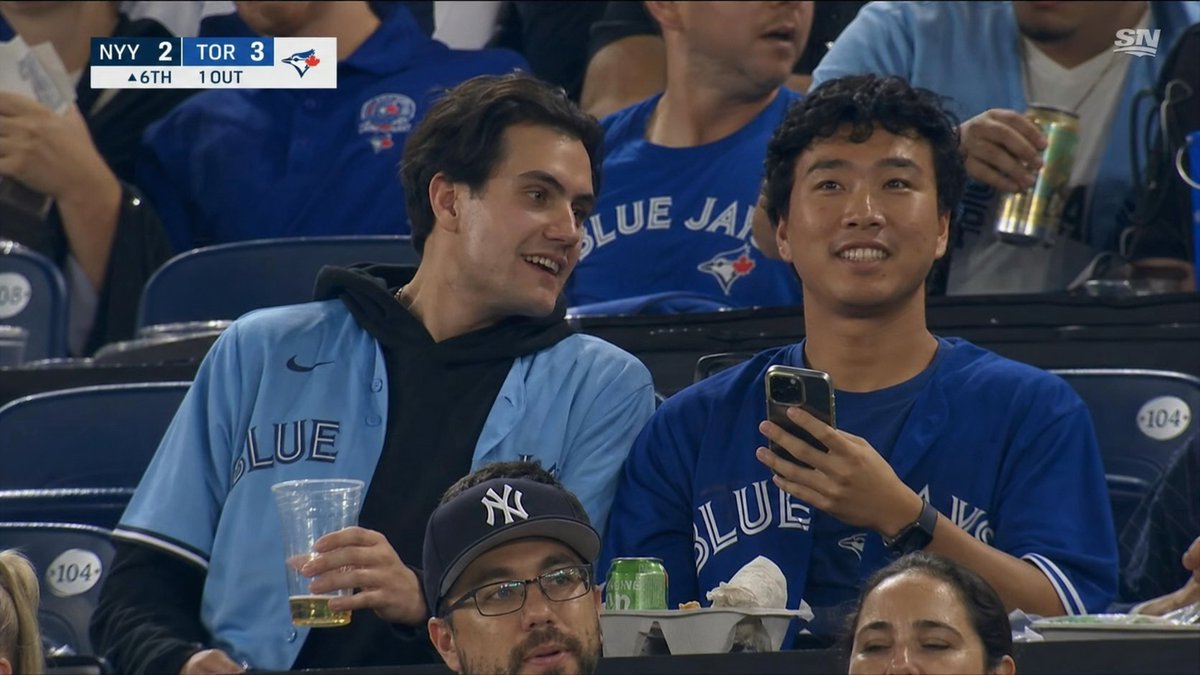
Blue Jays Broadcast Crowd Screenshot

prompt

Create a realistic broadcast-quality television screenshot from a Major League Baseball game in the stands at a Toronto Blue Jays home game, as if captured from a Sportsnet live feed. The scene shows two young male fans seated in dark blue stadium seats, centered in the frame, both with their faces covered by plain dark-brown rectangular privacy masks. The left fan has medium dark hair and wears a light powder-blue Blue Jays button-up jersey over a black hoodie, holding a clear plastic cup with a small amount of beer; the right fan wears a royal-blue Blue Jays jersey, holds a smartphone upright in one hand, and has a black smartwatch. In the foreground, partially cropped spectators include two additional visible dark-brown face-cover rectangles, making four total privacy masks in the image. Around them are other fans in Blue Jays shirts, one holding a tall can, plus stadium seat number plaques reading 104, a snack tray with food, a green can, and crumpled napkins. Add an authentic TV scoreboard graphic in the top-left corner with NYY 2, TOR 3, the Blue Jays logo, and a lower status row reading ▲6TH 1 OUT. Add a small white SN logo in the top-right corner. Use documentary sports-broadcast framing, slight telephoto compression, arena lighting, realistic crowd blur, sharp jerseys and hands, 16:9 aspect ratio, no cinematic filters, no illustration style.

Funciona con 20 modelos

  • Flux
  • Flux 2
  • Flux Kontext
  • GPT-4o Image
  • GPT Image
  • GPT Image 2
  • GPT Image 2.5
  • GPT Image 2.6
  • Grok Imagine
  • Ideogram V3
  • Imagen 4
  • Kling
  • +8 Más

Lo que produce este prompt

Split-Page Coffee Shop Travel Journal No especificado gpt-image-2
Cute Chibi Characters in a Sweet Playful Moment No especificado gpt-image-2
Underground Train Yard Clash Anime Development Board No especificado gpt-image-2
Realistic Group Selfie with Smartphone Flash Effect No especificado nano-banana-pro
Exploded-View Structural Cutaway for Food Photography No especificado nano-banana-pro
Four Seasons Portrait Collage No especificado nano-banana-pro

Run este prompt con el API

La siguiente solicitud envía este mensaje, con sus valores predeterminados completados, al primer modelo en el que se ejecuta. Cambie el nombre del modelo por cualquier otro modelo enumerado anteriormente.

Documentación de la API de prompts
/api/v1/gpt_image_2/text_to_image
curl -X POST https://runapi.ai/api/v1/gpt_image_2/text_to_image \
  -H "Authorization: Bearer $RUNAPI_API_KEY" \
  -H "Content-Type: application/json" \
  --data-binary @- <<'JSON'
{
  "model": "gpt-image-2",
  "prompt": "Create a realistic broadcast-quality television screenshot from a Major League Baseball game in the stands at a Toronto Blue Jays home game, as if captured from a Sportsnet live feed. The scene shows two young male fans seated in dark blue stadium seats, centered in the frame, both with their faces covered by plain dark-brown rectangular privacy masks. The left fan has medium dark hair and wears a light powder-blue Blue Jays button-up jersey over a black hoodie, holding a clear plastic cup with a small amount of beer; the right fan wears a royal-blue Blue Jays jersey, holds a smartphone upright in one hand, and has a black smartwatch. In the foreground, partially cropped spectators include two additional visible dark-brown face-cover rectangles, making four total privacy masks in the image. Around them are other fans in Blue Jays shirts, one holding a tall can, plus stadium seat number plaques reading 104, a snack tray with food, a green can, and crumpled napkins. Add an authentic TV scoreboard graphic in the top-left corner with NYY 2, TOR 3, the Blue Jays logo, and a lower status row reading ▲6TH  1 OUT. Add a small white SN logo in the top-right corner. Use documentary sports-broadcast framing, slight telephoto compression, arena lighting, realistic crowd blur, sharp jerseys and hands, 16:9 aspect ratio, no cinematic filters, no illustration style."
}
JSON

Probar a prompt

Estimado: $0.04 / imagen

Inicia sesión para generar con RunAPI.

Inicia sesión para generar

Inicia sesión para comenzar a generar con tus modelos de lenguaje disponibles.