Blue Jays Broadcast Crowd Screenshot
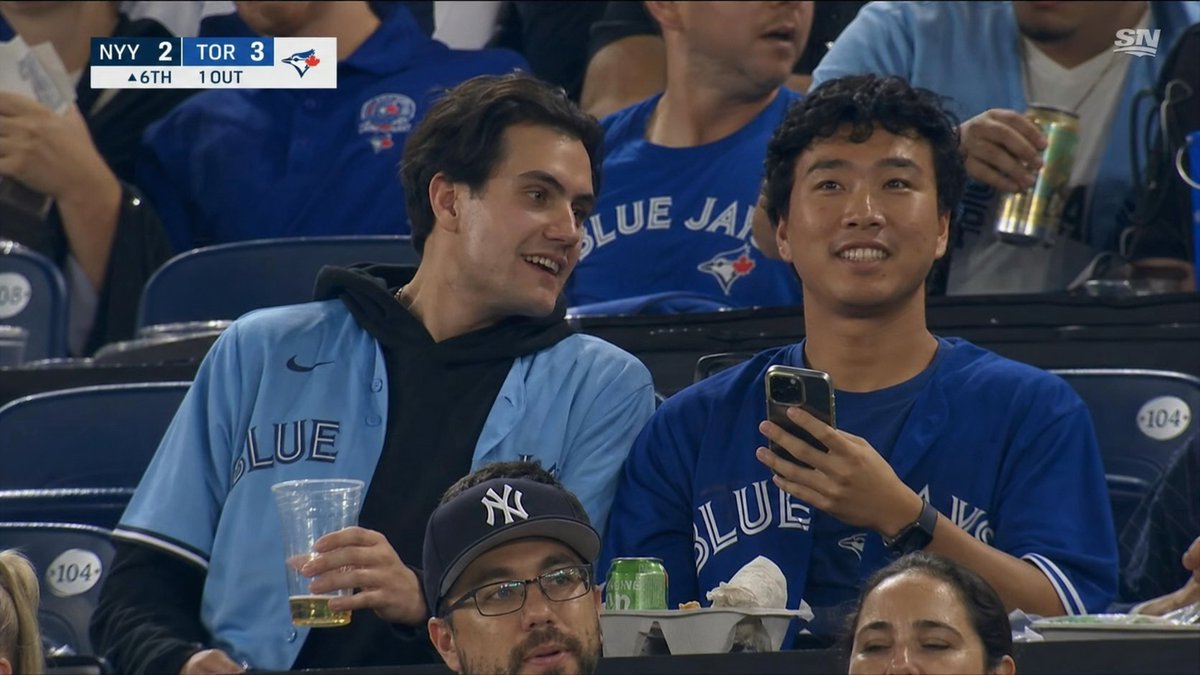
Blue Jays Broadcast Crowd Screenshot

prompt

Create a realistic broadcast-quality television screenshot from a Major League Baseball game in the stands at a Toronto Blue Jays home game, as if captured from a Sportsnet live feed. The scene shows two young male fans seated in dark blue stadium seats, centered in the frame, both with their faces covered by plain dark-brown rectangular privacy masks. The left fan has medium dark hair and wears a light powder-blue Blue Jays button-up jersey over a black hoodie, holding a clear plastic cup with a small amount of beer; the right fan wears a royal-blue Blue Jays jersey, holds a smartphone upright in one hand, and has a black smartwatch. In the foreground, partially cropped spectators include two additional visible dark-brown face-cover rectangles, making four total privacy masks in the image. Around them are other fans in Blue Jays shirts, one holding a tall can, plus stadium seat number plaques reading 104, a snack tray with food, a green can, and crumpled napkins. Add an authentic TV scoreboard graphic in the top-left corner with NYY 2, TOR 3, the Blue Jays logo, and a lower status row reading ▲6TH 1 OUT. Add a small white SN logo in the top-right corner. Use documentary sports-broadcast framing, slight telephoto compression, arena lighting, realistic crowd blur, sharp jerseys and hands, 16:9 aspect ratio, no cinematic filters, no illustration style.

Funziona su 20 modelli

  • Flux
  • Flux 2
  • Flux Kontext
  • GPT-4o Image
  • GPT Image
  • GPT Image 2
  • GPT Image 2.5
  • GPT Image 2.6
  • Grok Imagine
  • Ideogram V3
  • Imagen 4
  • Kling
  • +8 Altri

Cosa produce questo prompt

Split-Page Coffee Shop Travel Journal Non specificato gpt-image-2
Cute Chibi Characters in a Sweet Playful Moment Non specificato gpt-image-2
Underground Train Yard Clash Anime Development Board Non specificato gpt-image-2
Realistic Group Selfie with Smartphone Flash Effect Non specificato nano-banana-pro
Exploded-View Structural Cutaway for Food Photography Non specificato nano-banana-pro
Four Seasons Portrait Collage Non specificato nano-banana-pro

Run questo prompt con il API

La richiesta seguente invia questo prompt, con i valori predefiniti compilati, al primo modello su cui viene eseguito. Scambia il nome del modello con qualsiasi altro modello elencato sopra.

Documentazione API prompt
/api/v1/gpt_image_2/text_to_image
curl -X POST https://runapi.ai/api/v1/gpt_image_2/text_to_image \
  -H "Authorization: Bearer $RUNAPI_API_KEY" \
  -H "Content-Type: application/json" \
  --data-binary @- <<'JSON'
{
  "model": "gpt-image-2",
  "prompt": "Create a realistic broadcast-quality television screenshot from a Major League Baseball game in the stands at a Toronto Blue Jays home game, as if captured from a Sportsnet live feed. The scene shows two young male fans seated in dark blue stadium seats, centered in the frame, both with their faces covered by plain dark-brown rectangular privacy masks. The left fan has medium dark hair and wears a light powder-blue Blue Jays button-up jersey over a black hoodie, holding a clear plastic cup with a small amount of beer; the right fan wears a royal-blue Blue Jays jersey, holds a smartphone upright in one hand, and has a black smartwatch. In the foreground, partially cropped spectators include two additional visible dark-brown face-cover rectangles, making four total privacy masks in the image. Around them are other fans in Blue Jays shirts, one holding a tall can, plus stadium seat number plaques reading 104, a snack tray with food, a green can, and crumpled napkins. Add an authentic TV scoreboard graphic in the top-left corner with NYY 2, TOR 3, the Blue Jays logo, and a lower status row reading ▲6TH  1 OUT. Add a small white SN logo in the top-right corner. Use documentary sports-broadcast framing, slight telephoto compression, arena lighting, realistic crowd blur, sharp jerseys and hands, 16:9 aspect ratio, no cinematic filters, no illustration style."
}
JSON

Prova a prompt

Stimato: $0.04 / immagine

Accedi per generare con RunAPI.

Accedi per generare

Accedi per iniziare a generare con i modelli linguistici disponibili.