Split Pixel Art Canvas
Split Pixel Art Canvas

翻譯: Prompt

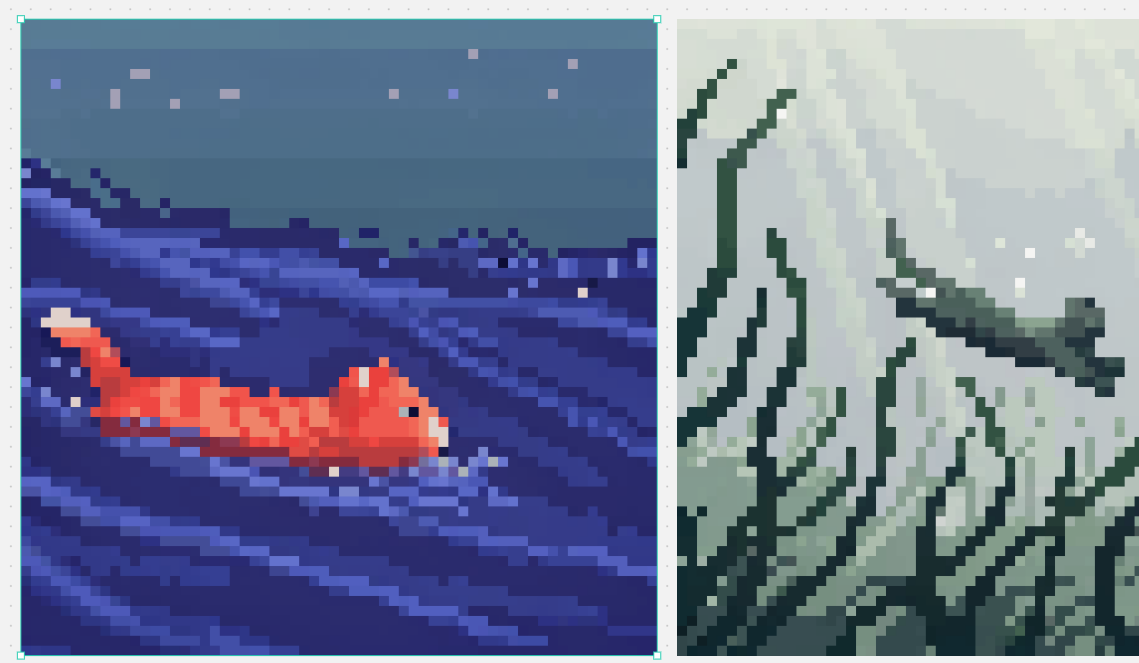
Goal: Create a split-screen pixel art comparison image in the style of a design canvas, showing exactly 2 square pixel-art panels side by side. Canvas: Wide horizontal canvas, about 1139×671 px, light gray workspace background with tiny scattered gray speckles. Place two large square artworks aligned horizontally with a narrow vertical gap between them. Add a thin bright cyan selection outline with small square corner/edge handles around the left artwork only, as if it is selected in an editor. Layout: Left panel occupies slightly more than half the canvas width and is framed by the cyan selection box. Right panel is the same height but slightly narrower in the visible crop, flush to the right side. Keep both artworks rendered as low-resolution blocky pixel art with crisp square pixels and no antialiasing. Left panel subject: A night ocean scene in deep indigo and blue pixel art. A small orange-red koi or goldfish swims from left to right in the lower left-to-center area, with a pale cream tail tip and lighter orange highlights on its segmented body. The water is dark navy with diagonal wave streaks and layered horizontal bands in violet, periwinkle, and electric blue. The upper third is a muted blue-gray night sky with exactly 8 small square star-like pixels scattered across it in pale lavender, pink, and blue. Mood: calm, retro game scene, underwater/night seascape. Right panel subject: A misty mountainous landscape rendered in desaturated green-gray pixel art. Tall jagged mountain ridges and cliff faces fill the frame, with dark teal outlines and angular snowy or misty white planes. Include a winding dark ridge or branch-like ledge crossing the mid-right area, and pale foggy atmosphere in the upper background. Use muted sage, gray, off-white, and dark forest-green tones. Visual style: authentic 16-bit pixel art, large visible square pixels, limited color palettes, high contrast silhouettes, no smooth gradients except stepped pixel dithering. Make the two panels feel like examples from different pixel-art models: left colorful and aquatic, right monochrome misty fantasy landscape. Customizable details: left fish color orange-red; left scene theme night ocean; right landscape theme misty green-gray mountains; pixel art scale large crisp square pixels; selection outline color bright cyan. Constraints: Show exactly 2 main image panels. Do not add text, logos, characters, UI menus, or watermarks. Preserve the editor-like cyan selection border only around the left panel.

翻譯: Runs on 21 models

  • Flux
  • Flux 2
  • Flux Kontext
  • GPT-4o Image
  • GPT Image
  • GPT Image 2
  • GPT Image 2.5
  • GPT Image 2.6
  • Grok Imagine
  • Ideogram V3
  • Imagen 4
  • Kling
  • 翻譯: +9 more

這則提示詞的輸出

Hunyuan  prompt: chained 未指定 hunyuan-3
Seedream 5 prompt: you can change the outfit if thats a better match ... 未指定 seedream-5-pro
Hunyuan  prompt: این موجود با اون دستی که روی زمین گذاشته و کنار پا... 未指定 hunyuan-3
Seedream 5 prompt: photo professionnelle 未指定 v2
Seedream 5 prompt: girls 未指定 v2
ChatGPT Image prompt: billboard 未指定 v1

翻譯: Run this prompt with the API

翻譯: The request below sends this prompt, with its default values filled in, to the first model it runs on. Swap the model name for any other model listed above.

翻譯: Prompt API docs
/api/v1/gpt_image_2/text_to_image
curl -X POST https://runapi.ai/api/v1/gpt_image_2/text_to_image \
  -H "Authorization: Bearer $RUNAPI_API_KEY" \
  -H "Content-Type: application/json" \
  --data-binary @- <<'JSON'
{
  "model": "gpt-image-2",
  "prompt": "Goal: Create a split-screen pixel art comparison image in the style of a design canvas, showing exactly 2 square pixel-art panels side by side.\n\nCanvas: Wide horizontal canvas, about 1139×671 px, light gray workspace background with tiny scattered gray speckles. Place two large square artworks aligned horizontally with a narrow vertical gap between them. Add a thin bright cyan selection outline with small square corner/edge handles around the left artwork only, as if it is selected in an editor.\n\nLayout: Left panel occupies slightly more than half the canvas width and is framed by the cyan selection box. Right panel is the same height but slightly narrower in the visible crop, flush to the right side. Keep both artworks rendered as low-resolution blocky pixel art with crisp square pixels and no antialiasing.\n\nLeft panel subject: A night ocean scene in deep indigo and blue pixel art. A small orange-red koi or goldfish swims from left to right in the lower left-to-center area, with a pale cream tail tip and lighter orange highlights on its segmented body. The water is dark navy with diagonal wave streaks and layered horizontal bands in violet, periwinkle, and electric blue. The upper third is a muted blue-gray night sky with exactly 8 small square star-like pixels scattered across it in pale lavender, pink, and blue. Mood: calm, retro game scene, underwater/night seascape.\n\nRight panel subject: A misty mountainous landscape rendered in desaturated green-gray pixel art. Tall jagged mountain ridges and cliff faces fill the frame, with dark teal outlines and angular snowy or misty white planes. Include a winding dark ridge or branch-like ledge crossing the mid-right area, and pale foggy atmosphere in the upper background. Use muted sage, gray, off-white, and dark forest-green tones.\n\nVisual style: authentic 16-bit pixel art, large visible square pixels, limited color palettes, high contrast silhouettes, no smooth gradients except stepped pixel dithering. Make the two panels feel like examples from different pixel-art models: left colorful and aquatic, right monochrome misty fantasy landscape.\n\nCustomizable details: left fish color orange-red; left scene theme night ocean; right landscape theme misty green-gray mountains; pixel art scale large crisp square pixels; selection outline color bright cyan.\n\nConstraints: Show exactly 2 main image panels. Do not add text, logos, characters, UI menus, or watermarks. Preserve the editor-like cyan selection border only around the left panel."
}
JSON

翻譯: Try a prompt