Chinese Viral AI Comic Post Screenshot
Chinese Viral AI Comic Post Screenshot

翻譯: Prompt

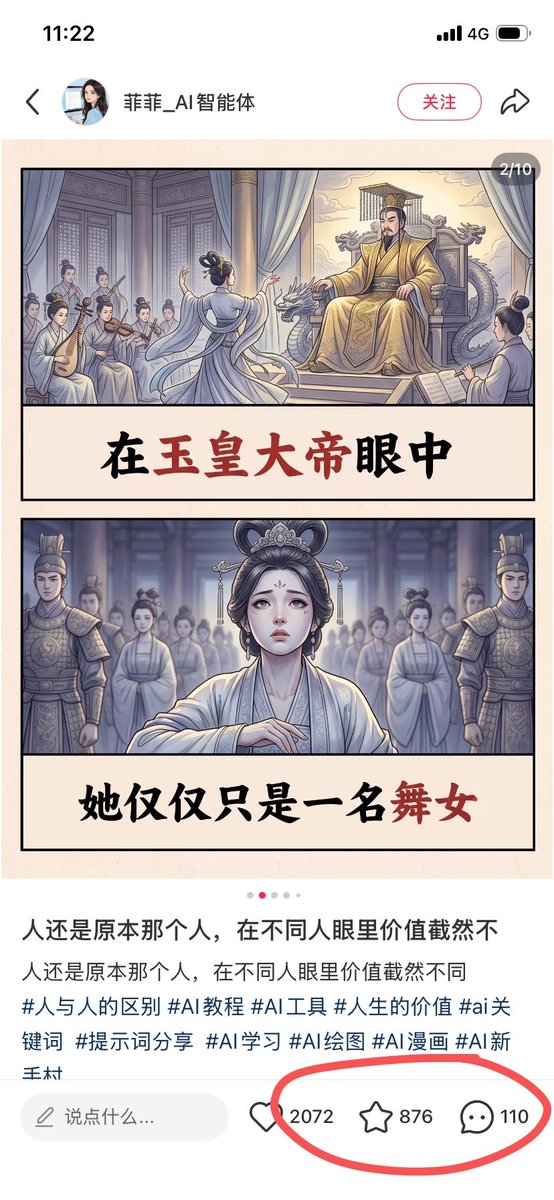
Goal: Create a realistic screenshot of a Chinese social media post on a smartphone, showing a viral AI-generated illustrated story card about an ancient palace dancer and an emperor, with engagement metrics circled in red. Canvas: Vertical smartphone screenshot, 9:16 aspect ratio, white app interface background, clean mobile UI. The status bar at the top shows 11:22, 4G signal, and battery icon. Top app header: Include a back arrow on the left, a small circular female profile avatar, the account name 菲菲_AI智能体, a rounded pink outline follow button labeled “关注”, and a share arrow icon on the right. Main image post: A beige comic-style image card centered below the header, with a small dark rounded page indicator at the top-right reading “2/10”. The card contains exactly 2 stacked illustrated panels, each bordered in black, separated by large cream caption bands with bold Chinese brush-calligraphy text. Panel 1: Ancient Chinese imperial palace scene in soft muted watercolor comic style. On the right, a stern emperor in ornate golden robes sits on a dragon-carved throne under curtains, with palace architecture behind him. In the center foreground, a graceful female dancer in pale flowing robes performs with her back partially turned. On the left, exactly 5 seated female musicians in traditional robes play instruments, including pipa and string instruments. The caption band below reads “在玉皇大帝眼中”, with “玉皇大帝” emphasized in dark red and the rest in black. Panel 2: Frontal dramatic portrait of the same dancer standing in a palace hall, looking sad and vulnerable, wearing pale white-blue hanfu, ornate hair accessories, and delicate makeup. Behind her are exactly 2 armored palace guards, one on each side, plus a blurred group of palace women in the background. Cool blue-gray lighting creates a solemn atmosphere. The caption band below reads “她仅仅只是一名舞女”, with “舞女” emphasized in dark red and the rest in black. Post text below image: Show a carousel dot row with exactly 5 dots, the second dot red and the other 4 light gray. Then display the Chinese caption text in two lines: “人还是原本那个人,在不同人眼里价值截然不” and “人还是原本那个人,在不同人眼里价值截然不同”. Beneath it, show hashtags in blue-gray text: “#人与人的区别 #AI教程 #AI工具 #人生的价值 #ai关键词 #提示词分享 #AI学习 #AI绘图 #AI漫画 #AI新手村”. Bottom interaction bar: Include a rounded comment input field labeled “说点什么...”. To the right, show exactly 3 engagement items: a heart icon with 2072, a star/favorite icon with 876, and a comment bubble icon with 110. Draw a thick hand-drawn red oval around these 3 metrics only. Visual style: The app UI should look like a real screenshot, while the embedded artwork should look like polished AI comic illustration with ink outlines, soft watercolor shading, muted palace colors, and cinematic ancient Chinese drama atmosphere. Constraints: Keep all visible Chinese text legible and accurately placed. Do not add extra panels, extra engagement icons, watermarks, or unrelated UI elements.

翻譯: Runs on 21 models

  • Flux
  • Flux 2
  • Flux Kontext
  • GPT-4o Image
  • GPT Image
  • GPT Image 2
  • GPT Image 2.5
  • GPT Image 2.6
  • Grok Imagine
  • Ideogram V3
  • Imagen 4
  • Kling
  • 翻譯: +9 more

此提示的輸出

Hunyuan  prompt: Publicidad profesional para lanzamiento de un nuev... 未指定 hunyuan-3
Seedream 5 prompt: High-end commercial product photography for a gent... 未指定 v2
ChatGPT Image prompt: Publicidad profesional para lanzamiento de un nuev... 未指定 v1
FLUX prompt: Elaborar un cómic con una temática de un problema ... 未指定 flux-2-pro
FLUX prompt: cyberpunk 未指定 flux-2-pro
Nano Banana prompt: Hayley Williams as an ICE officer 未指定 nano-banana-2.1

翻譯: Run this prompt with the API

翻譯: The request below sends this prompt, with its default values filled in, to the first model it runs on. Swap the model name for any other model listed above.

翻譯: Prompt API docs
/api/v1/gpt_image_2/text_to_image
curl -X POST https://runapi.ai/api/v1/gpt_image_2/text_to_image \
  -H "Authorization: Bearer $RUNAPI_API_KEY" \
  -H "Content-Type: application/json" \
  --data-binary @- <<'JSON'
{
  "model": "gpt-image-2",
  "prompt": "Goal: Create a realistic screenshot of a Chinese social media post on a smartphone, showing a viral AI-generated illustrated story card about an ancient palace dancer and an emperor, with engagement metrics circled in red.\n\nCanvas: Vertical smartphone screenshot, 9:16 aspect ratio, white app interface background, clean mobile UI. The status bar at the top shows 11:22, 4G signal, and battery icon.\n\nTop app header: Include a back arrow on the left, a small circular female profile avatar, the account name 菲菲_AI智能体, a rounded pink outline follow button labeled “关注”, and a share arrow icon on the right.\n\nMain image post: A beige comic-style image card centered below the header, with a small dark rounded page indicator at the top-right reading “2/10”. The card contains exactly 2 stacked illustrated panels, each bordered in black, separated by large cream caption bands with bold Chinese brush-calligraphy text.\n\nPanel 1: Ancient Chinese imperial palace scene in soft muted watercolor comic style. On the right, a stern emperor in ornate golden robes sits on a dragon-carved throne under curtains, with palace architecture behind him. In the center foreground, a graceful female dancer in pale flowing robes performs with her back partially turned. On the left, exactly 5 seated female musicians in traditional robes play instruments, including pipa and string instruments. The caption band below reads “在玉皇大帝眼中”, with “玉皇大帝” emphasized in dark red and the rest in black.\n\nPanel 2: Frontal dramatic portrait of the same dancer standing in a palace hall, looking sad and vulnerable, wearing pale white-blue hanfu, ornate hair accessories, and delicate makeup. Behind her are exactly 2 armored palace guards, one on each side, plus a blurred group of palace women in the background. Cool blue-gray lighting creates a solemn atmosphere. The caption band below reads “她仅仅只是一名舞女”, with “舞女” emphasized in dark red and the rest in black.\n\nPost text below image: Show a carousel dot row with exactly 5 dots, the second dot red and the other 4 light gray. Then display the Chinese caption text in two lines: “人还是原本那个人,在不同人眼里价值截然不” and “人还是原本那个人,在不同人眼里价值截然不同”. Beneath it, show hashtags in blue-gray text: “#人与人的区别 #AI教程 #AI工具 #人生的价值 #ai关键词 #提示词分享 #AI学习 #AI绘图 #AI漫画 #AI新手村”.\n\nBottom interaction bar: Include a rounded comment input field labeled “说点什么...”. To the right, show exactly 3 engagement items: a heart icon with 2072, a star/favorite icon with 876, and a comment bubble icon with 110. Draw a thick hand-drawn red oval around these 3 metrics only.\n\nVisual style: The app UI should look like a real screenshot, while the embedded artwork should look like polished AI comic illustration with ink outlines, soft watercolor shading, muted palace colors, and cinematic ancient Chinese drama atmosphere.\n\nConstraints: Keep all visible Chinese text legible and accurately placed. Do not add extra panels, extra engagement icons, watermarks, or unrelated UI elements."
}
JSON

翻譯: Try a prompt