AI Cutout Demo Screenshot
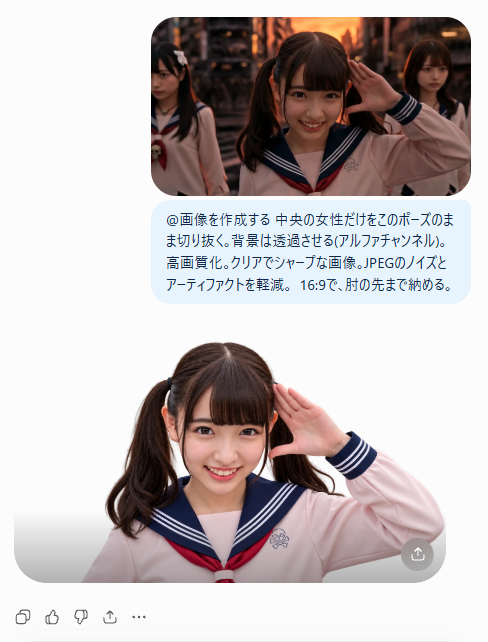
AI Cutout Demo Screenshot

prompt

Goal: Create a clean mobile-style social media screenshot demonstrating an AI background-removal result for a thumbnail image. Canvas: Vertical 488×641 px composition on a pure white background, with generous margins and a centered content column. Layout: At the top, place one rounded-corner rectangular photo, about 318 px wide, showing three Japanese schoolgirls in sailor-style uniforms in a warm sunset urban street scene. The central girl is closest to camera, smiling brightly and raising her right hand beside her face in a salute-like pose; the two other girls are behind her, one on the left partly cropped and looking serious, one on the right in the background. Use cinematic dusk lighting with orange highlights and shallow depth of field. Prompt bubble: Directly below the top photo, add one pale light-blue rounded speech bubble containing Japanese text in dark navy. Preserve the text exactly as: 「@画像を作成する 中央の女性だけをそのポーズのまま切り抜く。背景は透過させる(アルファチャンネル)。高画質化。クリアでシャープな画像。JPEGのノイズとアーティファクトを軽減。16:9で、肘の先まで納める。」 The bubble should be aligned under the image and look like a chat prompt. Result image: Below the bubble, show one large cut-out portrait of only the central girl from the top image, isolated against a white/transparent-looking background. She remains in the same salute pose, smiling, with twin ponytails, straight bangs, a pale pink sailor uniform, navy sailor collar with white stripes, and a red necktie. Re-light her cleanly and evenly so the face is sharper and brighter than in the top photo. Crop from upper torso to just past the raised elbow, with a soft rounded gray bottom container edge like an image preview. Add one small circular gray share/download button at the bottom-right corner of the result preview. Bottom UI: Along the lower left margin, draw exactly five small gray interaction icons in a row: copy/duplicate, thumbs up, thumbs down, share/upload arrow, and ellipsis menu. Customizable subject details: The main cutout subject is a smiling Japanese teenage schoolgirl with twin ponytails and straight bangs; the uniform is pale pink sailor-style school uniform with navy collar, white stripes, and red necktie; the top background is warm sunset urban street with cinematic bokeh; the chat bubble text is @画像を作成する 中央の女性だけをそのポーズのまま切り抜く。背景は透過させる(アルファチャンネル)。高画質化。クリアでシャープな画像。JPEGのノイズとアーティファクトを軽減。16:9で、肘の先まで納める。. Visual style: Photorealistic portraits embedded in a minimal app interface, crisp shadows, rounded corners, clean white UI, high-resolution thumbnail demonstration. Avoid extra people beyond the three in the top image and the single isolated cutout below; avoid watermarks or additional text.

Działa z 20 modelami

  • Flux
  • Flux 2
  • Flux Kontext
  • GPT-4o Image
  • GPT Image
  • GPT Image 2
  • GPT Image 2.5
  • GPT Image 2.6
  • Grok Imagine
  • Ideogram V3
  • Imagen 4
  • Kling
  • +8 Więcej

Wynik tego promptu

Split-Page Coffee Shop Travel Journal Nie określono gpt-image-2
Cute Chibi Characters in a Sweet Playful Moment Nie określono gpt-image-2
Underground Train Yard Clash Anime Development Board Nie określono gpt-image-2
Realistic Group Selfie with Smartphone Flash Effect Nie określono nano-banana-pro
Exploded-View Structural Cutaway for Food Photography Nie określono nano-banana-pro
Four Seasons Portrait Collage Nie określono nano-banana-pro

Run ten prompt z ten API

Poniższe żądanie wysyła ten monit z wypełnionymi wartościami domyślnymi do pierwszego modelu, na którym działa. Zamień nazwę modelu na dowolny inny model wymieniony powyżej.

Dokumentacja prompt API
/api/v1/gpt_image_2/text_to_image
curl -X POST https://runapi.ai/api/v1/gpt_image_2/text_to_image \
  -H "Authorization: Bearer $RUNAPI_API_KEY" \
  -H "Content-Type: application/json" \
  --data-binary @- <<'JSON'
{
  "model": "gpt-image-2",
  "prompt": "Goal: Create a clean mobile-style social media screenshot demonstrating an AI background-removal result for a thumbnail image.\n\nCanvas: Vertical 488×641 px composition on a pure white background, with generous margins and a centered content column.\n\nLayout: At the top, place one rounded-corner rectangular photo, about 318 px wide, showing three Japanese schoolgirls in sailor-style uniforms in a warm sunset urban street scene. The central girl is closest to camera, smiling brightly and raising her right hand beside her face in a salute-like pose; the two other girls are behind her, one on the left partly cropped and looking serious, one on the right in the background. Use cinematic dusk lighting with orange highlights and shallow depth of field.\n\nPrompt bubble: Directly below the top photo, add one pale light-blue rounded speech bubble containing Japanese text in dark navy. Preserve the text exactly as: 「@画像を作成する 中央の女性だけをそのポーズのまま切り抜く。背景は透過させる(アルファチャンネル)。高画質化。クリアでシャープな画像。JPEGのノイズとアーティファクトを軽減。16:9で、肘の先まで納める。」 The bubble should be aligned under the image and look like a chat prompt.\n\nResult image: Below the bubble, show one large cut-out portrait of only the central girl from the top image, isolated against a white/transparent-looking background. She remains in the same salute pose, smiling, with twin ponytails, straight bangs, a pale pink sailor uniform, navy sailor collar with white stripes, and a red necktie. Re-light her cleanly and evenly so the face is sharper and brighter than in the top photo. Crop from upper torso to just past the raised elbow, with a soft rounded gray bottom container edge like an image preview. Add one small circular gray share/download button at the bottom-right corner of the result preview.\n\nBottom UI: Along the lower left margin, draw exactly five small gray interaction icons in a row: copy/duplicate, thumbs up, thumbs down, share/upload arrow, and ellipsis menu.\n\nCustomizable subject details: The main cutout subject is a smiling Japanese teenage schoolgirl with twin ponytails and straight bangs; the uniform is pale pink sailor-style school uniform with navy collar, white stripes, and red necktie; the top background is warm sunset urban street with cinematic bokeh; the chat bubble text is @画像を作成する 中央の女性だけをそのポーズのまま切り抜く。背景は透過させる(アルファチャンネル)。高画質化。クリアでシャープな画像。JPEGのノイズとアーティファクトを軽減。16:9で、肘の先まで納める。.\n\nVisual style: Photorealistic portraits embedded in a minimal app interface, crisp shadows, rounded corners, clean white UI, high-resolution thumbnail demonstration. Avoid extra people beyond the three in the top image and the single isolated cutout below; avoid watermarks or additional text."
}
JSON

Wypróbuj a prompt

Szacunkowo: $0.04 / obraz

Zaloguj się, aby generować przez RunAPI.

Zaloguj się, aby generować

Zaloguj się, aby rozpocząć generowanie z dostępnymi modelami językowymi.

















