AI Product Sketch to Lamp Render
AI Product Sketch to Lamp Render

prompt

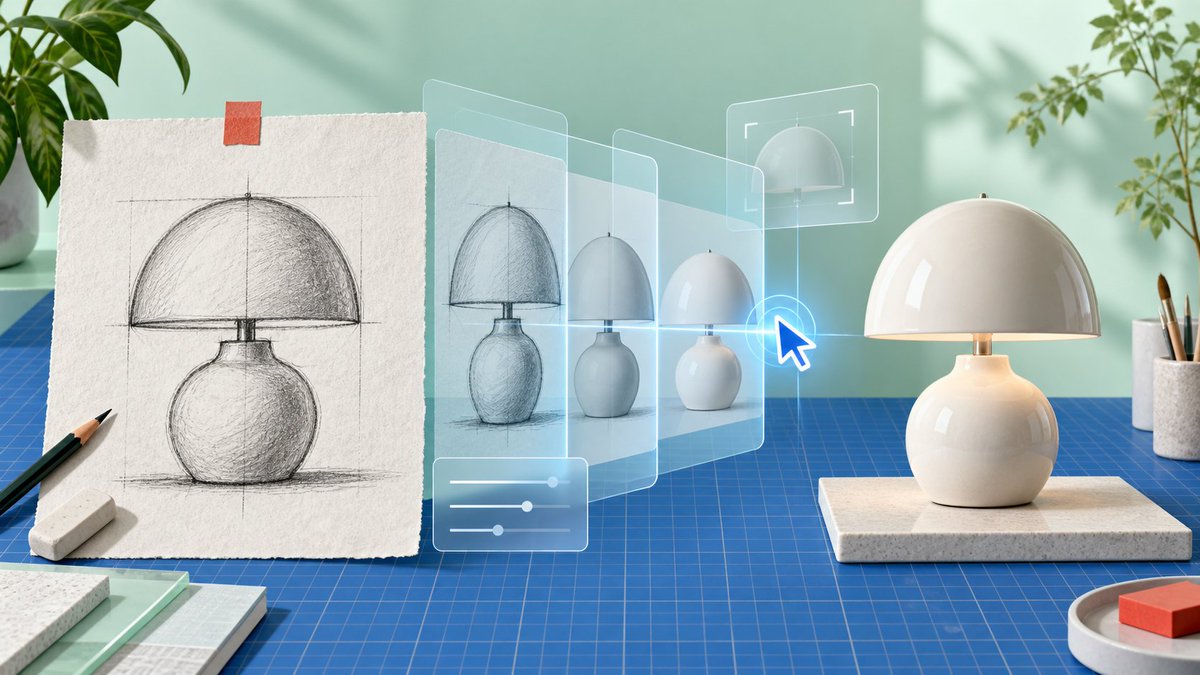
Create a clean, photorealistic product-design workspace scene showing an AI-assisted transformation from sketch to finished object. Use a wide 16:9 canvas with soft natural daylight, pastel mint-green wall, realistic shadows from window light, and a modern maker-studio aesthetic. On the left, place a sheet of rough off-white textured drawing paper standing upright on a blue gridded cutting mat, held at the top with one small strip of orange tape; the paper shows a detailed graphite construction sketch of a mushroom-shaped ceramic table lamp, including vertical and horizontal guide lines, a domed shade, a short neck, rounded bulbous base, hatch shading, and a ground shadow. In front of the sketch are exactly 2 drawing tools: one black pencil angled diagonally and one white rectangular eraser. Across the center, add a translucent futuristic UI visualization: exactly 4 semi-transparent glass panels receding from left to right, each showing the lamp evolving from rough sketch to cleaner render to simplified 3D form, with pale cyan outlines and a subtle blue glow. Add exactly 3 interface overlays: one bottom-left rounded rectangle with three horizontal slider controls, one upper-right rectangular crop/selection frame around a dome preview, and one bright blue glowing cursor arrow pointing at the lamp evolution. On the right, place the final physical glossy warm-white ceramic lamp on a rectangular speckled stone platform: a smooth hemispherical dome shade, small brass stem, softly glowing warm light under the shade, and a round bulbous base matching the sketch. Surround the scene with studio props: leafy green plants partially visible at the upper left and upper right, a white cup holding paintbrushes at the far right, a small round tray with a red-orange block in the lower right, and stacked sample boards or notebooks in the lower left. The blue cutting mat should cover the tabletop with precise grid lines, reinforcing a design-prototyping environment. No visible text, no logos, no watermark; emphasize the concept of turning a hand sketch into a finished product through transparent AI editing layers.

Funziona su 20 modelli

  • Flux
  • Flux 2
  • Flux Kontext
  • GPT-4o Image
  • GPT Image
  • GPT Image 2
  • GPT Image 2.5
  • GPT Image 2.6
  • Grok Imagine
  • Ideogram V3
  • Imagen 4
  • Kling
  • +8 Altri

Cosa produce questo prompt

Split-Page Coffee Shop Travel Journal Non specificato gpt-image-2
Cute Chibi Characters in a Sweet Playful Moment Non specificato gpt-image-2
Underground Train Yard Clash Anime Development Board Non specificato gpt-image-2
Realistic Group Selfie with Smartphone Flash Effect Non specificato nano-banana-pro
Exploded-View Structural Cutaway for Food Photography Non specificato nano-banana-pro
Four Seasons Portrait Collage Non specificato nano-banana-pro

Run questo prompt con il API

La richiesta seguente invia questo prompt, con i valori predefiniti compilati, al primo modello su cui viene eseguito. Scambia il nome del modello con qualsiasi altro modello elencato sopra.

Documentazione API prompt
/api/v1/gpt_image_2/text_to_image
curl -X POST https://runapi.ai/api/v1/gpt_image_2/text_to_image \
  -H "Authorization: Bearer $RUNAPI_API_KEY" \
  -H "Content-Type: application/json" \
  --data-binary @- <<'JSON'
{
  "model": "gpt-image-2",
  "prompt": "Create a clean, photorealistic product-design workspace scene showing an AI-assisted transformation from sketch to finished object. Use a wide 16:9 canvas with soft natural daylight, pastel mint-green wall, realistic shadows from window light, and a modern maker-studio aesthetic. On the left, place a sheet of rough off-white textured drawing paper standing upright on a blue gridded cutting mat, held at the top with one small strip of orange tape; the paper shows a detailed graphite construction sketch of a mushroom-shaped ceramic table lamp, including vertical and horizontal guide lines, a domed shade, a short neck, rounded bulbous base, hatch shading, and a ground shadow. In front of the sketch are exactly 2 drawing tools: one black pencil angled diagonally and one white rectangular eraser. Across the center, add a translucent futuristic UI visualization: exactly 4 semi-transparent glass panels receding from left to right, each showing the lamp evolving from rough sketch to cleaner render to simplified 3D form, with pale cyan outlines and a subtle blue glow. Add exactly 3 interface overlays: one bottom-left rounded rectangle with three horizontal slider controls, one upper-right rectangular crop/selection frame around a dome preview, and one bright blue glowing cursor arrow pointing at the lamp evolution. On the right, place the final physical glossy warm-white ceramic lamp on a rectangular speckled stone platform: a smooth hemispherical dome shade, small brass stem, softly glowing warm light under the shade, and a round bulbous base matching the sketch. Surround the scene with studio props: leafy green plants partially visible at the upper left and upper right, a white cup holding paintbrushes at the far right, a small round tray with a red-orange block in the lower right, and stacked sample boards or notebooks in the lower left. The blue cutting mat should cover the tabletop with precise grid lines, reinforcing a design-prototyping environment. No visible text, no logos, no watermark; emphasize the concept of turning a hand sketch into a finished product through transparent AI editing layers."
}
JSON

Prova a prompt

Stimato: $0.04 / immagine

Accedi per generare con RunAPI.

Accedi per generare

Accedi per iniziare a generare con i modelli linguistici disponibili.