AI Product Sketch to Lamp Render
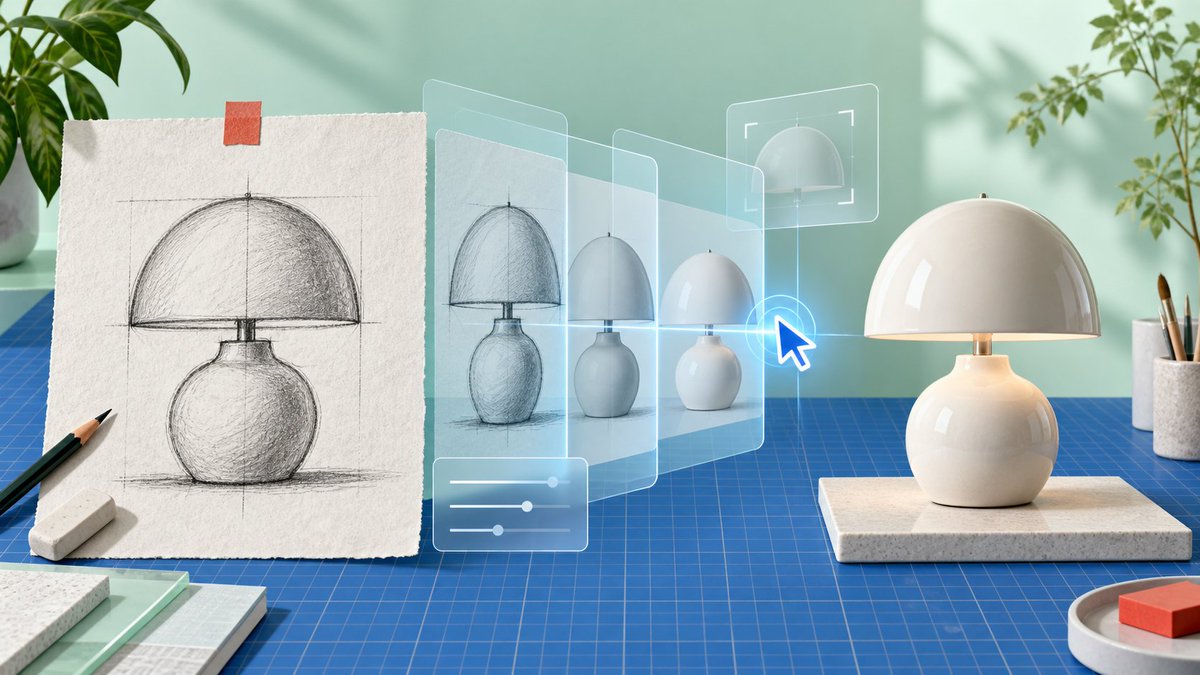
AI Product Sketch to Lamp Render

prompt

Create a clean, photorealistic product-design workspace scene showing an AI-assisted transformation from sketch to finished object. Use a wide 16:9 canvas with soft natural daylight, pastel mint-green wall, realistic shadows from window light, and a modern maker-studio aesthetic. On the left, place a sheet of rough off-white textured drawing paper standing upright on a blue gridded cutting mat, held at the top with one small strip of orange tape; the paper shows a detailed graphite construction sketch of a mushroom-shaped ceramic table lamp, including vertical and horizontal guide lines, a domed shade, a short neck, rounded bulbous base, hatch shading, and a ground shadow. In front of the sketch are exactly 2 drawing tools: one black pencil angled diagonally and one white rectangular eraser. Across the center, add a translucent futuristic UI visualization: exactly 4 semi-transparent glass panels receding from left to right, each showing the lamp evolving from rough sketch to cleaner render to simplified 3D form, with pale cyan outlines and a subtle blue glow. Add exactly 3 interface overlays: one bottom-left rounded rectangle with three horizontal slider controls, one upper-right rectangular crop/selection frame around a dome preview, and one bright blue glowing cursor arrow pointing at the lamp evolution. On the right, place the final physical glossy warm-white ceramic lamp on a rectangular speckled stone platform: a smooth hemispherical dome shade, small brass stem, softly glowing warm light under the shade, and a round bulbous base matching the sketch. Surround the scene with studio props: leafy green plants partially visible at the upper left and upper right, a white cup holding paintbrushes at the far right, a small round tray with a red-orange block in the lower right, and stacked sample boards or notebooks in the lower left. The blue cutting mat should cover the tabletop with precise grid lines, reinforcing a design-prototyping environment. No visible text, no logos, no watermark; emphasize the concept of turning a hand sketch into a finished product through transparent AI editing layers.

20 modelde çalışır

  • Flux
  • Flux 2
  • Flux Kontext
  • GPT-4o Image
  • GPT Image
  • GPT Image 2
  • GPT Image 2.5
  • GPT Image 2.6
  • Grok Imagine
  • Ideogram V3
  • Imagen 4
  • Kling
  • +8 Daha fazla

Bu prompt ne üretir

Split-Page Coffee Shop Travel Journal Belirtilmedi gpt-image-2
Cute Chibi Characters in a Sweet Playful Moment Belirtilmedi gpt-image-2
Underground Train Yard Clash Anime Development Board Belirtilmedi gpt-image-2
Realistic Group Selfie with Smartphone Flash Effect Belirtilmedi nano-banana-pro
Exploded-View Structural Cutaway for Food Photography Belirtilmedi nano-banana-pro
Four Seasons Portrait Collage Belirtilmedi nano-banana-pro

Run bu prompt ile bu API

bu request below sends bu prompt, ile its default values filled in, to bu first model it runs on. Swap bu model name için any other model listed above.

prompt API belgeleri
/api/v1/gpt_image_2/text_to_image
curl -X POST https://runapi.ai/api/v1/gpt_image_2/text_to_image \
  -H "Authorization: Bearer $RUNAPI_API_KEY" \
  -H "Content-Type: application/json" \
  --data-binary @- <<'JSON'
{
  "model": "gpt-image-2",
  "prompt": "Create a clean, photorealistic product-design workspace scene showing an AI-assisted transformation from sketch to finished object. Use a wide 16:9 canvas with soft natural daylight, pastel mint-green wall, realistic shadows from window light, and a modern maker-studio aesthetic. On the left, place a sheet of rough off-white textured drawing paper standing upright on a blue gridded cutting mat, held at the top with one small strip of orange tape; the paper shows a detailed graphite construction sketch of a mushroom-shaped ceramic table lamp, including vertical and horizontal guide lines, a domed shade, a short neck, rounded bulbous base, hatch shading, and a ground shadow. In front of the sketch are exactly 2 drawing tools: one black pencil angled diagonally and one white rectangular eraser. Across the center, add a translucent futuristic UI visualization: exactly 4 semi-transparent glass panels receding from left to right, each showing the lamp evolving from rough sketch to cleaner render to simplified 3D form, with pale cyan outlines and a subtle blue glow. Add exactly 3 interface overlays: one bottom-left rounded rectangle with three horizontal slider controls, one upper-right rectangular crop/selection frame around a dome preview, and one bright blue glowing cursor arrow pointing at the lamp evolution. On the right, place the final physical glossy warm-white ceramic lamp on a rectangular speckled stone platform: a smooth hemispherical dome shade, small brass stem, softly glowing warm light under the shade, and a round bulbous base matching the sketch. Surround the scene with studio props: leafy green plants partially visible at the upper left and upper right, a white cup holding paintbrushes at the far right, a small round tray with a red-orange block in the lower right, and stacked sample boards or notebooks in the lower left. The blue cutting mat should cover the tabletop with precise grid lines, reinforcing a design-prototyping environment. No visible text, no logos, no watermark; emphasize the concept of turning a hand sketch into a finished product through transparent AI editing layers."
}
JSON

Dene a prompt

Tahmini: $0.04 / görsel

RunAPI ile oluşturmak için giriş yapın.

Oluşturmak için giriş yapın

Mevcut dil modellerinizle oluşturmaya başlamak için giriş yapın.