Rainy Japanese Visual Novel Title Screen
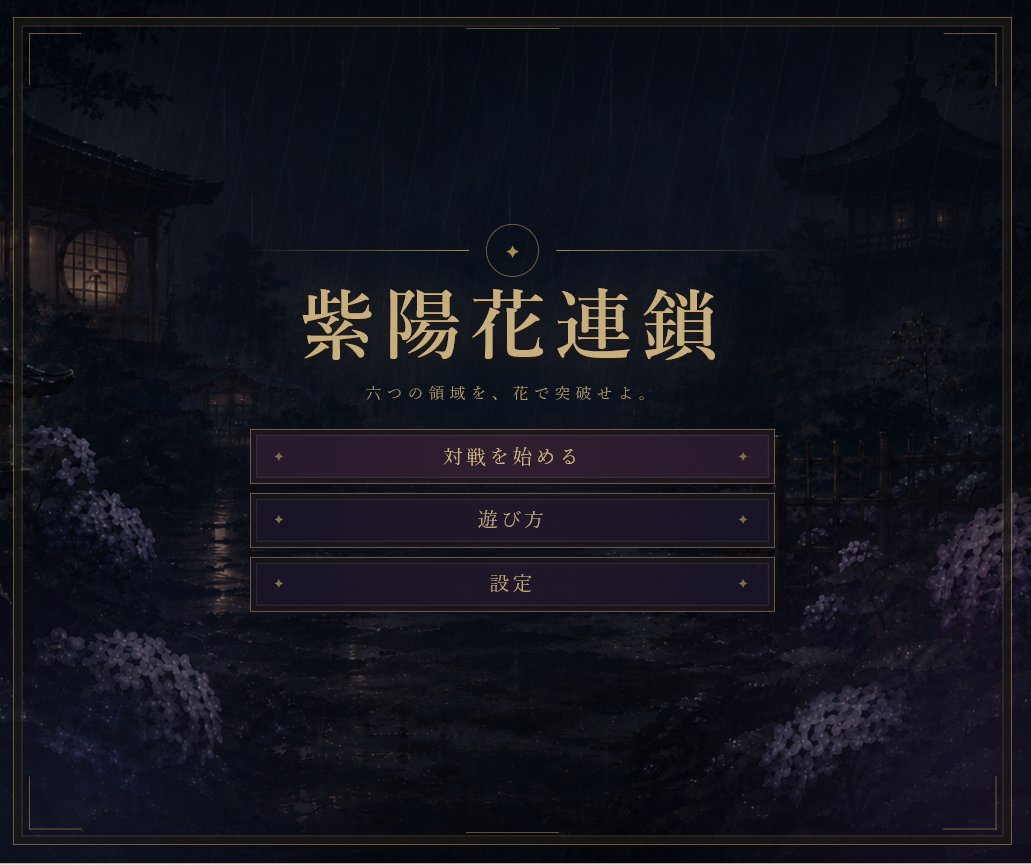
Rainy Japanese Visual Novel Title Screen

prompt

Goal: Create a moody Japanese visual-novel title screen for a dark fantasy strategy game named 紫陽花連鎖. Canvas: 4:3 landscape game menu screen, approximately 920×768, with a dark cinematic vignette and refined antique framing. Background: A rainy midnight Japanese garden scene. Show heavy diagonal rain streaks over a shadowy stone path and wet reflective ground. On the left, place a traditional wooden building with a warm glowing round window; on the right, a dark pagoda-like pavilion with faint warm window lights. Add silhouettes of trees, fences, shrubs, lantern-like structures, and clusters of pale purple hydrangeas in the lower left and lower right foreground. Keep the scenery atmospheric, low-contrast, and mostly obscured by darkness and mist. Layout: Center the title area in the upper-middle of the screen. Above the title, add a thin gold horizontal divider line split by a small circular emblem containing a simple four-point sparkle/star. Use elegant metallic gold typography for the large Japanese title. Beneath it, add the small subtitle text 六つの領域を、花で突破せよ。. Below the subtitle, place exactly 3 horizontal menu buttons stacked vertically and centered. Menu buttons: Use exactly 3 rectangular dark purple buttons with thin gold borders, subtle inner glow, and small gold diamond ornaments near both left and right edges. The visible button labels, from top to bottom, must be: 対戦を始める, 遊び方, 設定. The first button should be slightly lighter/brighter purple than the other two, as if selected. Frame and style: Add a thin double-line gold border around the entire screen with small decorative corner breaks and short accent line segments near the corners. Use a refined Japanese gothic aesthetic, muted indigo/black/purple palette, antique gold UI accents, painterly background art, and crisp game UI typography. Avoid modern icons, extra buttons, logos, watermarks, or characters.

Funziona su 21 modelli

  • Flux
  • Flux 2
  • Flux Kontext
  • GPT-4o Image
  • GPT Image
  • GPT Image 2
  • GPT Image 2.5
  • GPT Image 2.6
  • Grok Imagine
  • Ideogram V3
  • Imagen 4
  • Kling
  • +9 Altri

Cosa produce questo prompt

Seedream 5 prompt: f smiling middle aged woman in nice home wrapped i... Non specificato v2
Create an extreme close-up underwater portrait, ca... Non specificato Non specificato
Using the face from the attached photograph, recre... Non specificato Non specificato
Using the face from the attached photo, recreate a... Non specificato Non specificato
Seedream 5 prompt: cosplay Non specificato v2
Seedream 5 prompt: photography, portrait of contrast, profile silhoue... Non specificato seedream-5-pro

Run questo prompt con il API

La richiesta seguente invia questo prompt, con i valori predefiniti compilati, al primo modello su cui viene eseguito. Scambia il nome del modello con qualsiasi altro modello elencato sopra.

Documentazione API prompt
/api/v1/gpt_image_2/text_to_image
curl -X POST https://runapi.ai/api/v1/gpt_image_2/text_to_image \
  -H "Authorization: Bearer $RUNAPI_API_KEY" \
  -H "Content-Type: application/json" \
  --data-binary @- <<'JSON'
{
  "model": "gpt-image-2",
  "prompt": "Goal: Create a moody Japanese visual-novel title screen for a dark fantasy strategy game named 紫陽花連鎖.\n\nCanvas: 4:3 landscape game menu screen, approximately 920×768, with a dark cinematic vignette and refined antique framing.\n\nBackground: A rainy midnight Japanese garden scene. Show heavy diagonal rain streaks over a shadowy stone path and wet reflective ground. On the left, place a traditional wooden building with a warm glowing round window; on the right, a dark pagoda-like pavilion with faint warm window lights. Add silhouettes of trees, fences, shrubs, lantern-like structures, and clusters of pale purple hydrangeas in the lower left and lower right foreground. Keep the scenery atmospheric, low-contrast, and mostly obscured by darkness and mist.\n\nLayout: Center the title area in the upper-middle of the screen. Above the title, add a thin gold horizontal divider line split by a small circular emblem containing a simple four-point sparkle/star. Use elegant metallic gold typography for the large Japanese title. Beneath it, add the small subtitle text 六つの領域を、花で突破せよ。. Below the subtitle, place exactly 3 horizontal menu buttons stacked vertically and centered.\n\nMenu buttons: Use exactly 3 rectangular dark purple buttons with thin gold borders, subtle inner glow, and small gold diamond ornaments near both left and right edges. The visible button labels, from top to bottom, must be: 対戦を始める, 遊び方, 設定. The first button should be slightly lighter/brighter purple than the other two, as if selected.\n\nFrame and style: Add a thin double-line gold border around the entire screen with small decorative corner breaks and short accent line segments near the corners. Use a refined Japanese gothic aesthetic, muted indigo/black/purple palette, antique gold UI accents, painterly background art, and crisp game UI typography. Avoid modern icons, extra buttons, logos, watermarks, or characters."
}
JSON

Prova a prompt