Mona Lisa Coca-Cola Web Example
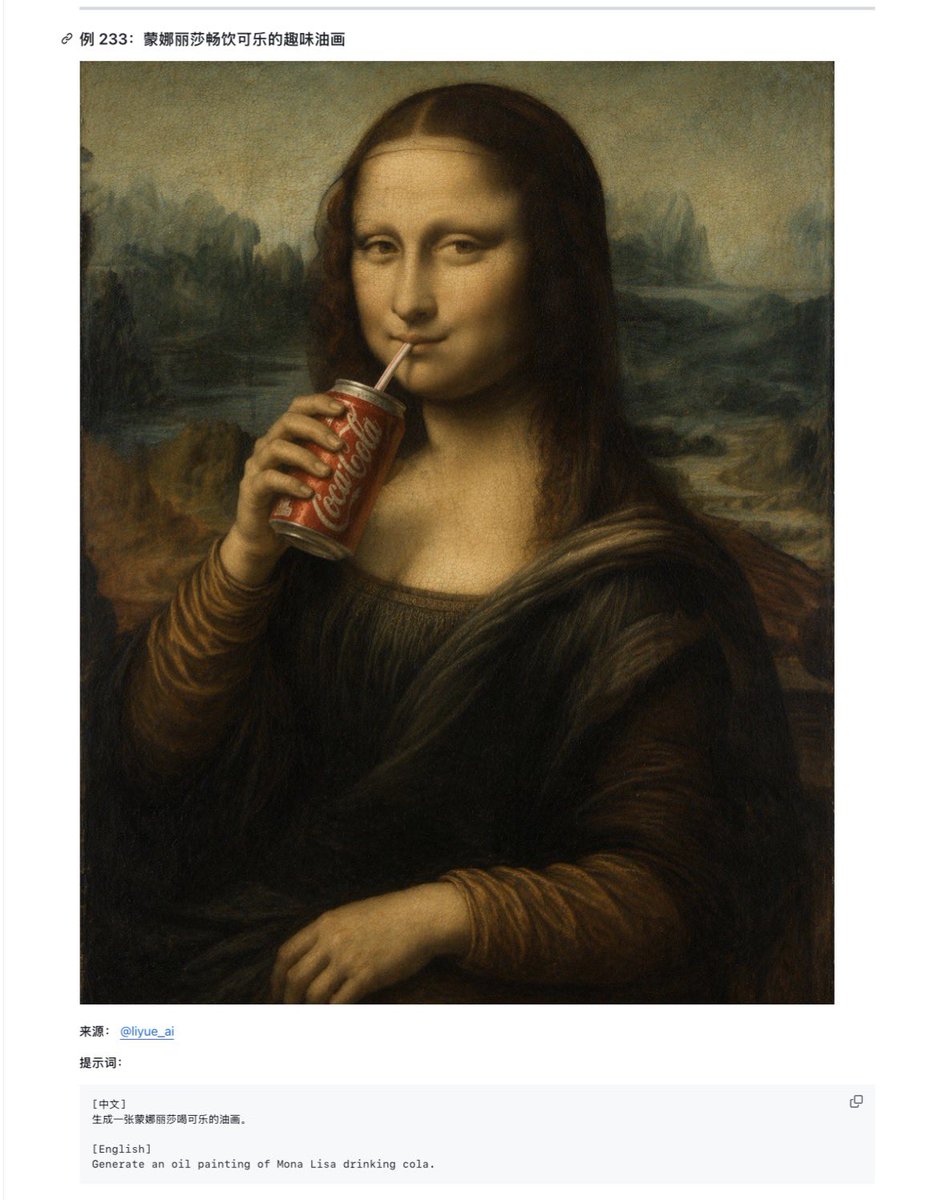
Mona Lisa Coca-Cola Web Example

prompt

Goal: Create a clean documentation-style webpage screenshot showing an example entry about Mona Lisa drinking Coca-Cola, with a large generated artwork preview and a small bilingual prompt box below it. Canvas: Portrait-oriented screenshot on a white page, approximately 768 × 984 px, with generous margins and a very light gray horizontal rule near the top. Layout: At the top left, place a small link/chain icon followed by the bold Chinese title “例 233: 蒙娜丽莎畅饮可乐的趣味油画”. Below it, center a large square artwork image with a thin white margin around it. Under the artwork, add exactly 3 lower content elements: 1 source line, 1 prompt label line, and 1 pale gray code-style prompt box. Main artwork: Generate an old-master oil painting parody of Mona Lisa drinking Coca-Cola. The figure is seated in the classic Mona Lisa pose with dark brown hair, Renaissance clothing, folded lower hand, and a misty landscape background in muted green, brown, and ochre tones. The left hand holds a red soda can near the mouth, with the white Coca-Cola script visible on the can. The painting should look aged, softly blended, and varnished, imitating a Renaissance oil portrait. Add one opaque dark brown square censorship block over the face, centered from forehead to chin, obscuring the facial features while leaving hair, neck, hand, and soda can visible. Lower text content: The source line reads “来源: @liyue_ai” with the handle in blue like a hyperlink. The next line reads “提示词:”. The code box contains exactly 2 labeled language blocks: “[中文]” followed by “生成一张蒙娜丽莎畅饮可乐的油画。” and “[English]” followed by “Generate an oil painting of Mona Lisa drinking cola.” Add one small copy icon at the upper right of the code box. Visual style: Minimal Chinese web article interface, white background, black and gray sans-serif UI text, light gray code box, subtle borders, no decorative clutter. Keep the artwork painterly and historically styled, while the surrounding page remains crisp like a browser screenshot. Constraints: Include exactly 1 main artwork, exactly 1 soda can, exactly 1 face-obscuring square, exactly 1 title line, exactly 1 source line, exactly 1 prompt label, exactly 1 code box, and exactly 2 language sections inside the code box. Do not add extra images, comments, watermarks, or unrelated UI panels.

Funziona su 21 modelli

  • Flux
  • Flux 2
  • Flux Kontext
  • GPT-4o Image
  • GPT Image
  • GPT Image 2
  • GPT Image 2.5
  • GPT Image 2.6
  • Grok Imagine
  • Ideogram V3
  • Imagen 4
  • Kling
  • +9 Altri

Cosa produce questo prompt

Hunyuan  prompt: dog pose Non specificato hunyuan-3
Wireless Doorbell Camera Instructions Prompt Non specificato gpt-image-2
Hunyuan  prompt: wine Non specificato hunyuan-3
Hunyuan  prompt: can beer Non specificato hunyuan-3
Hunyuan  prompt: ربات Non specificato hunyuan-3
Hero prompt: recreate image 1 (close up indoor portrait of a wo... Non specificato 1.0

Run questo prompt con il API

La richiesta seguente invia questo prompt, con i valori predefiniti compilati, al primo modello su cui viene eseguito. Scambia il nome del modello con qualsiasi altro modello elencato sopra.

Documentazione API prompt
/api/v1/gpt_image_2/text_to_image
curl -X POST https://runapi.ai/api/v1/gpt_image_2/text_to_image \
  -H "Authorization: Bearer $RUNAPI_API_KEY" \
  -H "Content-Type: application/json" \
  --data-binary @- <<'JSON'
{
  "model": "gpt-image-2",
  "prompt": "Goal: Create a clean documentation-style webpage screenshot showing an example entry about Mona Lisa drinking Coca-Cola, with a large generated artwork preview and a small bilingual prompt box below it.\n\nCanvas: Portrait-oriented screenshot on a white page, approximately 768 × 984 px, with generous margins and a very light gray horizontal rule near the top.\n\nLayout: At the top left, place a small link/chain icon followed by the bold Chinese title “例 233: 蒙娜丽莎畅饮可乐的趣味油画”. Below it, center a large square artwork image with a thin white margin around it. Under the artwork, add exactly 3 lower content elements: 1 source line, 1 prompt label line, and 1 pale gray code-style prompt box.\n\nMain artwork: Generate an old-master oil painting parody of Mona Lisa drinking Coca-Cola. The figure is seated in the classic Mona Lisa pose with dark brown hair, Renaissance clothing, folded lower hand, and a misty landscape background in muted green, brown, and ochre tones. The left hand holds a red soda can near the mouth, with the white Coca-Cola script visible on the can. The painting should look aged, softly blended, and varnished, imitating a Renaissance oil portrait. Add one opaque dark brown square censorship block over the face, centered from forehead to chin, obscuring the facial features while leaving hair, neck, hand, and soda can visible.\n\nLower text content: The source line reads “来源: @liyue_ai” with the handle in blue like a hyperlink. The next line reads “提示词:”. The code box contains exactly 2 labeled language blocks: “[中文]” followed by “生成一张蒙娜丽莎畅饮可乐的油画。” and “[English]” followed by “Generate an oil painting of Mona Lisa drinking cola.” Add one small copy icon at the upper right of the code box.\n\nVisual style: Minimal Chinese web article interface, white background, black and gray sans-serif UI text, light gray code box, subtle borders, no decorative clutter. Keep the artwork painterly and historically styled, while the surrounding page remains crisp like a browser screenshot.\n\nConstraints: Include exactly 1 main artwork, exactly 1 soda can, exactly 1 face-obscuring square, exactly 1 title line, exactly 1 source line, exactly 1 prompt label, exactly 1 code box, and exactly 2 language sections inside the code box. Do not add extra images, comments, watermarks, or unrelated UI panels."
}
JSON

Prova a prompt