Selfie to Comic Style Split Mockup
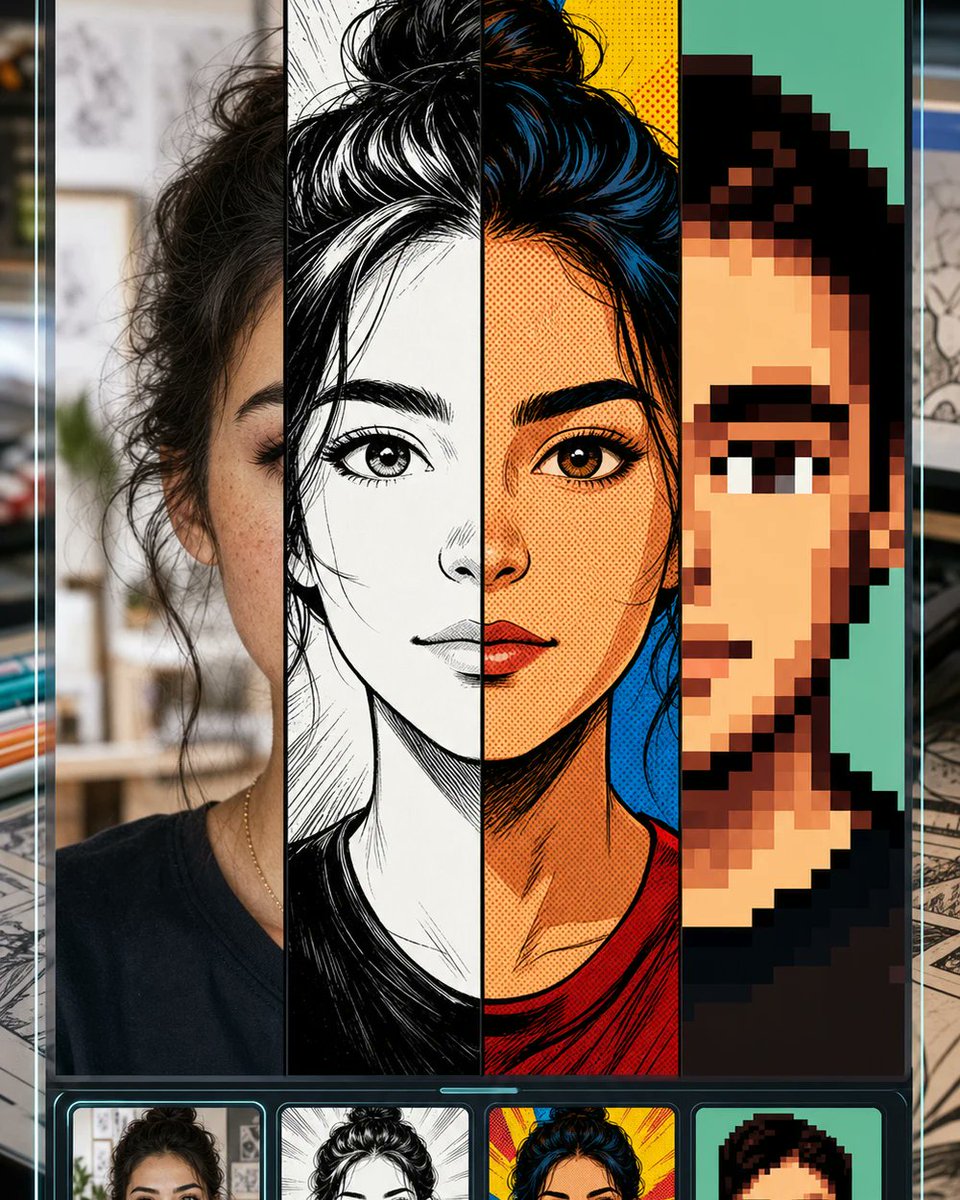
Selfie to Comic Style Split Mockup

prompt

Goal: Create a vertical promotional app-style mockup for a “selfie to comic” image transformation tool, showing one portrait converted into multiple comic styles while keeping the same face structure recognizable. Canvas: Tall smartphone-like 4:5 composition, dark glossy interface frame with thin cyan glow lines along the left and right edges. Background outside the phone is softly blurred, like a desk or creative studio with papers and drawing materials. Layout: The main preview fills most of the screen and is split into exactly 4 vertical style panels from left to right: 1) realistic selfie/photo style, 2) black-and-white manga ink drawing, 3) saturated retro comic book halftone style, 4) chunky pixel-art avatar style. A large centered square mask/placeholder covers the middle of the face and upper torso area, colored warm beige/gray, as if the central facial region is intentionally hidden. Below the main preview is a dark carousel strip with exactly 4 rounded thumbnail cards matching the same four styles: photo selfie, manga ink, retro comic, and pixel art. Subject details: Use a young woman with dark brown/black messy hair tied in a high bun, visible eyebrow and eye on the left and right panels, medium warm skin tone, wearing a simple dark crew-neck shirt and a thin necklace. Keep the same head position across all four transformations. Style panel details: The photo panel should look like a casual indoor selfie with shallow depth of field and natural texture. The manga panel should use dramatic black ink, white highlights, crosshatching, and clean linework. The retro comic panel should use bold outlines, red and yellow background bursts, blue-black hair highlights, orange skin tones, and halftone dots. The pixel-art panel should use large square pixels, simplified facial features, teal background, and a limited palette. Visual style: High-contrast social media product preview, crisp vertical divisions, glossy black UI chrome, neon cyan accents, clean rounded thumbnail cards, polished GPT-image promotional aesthetic. Constraints: Include exactly 4 main vertical panels and exactly 4 bottom thumbnails. Do not add readable text, logos, or watermarks. Keep the central beige square mask prominent and perfectly centered. Use dark futuristic mobile UI, manga, retro comic, and pixel art selfie conversion, and blurred creative studio desk.

Działa z 20 modelami

  • Flux
  • Flux 2
  • Flux Kontext
  • GPT-4o Image
  • GPT Image
  • GPT Image 2
  • GPT Image 2.5
  • GPT Image 2.6
  • Grok Imagine
  • Ideogram V3
  • Imagen 4
  • Kling
  • +8 Więcej

Wynik tego promptu

Split-Page Coffee Shop Travel Journal Nie określono gpt-image-2
Cute Chibi Characters in a Sweet Playful Moment Nie określono gpt-image-2
Underground Train Yard Clash Anime Development Board Nie określono gpt-image-2
Realistic Group Selfie with Smartphone Flash Effect Nie określono nano-banana-pro
Exploded-View Structural Cutaway for Food Photography Nie określono nano-banana-pro
Four Seasons Portrait Collage Nie określono nano-banana-pro

Run ten prompt z ten API

Poniższe żądanie wysyła ten monit z wypełnionymi wartościami domyślnymi do pierwszego modelu, na którym działa. Zamień nazwę modelu na dowolny inny model wymieniony powyżej.

Dokumentacja prompt API
/api/v1/gpt_image_2/text_to_image
curl -X POST https://runapi.ai/api/v1/gpt_image_2/text_to_image \
  -H "Authorization: Bearer $RUNAPI_API_KEY" \
  -H "Content-Type: application/json" \
  --data-binary @- <<'JSON'
{
  "model": "gpt-image-2",
  "prompt": "Goal: Create a vertical promotional app-style mockup for a “selfie to comic” image transformation tool, showing one portrait converted into multiple comic styles while keeping the same face structure recognizable.\n\nCanvas: Tall smartphone-like 4:5 composition, dark glossy interface frame with thin cyan glow lines along the left and right edges. Background outside the phone is softly blurred, like a desk or creative studio with papers and drawing materials.\n\nLayout: The main preview fills most of the screen and is split into exactly 4 vertical style panels from left to right: 1) realistic selfie/photo style, 2) black-and-white manga ink drawing, 3) saturated retro comic book halftone style, 4) chunky pixel-art avatar style. A large centered square mask/placeholder covers the middle of the face and upper torso area, colored warm beige/gray, as if the central facial region is intentionally hidden. Below the main preview is a dark carousel strip with exactly 4 rounded thumbnail cards matching the same four styles: photo selfie, manga ink, retro comic, and pixel art.\n\nSubject details: Use a young woman with dark brown/black messy hair tied in a high bun, visible eyebrow and eye on the left and right panels, medium warm skin tone, wearing a simple dark crew-neck shirt and a thin necklace. Keep the same head position across all four transformations.\n\nStyle panel details: The photo panel should look like a casual indoor selfie with shallow depth of field and natural texture. The manga panel should use dramatic black ink, white highlights, crosshatching, and clean linework. The retro comic panel should use bold outlines, red and yellow background bursts, blue-black hair highlights, orange skin tones, and halftone dots. The pixel-art panel should use large square pixels, simplified facial features, teal background, and a limited palette.\n\nVisual style: High-contrast social media product preview, crisp vertical divisions, glossy black UI chrome, neon cyan accents, clean rounded thumbnail cards, polished GPT-image promotional aesthetic.\n\nConstraints: Include exactly 4 main vertical panels and exactly 4 bottom thumbnails. Do not add readable text, logos, or watermarks. Keep the central beige square mask prominent and perfectly centered. Use dark futuristic mobile UI, manga, retro comic, and pixel art selfie conversion, and blurred creative studio desk."
}
JSON

Wypróbuj a prompt

Szacunkowo: $0.04 / obraz

Zaloguj się, aby generować przez RunAPI.

Zaloguj się, aby generować

Zaloguj się, aby rozpocząć generowanie z dostępnymi modelami językowymi.