Pink Lolita Color Correction Comparison
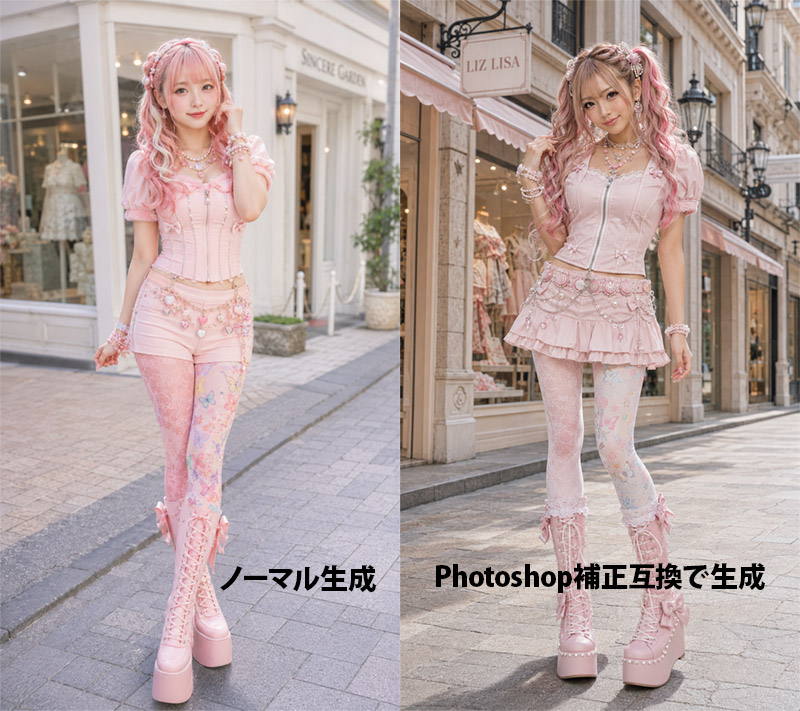
Pink Lolita Color Correction Comparison

prompt

Goal: Create a side-by-side comparison image showing an AI-generated fashion portrait before and after Photoshop-style color correction, featuring the same young woman in pastel pink sweet lolita/gyaru street fashion on a European boutique shopping street. Canvas: Landscape 4:3 image, split exactly into two equal vertical panels with a hard center divide. Photorealistic fashion editorial style, full-body subject in both panels, street-level perspective, shallow depth of field, soft daylight. Left panel: Show the uncorrected version labeled in bold black Japanese text near the bottom: 「ノーマル生成」. The model stands in front of a bright cream-white boutique facade with large display windows and a pale sign. Overall color is slightly flat, pale, low-contrast, airy, and softly washed out. The model faces forward with a gentle smile, one hand near her hair, wearing a pastel pink corset top with puff sleeves, pink short bottoms, decorative waist chains, patterned pastel tights, and tall pink lace-up platform boots. Right panel: Show the corrected version labeled in bold black mixed text near the bottom: 「Photoshop補正互換で生成」. The same model stands on a similar elegant shopping street in front of a boutique with a visible hanging sign reading LIZ LISA. The lighting and color correction should look more polished: warmer highlights, richer contrast, clearer skin tones, slightly deeper shadows, brighter pinks, crisp details, and a more professional retouched fashion-photo finish. The model poses with one hand in her hair and one leg slightly bent, smiling at the camera. Subject details: A cute young Japanese fashion model with fair skin, long wavy twin-tail hair in pink blonde, soft bangs, ribbons and pearl hair accessories, glossy idol-like makeup, large bright eyes, and a friendly expression. Outfit color theme is pastel pink. Include many kawaii accessories: layered pearl necklaces, bracelets, bows, lace, floral charms, decorative belt chains, and platform boots. Visible text: Exactly 2 large bottom labels: left label 「ノーマル生成」 and right label 「Photoshop補正互換で生成」. Keep the labels bold, black, horizontal, and placed over the pavement area without outlines. Constraints: Make both panels look like variations of the same fashion shoot, not a collage of unrelated characters. Use realistic anatomy, full-body framing, no extra logos except the boutique sign, no watermark, no additional captions, no borders other than the central split.

Funziona su 21 modelli

  • Flux
  • Flux 2
  • Flux Kontext
  • GPT-4o Image
  • GPT Image
  • GPT Image 2
  • GPT Image 2.5
  • GPT Image 2.6
  • Grok Imagine
  • Ideogram V3
  • Imagen 4
  • Kling
  • +9 Altri

Cosa produce questo prompt

Seedream 5 prompt: Je veut une photo de moi prise par quelqu’un d’aut... Non specificato v2
Hero prompt: es domāju par zēnu  no skolas. Non specificato 1.0
Hunyuan  prompt: birthday Non specificato hunyuan-3
Seedream 5 prompt: secretary Non specificato v2
ChatGPT Image prompt: Made horror movie poster. Silent Night, Deadly Nig... Non specificato v1
FLUX prompt: spartan stick man Non specificato flux-2-pro

Run questo prompt con il API

La richiesta seguente invia questo prompt, con i valori predefiniti compilati, al primo modello su cui viene eseguito. Scambia il nome del modello con qualsiasi altro modello elencato sopra.

Documentazione API prompt
/api/v1/gpt_image_2/text_to_image
curl -X POST https://runapi.ai/api/v1/gpt_image_2/text_to_image \
  -H "Authorization: Bearer $RUNAPI_API_KEY" \
  -H "Content-Type: application/json" \
  --data-binary @- <<'JSON'
{
  "model": "gpt-image-2",
  "prompt": "Goal: Create a side-by-side comparison image showing an AI-generated fashion portrait before and after Photoshop-style color correction, featuring the same young woman in pastel pink sweet lolita/gyaru street fashion on a European boutique shopping street.\n\nCanvas: Landscape 4:3 image, split exactly into two equal vertical panels with a hard center divide. Photorealistic fashion editorial style, full-body subject in both panels, street-level perspective, shallow depth of field, soft daylight.\n\nLeft panel: Show the uncorrected version labeled in bold black Japanese text near the bottom: 「ノーマル生成」. The model stands in front of a bright cream-white boutique facade with large display windows and a pale sign. Overall color is slightly flat, pale, low-contrast, airy, and softly washed out. The model faces forward with a gentle smile, one hand near her hair, wearing a pastel pink corset top with puff sleeves, pink short bottoms, decorative waist chains, patterned pastel tights, and tall pink lace-up platform boots.\n\nRight panel: Show the corrected version labeled in bold black mixed text near the bottom: 「Photoshop補正互換で生成」. The same model stands on a similar elegant shopping street in front of a boutique with a visible hanging sign reading LIZ LISA. The lighting and color correction should look more polished: warmer highlights, richer contrast, clearer skin tones, slightly deeper shadows, brighter pinks, crisp details, and a more professional retouched fashion-photo finish. The model poses with one hand in her hair and one leg slightly bent, smiling at the camera.\n\nSubject details: A cute young Japanese fashion model with fair skin, long wavy twin-tail hair in pink blonde, soft bangs, ribbons and pearl hair accessories, glossy idol-like makeup, large bright eyes, and a friendly expression. Outfit color theme is pastel pink. Include many kawaii accessories: layered pearl necklaces, bracelets, bows, lace, floral charms, decorative belt chains, and platform boots.\n\nVisible text: Exactly 2 large bottom labels: left label 「ノーマル生成」 and right label 「Photoshop補正互換で生成」. Keep the labels bold, black, horizontal, and placed over the pavement area without outlines.\n\nConstraints: Make both panels look like variations of the same fashion shoot, not a collage of unrelated characters. Use realistic anatomy, full-body framing, no extra logos except the boutique sign, no watermark, no additional captions, no borders other than the central split."
}
JSON

Prova a prompt