NOVALITH Mobile SaaS Onboarding Screen
NOVALITH Mobile SaaS Onboarding Screen

prompt

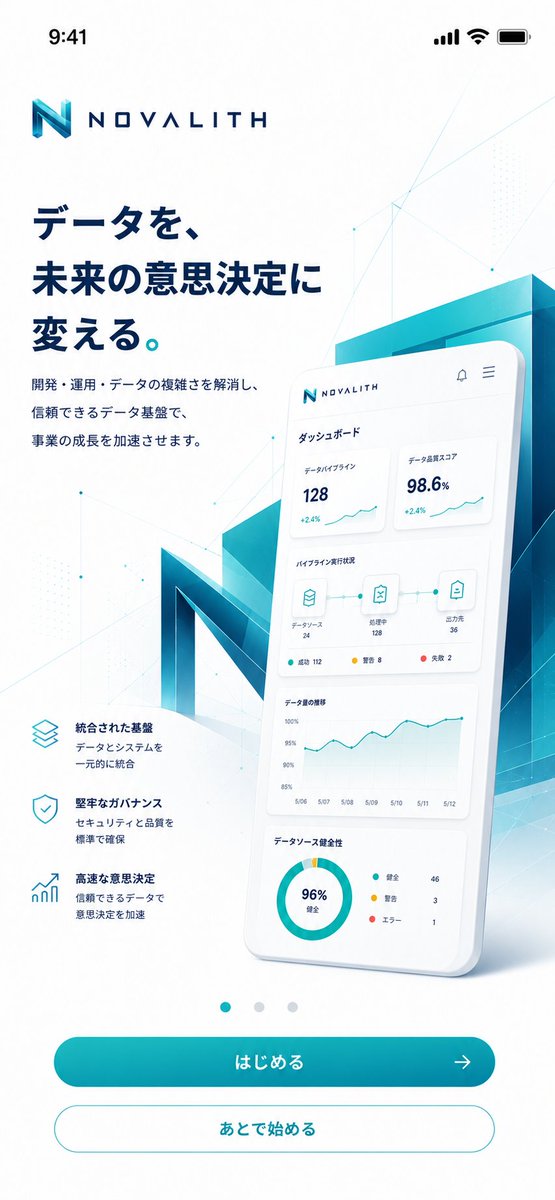
Goal: Create a polished mobile onboarding/top screen for a fictional B2B data platform named NOVALITH, in a premium Japanese SaaS visual style. Canvas: Vertical smartphone screenshot, 9:16 aspect ratio, white background, iOS status bar at the top showing 9:41 with signal, Wi-Fi, and battery icons. Use generous margins and a clean app-advertising composition. Layout: Place the NOVALITH logo near the top left, with a geometric turquoise-blue “N” mark and wide-spaced navy wordmark. Below it, set a large bold Japanese headline in dark navy: データを、未来の意思決定に変える。. Under the headline, add a smaller two-line Japanese description: 開発・運用・データの複雑さを解消し、信頼できるデータ基盤で、事業の成長を加速させます。. On the lower left, show exactly 3 feature blurbs with thin cyan outline icons: 1) stacked layers icon, title “統合された基盤”, description “データとシステムを一元的に統合”; 2) shield check icon, title “堅牢なガバナンス”, description “セキュリティと品質を標準で確保”; 3) rising bar chart icon, title “高速な意思決定”, description “信頼できるデータで意思決定を加速”. Hero visual: On the right half, create a large glossy 3D smartphone card tilted slightly backward, overlapping a translucent teal-blue architectural block and a giant faceted 3D letter N behind it. The phone screen shows a Japanese dashboard UI with exactly 4 dashboard sections: 1) top metric cards, with “データパイプライン 128 +2.4%” and “データ品質スコア 98.6% +2.4%”; 2) pipeline status row with three connected icons labeled “データソース 24”, “処理中 128”, and “出力先 36”, plus small status dots; 3) line chart titled “データ量の推移” with dates from 5/06 to 5/12; 4) donut chart titled “データソース健全性” showing “96% 健全” and a legend with “健全 46”, “警告 3”, “エラー 1”. Keep the dashboard text small but believable and neatly aligned. Bottom navigation and actions: Center exactly 3 small carousel dots above the buttons; the first dot is teal and active, the other two are pale gray. Add exactly 2 rounded buttons at the bottom: a filled teal gradient primary button labeled はじめる with a right arrow icon, and a white secondary button with teal outline labeled あとで始める. Visual style: Futuristic enterprise data analytics, crisp vector UI mixed with soft 3D glassmorphism. Palette is white, deep navy, cyan, teal, and aqua gradients. Add subtle polygon network lines, tiny nodes, faint dotted patterns, and light geometric overlays across the background. Use soft shadows, clean Japanese typography, high contrast, and a premium App Store marketing feel. Avoid clutter, avoid extra buttons, avoid extra feature items, and do not add watermarks.

20 modelde çalışır

  • Flux
  • Flux 2
  • Flux Kontext
  • GPT-4o Image
  • GPT Image
  • GPT Image 2
  • GPT Image 2.5
  • GPT Image 2.6
  • Grok Imagine
  • Ideogram V3
  • Imagen 4
  • Kling
  • +8 Daha fazla

Bu prompt ne üretir

Split-Page Coffee Shop Travel Journal Belirtilmedi gpt-image-2
Cute Chibi Characters in a Sweet Playful Moment Belirtilmedi gpt-image-2
Underground Train Yard Clash Anime Development Board Belirtilmedi gpt-image-2
Realistic Group Selfie with Smartphone Flash Effect Belirtilmedi nano-banana-pro
Exploded-View Structural Cutaway for Food Photography Belirtilmedi nano-banana-pro
Four Seasons Portrait Collage Belirtilmedi nano-banana-pro

Run bu prompt ile bu API

bu request below sends bu prompt, ile its default values filled in, to bu first model it runs on. Swap bu model name için any other model listed above.

prompt API belgeleri
/api/v1/gpt_image_2/text_to_image
curl -X POST https://runapi.ai/api/v1/gpt_image_2/text_to_image \
  -H "Authorization: Bearer $RUNAPI_API_KEY" \
  -H "Content-Type: application/json" \
  --data-binary @- <<'JSON'
{
  "model": "gpt-image-2",
  "prompt": "Goal: Create a polished mobile onboarding/top screen for a fictional B2B data platform named NOVALITH, in a premium Japanese SaaS visual style.\n\nCanvas: Vertical smartphone screenshot, 9:16 aspect ratio, white background, iOS status bar at the top showing 9:41 with signal, Wi-Fi, and battery icons. Use generous margins and a clean app-advertising composition.\n\nLayout: Place the NOVALITH logo near the top left, with a geometric turquoise-blue “N” mark and wide-spaced navy wordmark. Below it, set a large bold Japanese headline in dark navy: データを、未来の意思決定に変える。. Under the headline, add a smaller two-line Japanese description: 開発・運用・データの複雑さを解消し、信頼できるデータ基盤で、事業の成長を加速させます。. On the lower left, show exactly 3 feature blurbs with thin cyan outline icons: 1) stacked layers icon, title “統合された基盤”, description “データとシステムを一元的に統合”; 2) shield check icon, title “堅牢なガバナンス”, description “セキュリティと品質を標準で確保”; 3) rising bar chart icon, title “高速な意思決定”, description “信頼できるデータで意思決定を加速”.\n\nHero visual: On the right half, create a large glossy 3D smartphone card tilted slightly backward, overlapping a translucent teal-blue architectural block and a giant faceted 3D letter N behind it. The phone screen shows a Japanese dashboard UI with exactly 4 dashboard sections: 1) top metric cards, with “データパイプライン 128 +2.4%” and “データ品質スコア 98.6% +2.4%”; 2) pipeline status row with three connected icons labeled “データソース 24”, “処理中 128”, and “出力先 36”, plus small status dots; 3) line chart titled “データ量の推移” with dates from 5/06 to 5/12; 4) donut chart titled “データソース健全性” showing “96% 健全” and a legend with “健全 46”, “警告 3”, “エラー 1”. Keep the dashboard text small but believable and neatly aligned.\n\nBottom navigation and actions: Center exactly 3 small carousel dots above the buttons; the first dot is teal and active, the other two are pale gray. Add exactly 2 rounded buttons at the bottom: a filled teal gradient primary button labeled はじめる with a right arrow icon, and a white secondary button with teal outline labeled あとで始める.\n\nVisual style: Futuristic enterprise data analytics, crisp vector UI mixed with soft 3D glassmorphism. Palette is white, deep navy, cyan, teal, and aqua gradients. Add subtle polygon network lines, tiny nodes, faint dotted patterns, and light geometric overlays across the background. Use soft shadows, clean Japanese typography, high contrast, and a premium App Store marketing feel. Avoid clutter, avoid extra buttons, avoid extra feature items, and do not add watermarks."
}
JSON

Dene a prompt

Tahmini: $0.04 / görsel

RunAPI ile oluşturmak için giriş yapın.

Oluşturmak için giriş yapın

Mevcut dil modellerinizle oluşturmaya başlamak için giriş yapın.

















