Retro Claude Code Usage Gauge

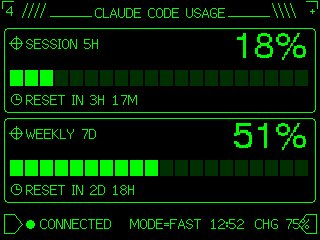
Transforms a simple usage meter reference into a neon-green pixel terminal dashboard suitable for an M5Stack-style device UI.
Retro Claude Code Usage Gauge

prompt

Using REFERENCE_0 as the functional layout and data source, redesign it as a polished monochrome neon-green retro terminal UI for an M5Stack-style low-resolution display. Keep the same concept of a Claude Code usage gauge with 2 usage panels: SESSION 5H and WEEKLY 7D. Convert the plain progress bars into segmented pixel bars with 24 rectangular blocks each, preserve the approximate usage values but update the visible numbers to 18% and 51%. Add thin glowing green borders around each panel, pixel/bitmap typography, small target/crosshair icons beside the panel titles, and clock icons beside the reset lines. Replace the simple title with a decorative header reading CLAUDE CODE USAGE, flanked by terminal-like slashes and line ornaments. At the bottom, add a retro status row with a flag/terminal outline icon, green connection dot, CONNECTED, MODE=FAST, 12:52, and CHG 75% with a small battery/charging icon. Use a black background, bright CRT green lines, crisp pixel art styling, and make the result look like a refined embedded-device dashboard rather than a flat chart.

20 modelde çalışır

  • Flux
  • Flux 2
  • Flux Kontext
  • GPT-4o Image
  • GPT Image
  • GPT Image 2
  • GPT Image 2.5
  • GPT Image 2.6
  • Grok Imagine
  • Ideogram V3
  • Imagen 4
  • Kling
  • +8 Daha fazla

Bu prompt ne üretir

Split-Page Coffee Shop Travel Journal Belirtilmedi gpt-image-2
Cute Chibi Characters in a Sweet Playful Moment Belirtilmedi gpt-image-2
Underground Train Yard Clash Anime Development Board Belirtilmedi gpt-image-2
Realistic Group Selfie with Smartphone Flash Effect Belirtilmedi nano-banana-pro
Exploded-View Structural Cutaway for Food Photography Belirtilmedi nano-banana-pro
Four Seasons Portrait Collage Belirtilmedi nano-banana-pro

Run bu prompt ile bu API

bu request below sends bu prompt, ile its default values filled in, to bu first model it runs on. Swap bu model name için any other model listed above.

prompt API belgeleri
/api/v1/gpt_image_2/text_to_image
curl -X POST https://runapi.ai/api/v1/gpt_image_2/text_to_image \
  -H "Authorization: Bearer $RUNAPI_API_KEY" \
  -H "Content-Type: application/json" \
  --data-binary @- <<'JSON'
{
  "model": "gpt-image-2",
  "prompt": "Using REFERENCE_0 as the functional layout and data source, redesign it as a polished monochrome neon-green retro terminal UI for an M5Stack-style low-resolution display. Keep the same concept of a Claude Code usage gauge with 2 usage panels: SESSION 5H and WEEKLY 7D. Convert the plain progress bars into segmented pixel bars with 24 rectangular blocks each, preserve the approximate usage values but update the visible numbers to 18% and 51%. Add thin glowing green borders around each panel, pixel/bitmap typography, small target/crosshair icons beside the panel titles, and clock icons beside the reset lines. Replace the simple title with a decorative header reading CLAUDE CODE USAGE, flanked by terminal-like slashes and line ornaments. At the bottom, add a retro status row with a flag/terminal outline icon, green connection dot, CONNECTED, MODE=FAST, 12:52, and CHG 75% with a small battery/charging icon. Use a black background, bright CRT green lines, crisp pixel art styling, and make the result look like a refined embedded-device dashboard rather than a flat chart."
}
JSON

Dene a prompt

Tahmini: $0.04 / görsel

RunAPI ile oluşturmak için giriş yapın.

Oluşturmak için giriş yapın

Mevcut dil modellerinizle oluşturmaya başlamak için giriş yapın.