Cute Google Fonts Tutorial Infographic

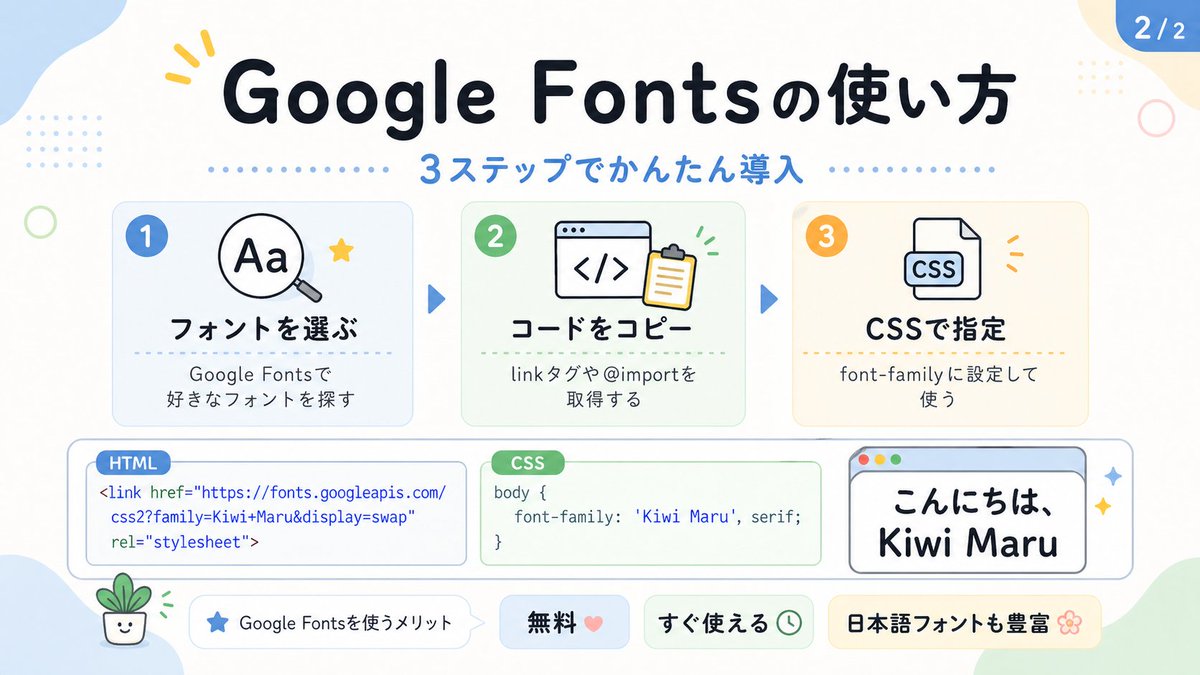
This prompt generates a pastel Japanese educational infographic slide explaining Google Fonts setup in three steps, suitable for social media carousels or tech tutorial posts.
Cute Google Fonts Tutorial Infographic

Prompt

Create a cute pastel Japanese infographic slide with a clean white background and soft rounded abstract corner blobs in pale blue, cream, and light green. The design is friendly, educational, and modern, with thick rounded sans-serif Japanese typography, subtle drop shadows, thin gray outlines, dotted divider accents, and small decorative doodles. At the top center, place a large bold headline in dark navy that reads "Google Fontsの使い方". Directly below it, add a blue subheadline reading "3ステップでかんたん導入" with a horizontal row of small blue dots on both sides. In the top right corner, add a rounded blue page badge that reads "2/2". Arrange 3 rounded rectangular step cards across the upper middle row, evenly spaced left to right, each with a pale tinted background, soft border, and a colored circular number badge in the upper left. Card 1 has a pale blue background and a blue badge with "1". Inside, show a simple magnifying glass icon over the letters "Aa" plus a small yellow star accent. The bold title reads "フォントを選ぶ" and the smaller text below reads "Google Fontsで 好きなフォントを探す". Card 2 has a pale green background and a green badge with "2". Inside, show a browser window icon with code brackets "</>" and a clipboard, plus tiny green motion marks. The bold title reads "コードをコピー" and the smaller text below reads "linkタグや@importを 取得する". Card 3 has a pale cream background and an orange badge with "3". Inside, show a document icon labeled "CSS" with small orange accent marks. The bold title reads "CSSで指定" and the smaller text below reads "font-family に設定して 使う". Place 2 medium blue triangular arrows between the 3 cards to show progression. Across the lower middle, create 3 horizontally aligned demo boxes. The left box is a rounded white code panel with a small blue tab label reading "HTML". Inside, display this code in blue text exactly across 3 lines: "<link href=\"https://fonts.googleapis.com/" "css2?family=Kiwi+Maru&display=swap" "rel=\"stylesheet\">". The center box is a rounded white code panel with a green tab label reading "CSS". Inside, display dark text exactly as: "body {" " font-family: 'Kiwi Maru', serif;" "}". The right box is a rounded white mock browser window with a pale blue title bar and 3 tiny circular window buttons at top left in red, yellow, and green. Inside, show large Japanese sample text in black reading "こんにちは、 Kiwi Maru" in a cute rounded handwritten-style font. Add 2 small sparkle accents to the right of this browser window. At the bottom, place 4 pill-shaped badges from left to right. Badge 1 is white with a small blue star icon and text "Google Fontsを使うメリット". Badge 2 is pale blue with bold text "無料" followed by a pink heart. Badge 3 is pale green with bold text "すぐ使える" followed by a small clock icon. Badge 4 is pale yellow with bold text "日本語フォントも豊富" followed by a flower icon. Add 4 extra decorative elements around the canvas: a yellow 3-stroke sparkle near the top left of the headline, a pale blue dotted square grid in the upper left background, a thin light green ring on the left side, and a tiny smiling potted plant illustration in the lower left corner. Keep the whole composition flat vector-like, crisp, cute, and highly legible, in a social-media educational carousel style.

Runs on 18 models

  • Flux
  • Flux 2
  • Flux Kontext
  • GPT-4o Image
  • GPT Image
  • GPT Image 2
  • GPT Image 2.5
  • Grok Imagine
  • Ideogram V3
  • Imagen 4
  • Midjourney
  • Nano Banana
  • +6 more

What this prompt produces

Realistic Group Selfie with Smartphone Flash Effect Not specified nano-banana-pro
Four Seasons Portrait Collage Not specified nano-banana-pro
Minimalist Dog Sketch Clipart Not specified nano-banana-pro
Mecha Girl figure concept generated by Nano Banana Pro Not specified nano-banana-pro
Candid Flash Photography: Chaotic Holiday Party (Duplicate) Not specified nano-banana-pro
Ethereal Floral Studio Portrait Not specified nano-banana-pro

Run this prompt with the API

The request below sends this prompt, with its default values filled in, to the first model it runs on. Swap the model name for any other model listed above.

Prompt API docs
/api/v1/gpt_image_2/text_to_image
curl -X POST https://runapi.ai/api/v1/gpt_image_2/text_to_image \
  -H "Authorization: Bearer $RUNAPI_API_KEY" \
  -H "Content-Type: application/json" \
  --data-binary @- <<'JSON'
{
  "model": "gpt-image-2",
  "prompt": "Create a cute pastel Japanese infographic slide with a clean white background and soft rounded abstract corner blobs in pale blue, cream, and light green. The design is friendly, educational, and modern, with thick rounded sans-serif Japanese typography, subtle drop shadows, thin gray outlines, dotted divider accents, and small decorative doodles. At the top center, place a large bold headline in dark navy that reads \"Google Fontsの使い方\". Directly below it, add a blue subheadline reading \"3ステップでかんたん導入\" with a horizontal row of small blue dots on both sides. In the top right corner, add a rounded blue page badge that reads \"2/2\".\n\nArrange 3 rounded rectangular step cards across the upper middle row, evenly spaced left to right, each with a pale tinted background, soft border, and a colored circular number badge in the upper left. Card 1 has a pale blue background and a blue badge with \"1\". Inside, show a simple magnifying glass icon over the letters \"Aa\" plus a small yellow star accent. The bold title reads \"フォントを選ぶ\" and the smaller text below reads \"Google Fontsで\n好きなフォントを探す\". Card 2 has a pale green background and a green badge with \"2\". Inside, show a browser window icon with code brackets \"</>\" and a clipboard, plus tiny green motion marks. The bold title reads \"コードをコピー\" and the smaller text below reads \"linkタグや@importを\n取得する\". Card 3 has a pale cream background and an orange badge with \"3\". Inside, show a document icon labeled \"CSS\" with small orange accent marks. The bold title reads \"CSSで指定\" and the smaller text below reads \"font-family に設定して\n使う\". Place 2 medium blue triangular arrows between the 3 cards to show progression.\n\nAcross the lower middle, create 3 horizontally aligned demo boxes. The left box is a rounded white code panel with a small blue tab label reading \"HTML\". Inside, display this code in blue text exactly across 3 lines: \"<link href=\\\"https://fonts.googleapis.com/\"\n\"css2?family=Kiwi+Maru&display=swap\"\n\"rel=\\\"stylesheet\\\">\". The center box is a rounded white code panel with a green tab label reading \"CSS\". Inside, display dark text exactly as: \"body {\"\n\"    font-family: 'Kiwi Maru', serif;\"\n\"}\". The right box is a rounded white mock browser window with a pale blue title bar and 3 tiny circular window buttons at top left in red, yellow, and green. Inside, show large Japanese sample text in black reading \"こんにちは、\nKiwi Maru\" in a cute rounded handwritten-style font. Add 2 small sparkle accents to the right of this browser window.\n\nAt the bottom, place 4 pill-shaped badges from left to right. Badge 1 is white with a small blue star icon and text \"Google Fontsを使うメリット\". Badge 2 is pale blue with bold text \"無料\" followed by a pink heart. Badge 3 is pale green with bold text \"すぐ使える\" followed by a small clock icon. Badge 4 is pale yellow with bold text \"日本語フォントも豊富\" followed by a flower icon.\n\nAdd 4 extra decorative elements around the canvas: a yellow 3-stroke sparkle near the top left of the headline, a pale blue dotted square grid in the upper left background, a thin light green ring on the left side, and a tiny smiling potted plant illustration in the lower left corner. Keep the whole composition flat vector-like, crisp, cute, and highly legible, in a social-media educational carousel style."
}
JSON

Try a prompt

Estimated: $0.04 / image

Sign in to generate with RunAPI.

Sign in to generate

Sign in to start generating with your available language models.