Layered GPT Image 2 Workflow Infographic

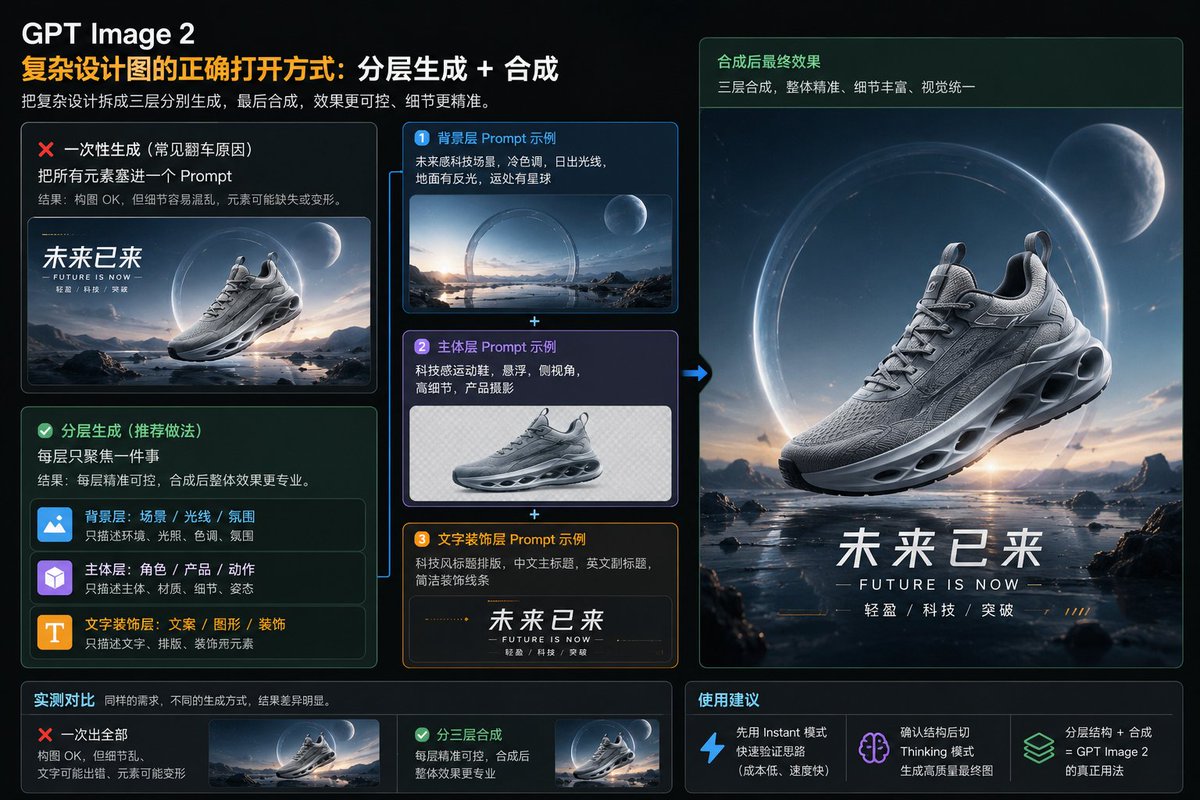
A dark futuristic Chinese infographic explaining layered AI image generation and compositing through a sci-fi sneaker advertisement example.
Layered GPT Image 2 Workflow Infographic

Prompt

Goal: Create a polished 16:9 Chinese tech infographic slide explaining the correct workflow for making complex design images with GPT Image 2: layered generation plus compositing, using a futuristic sneaker advertisement as the example. Canvas: Wide 16:9 dark interface-style presentation, approximately 1152×768, black-to-deep-navy background, thin glowing panel borders, rounded cards, subtle grid and glassmorphism. Accent colors are orange, cyan-blue, mint green, purple, and white. Overall look: premium AI design tutorial, SaaS dashboard, high contrast, crisp typography. Header: At top left, large white title “GPT Image 2”. Under it, a two-color Chinese headline: orange text “复杂设计图的正确打开方式:” followed by white text “分层生成 + 合成”. Below, a smaller gray subtitle: “把复杂设计拆成三层分别生成,最后合成,效果更可控、细节更精准。” Main layout: Split the slide into three columns. Left column compares wrong vs recommended method. Middle column shows exactly 3 separate prompt-layer example cards stacked vertically with plus signs between them. Right column shows the final composited sneaker poster. Bottom row contains exactly 2 comparison result cards on the left and exactly 3 recommendation cards on the right. Left column details: Create 2 large rounded cards. 1. Top card, red warning style with red X icon. Title: “一次性生成(常见翻车原因)”. Body: “把所有元素塞进一个 Prompt”. Smaller explanation: “结果:构图 OK,但细节容易混乱,元素可能缺失或变形。” Include a small preview image of a futuristic running shoe floating over a sci-fi landscape with large Chinese text “未来已来” and tiny English “FUTURE IS NOW”. 2. Bottom card, green success style with green check icon. Title: “分层生成(推荐做法)”. Body: “每层只聚焦一件事”. Smaller explanation: “结果:每层精准可控,合成后整体效果更专业。” Inside this card, show exactly 3 mini layer rows with icons and labels: blue image icon row “背景层:场景 / 光线 / 氛围” with note “只描述环境、光照、色调、氛围”; purple cube icon row “主体层:角色 / 产品 / 动作” with note “只描述主体、材质、细节、姿态”; orange T icon row “文字装饰层:文案 / 图形 / 装饰” with note “只描述文字、排版、装饰视觉元素”. Middle column details: Show exactly 3 stacked prompt example cards connected by cyan plus signs, and a cyan arrow pointing from the stack to the final poster on the right. 1. Blue card numbered “1”, title “背景层 Prompt 示例”. Text: “未来感科技场景,冷色调,日出光线,地面有反光,远处有星球”. Image: a wide empty sci-fi landscape with reflective water, mountains, sunrise, a large glowing ring, and a planet, no shoe. 2. Purple card numbered “2”, title “主体层 Prompt 示例”. Text: “科技感运动鞋,悬浮,侧视角,高细节,产品摄影”. Image: a single gray futuristic sneaker isolated on a transparent/checkered or pale background, no scenery, no text. 3. Orange card numbered “3”, title “文字装饰层 Prompt 示例”. Text: “科技风标题排版,中文主标题,英文副标题,简洁装饰线条”. Image: typography strip with Chinese title “未来已来”, English subtitle “FUTURE IS NOW”, small text “轻盈 / 科技 / 突破”, and fine orange decorative lines. Right column final poster: Large vertical rounded panel with a green header strip. Header title: “合成后最终效果”. Header subtitle: “三层合成,整体精准,细节丰富,视觉统一”. Below it, create a cinematic finished advertisement: a detailed gray futuristic running shoe floating above reflective shallow water in a sci-fi alien landscape, with mountains and rocks, dawn light, a huge glowing circular portal/ring behind the shoe, and a large moon/planet in the upper right. At the bottom of the poster, include bold Chinese headline 未来已来, English subtitle FUTURE IS NOW, and small spaced feature words “轻盈 / 科技 / 突破”. Bottom row: Create exactly 5 small cards total. Left section titled “实测对比” with caption “同样的需求,不同的生成方式,结果差异明显。” It contains 2 cards: red X card “一次出全部” with notes “构图 OK,但细节乱,文字可能出错,元素可能变形” and a tiny preview; green check card “分三层合成” with notes “每层精准可控,合成后整体效果更专业” and a tiny preview. Right section titled “使用建议” contains exactly 3 recommendation cards with icons: blue lightning icon “先用 Instant 模式快速验证思路(成本低、速度快)”; purple brain icon “确认结构后切 Thinking 模式生成高质量最终图”; green stacked-layers icon “分层结构 + 合成 = GPT Image 2 的真正用法”. Visual style: Modern Chinese infographic, dark glass panels, glowing neon outlines, realistic 3D product render previews, crisp white Chinese typography, orange emphasis for the main concept, green for recommended workflow, red for mistakes, cyan arrows and connectors. Keep all text legible and aligned. Use the futuristic sneaker theme consistently; the shoe should be silver-gray, aerodynamic, high-detail, with sculpted sole holes and visible laces. Constraints: Use exactly 3 layer example cards, exactly 3 mini layer rows, exactly 2 method comparison cards, exactly 3 usage recommendation cards, exactly 1 large final poster, and exactly 1 cyan arrow from the layer stack to the final poster. Do not add extra logos, watermarks, QR codes, people, or unrelated objects.

Runs on 18 models

  • Flux
  • Flux 2
  • Flux Kontext
  • GPT-4o Image
  • GPT Image
  • GPT Image 2
  • GPT Image 2.5
  • Grok Imagine
  • Ideogram V3
  • Imagen 4
  • Midjourney
  • Nano Banana
  • +6 more

What this prompt produces

Realistic Group Selfie with Smartphone Flash Effect Not specified nano-banana-pro
Four Seasons Portrait Collage Not specified nano-banana-pro
Minimalist Dog Sketch Clipart Not specified nano-banana-pro
Mecha Girl figure concept generated by Nano Banana Pro Not specified nano-banana-pro
Candid Flash Photography: Chaotic Holiday Party (Duplicate) Not specified nano-banana-pro
Ethereal Floral Studio Portrait Not specified nano-banana-pro

Run this prompt with the API

The request below sends this prompt, with its default values filled in, to the first model it runs on. Swap the model name for any other model listed above.

Prompt API docs
/api/v1/gpt_image_2/text_to_image
curl -X POST https://runapi.ai/api/v1/gpt_image_2/text_to_image \
  -H "Authorization: Bearer $RUNAPI_API_KEY" \
  -H "Content-Type: application/json" \
  --data-binary @- <<'JSON'
{
  "model": "gpt-image-2",
  "prompt": "Goal: Create a polished 16:9 Chinese tech infographic slide explaining the correct workflow for making complex design images with GPT Image 2: layered generation plus compositing, using a futuristic sneaker advertisement as the example.\n\nCanvas: Wide 16:9 dark interface-style presentation, approximately 1152×768, black-to-deep-navy background, thin glowing panel borders, rounded cards, subtle grid and glassmorphism. Accent colors are orange, cyan-blue, mint green, purple, and white. Overall look: premium AI design tutorial, SaaS dashboard, high contrast, crisp typography.\n\nHeader: At top left, large white title “GPT Image 2”. Under it, a two-color Chinese headline: orange text “复杂设计图的正确打开方式:” followed by white text “分层生成 + 合成”. Below, a smaller gray subtitle: “把复杂设计拆成三层分别生成,最后合成,效果更可控、细节更精准。”\n\nMain layout: Split the slide into three columns. Left column compares wrong vs recommended method. Middle column shows exactly 3 separate prompt-layer example cards stacked vertically with plus signs between them. Right column shows the final composited sneaker poster. Bottom row contains exactly 2 comparison result cards on the left and exactly 3 recommendation cards on the right.\n\nLeft column details: Create 2 large rounded cards.\n1. Top card, red warning style with red X icon. Title: “一次性生成(常见翻车原因)”. Body: “把所有元素塞进一个 Prompt”. Smaller explanation: “结果:构图 OK,但细节容易混乱,元素可能缺失或变形。” Include a small preview image of a futuristic running shoe floating over a sci-fi landscape with large Chinese text “未来已来” and tiny English “FUTURE IS NOW”.\n2. Bottom card, green success style with green check icon. Title: “分层生成(推荐做法)”. Body: “每层只聚焦一件事”. Smaller explanation: “结果:每层精准可控,合成后整体效果更专业。” Inside this card, show exactly 3 mini layer rows with icons and labels: blue image icon row “背景层:场景 / 光线 / 氛围” with note “只描述环境、光照、色调、氛围”; purple cube icon row “主体层:角色 / 产品 / 动作” with note “只描述主体、材质、细节、姿态”; orange T icon row “文字装饰层:文案 / 图形 / 装饰” with note “只描述文字、排版、装饰视觉元素”.\n\nMiddle column details: Show exactly 3 stacked prompt example cards connected by cyan plus signs, and a cyan arrow pointing from the stack to the final poster on the right.\n1. Blue card numbered “1”, title “背景层 Prompt 示例”. Text: “未来感科技场景,冷色调,日出光线,地面有反光,远处有星球”. Image: a wide empty sci-fi landscape with reflective water, mountains, sunrise, a large glowing ring, and a planet, no shoe.\n2. Purple card numbered “2”, title “主体层 Prompt 示例”. Text: “科技感运动鞋,悬浮,侧视角,高细节,产品摄影”. Image: a single gray futuristic sneaker isolated on a transparent/checkered or pale background, no scenery, no text.\n3. Orange card numbered “3”, title “文字装饰层 Prompt 示例”. Text: “科技风标题排版,中文主标题,英文副标题,简洁装饰线条”. Image: typography strip with Chinese title “未来已来”, English subtitle “FUTURE IS NOW”, small text “轻盈 / 科技 / 突破”, and fine orange decorative lines.\n\nRight column final poster: Large vertical rounded panel with a green header strip. Header title: “合成后最终效果”. Header subtitle: “三层合成,整体精准,细节丰富,视觉统一”. Below it, create a cinematic finished advertisement: a detailed gray futuristic running shoe floating above reflective shallow water in a sci-fi alien landscape, with mountains and rocks, dawn light, a huge glowing circular portal/ring behind the shoe, and a large moon/planet in the upper right. At the bottom of the poster, include bold Chinese headline 未来已来, English subtitle FUTURE IS NOW, and small spaced feature words “轻盈 / 科技 / 突破”.\n\nBottom row: Create exactly 5 small cards total.\nLeft section titled “实测对比” with caption “同样的需求,不同的生成方式,结果差异明显。” It contains 2 cards: red X card “一次出全部” with notes “构图 OK,但细节乱,文字可能出错,元素可能变形” and a tiny preview; green check card “分三层合成” with notes “每层精准可控,合成后整体效果更专业” and a tiny preview.\nRight section titled “使用建议” contains exactly 3 recommendation cards with icons: blue lightning icon “先用 Instant 模式快速验证思路(成本低、速度快)”; purple brain icon “确认结构后切 Thinking 模式生成高质量最终图”; green stacked-layers icon “分层结构 + 合成 = GPT Image 2 的真正用法”.\n\nVisual style: Modern Chinese infographic, dark glass panels, glowing neon outlines, realistic 3D product render previews, crisp white Chinese typography, orange emphasis for the main concept, green for recommended workflow, red for mistakes, cyan arrows and connectors. Keep all text legible and aligned. Use the futuristic sneaker theme consistently; the shoe should be silver-gray, aerodynamic, high-detail, with sculpted sole holes and visible laces.\n\nConstraints: Use exactly 3 layer example cards, exactly 3 mini layer rows, exactly 2 method comparison cards, exactly 3 usage recommendation cards, exactly 1 large final poster, and exactly 1 cyan arrow from the layer stack to the final poster. Do not add extra logos, watermarks, QR codes, people, or unrelated objects."
}
JSON

Try a prompt

Estimated: $0.04 / image

Sign in to generate with RunAPI.

Sign in to generate

Sign in to start generating with your available language models.