GitHub README Anime Gallery Screenshot

Generates a dark-mode GitHub README screenshot featuring a Chinese anime and manga prompt-gallery section with three fashion portrait thumbnails.
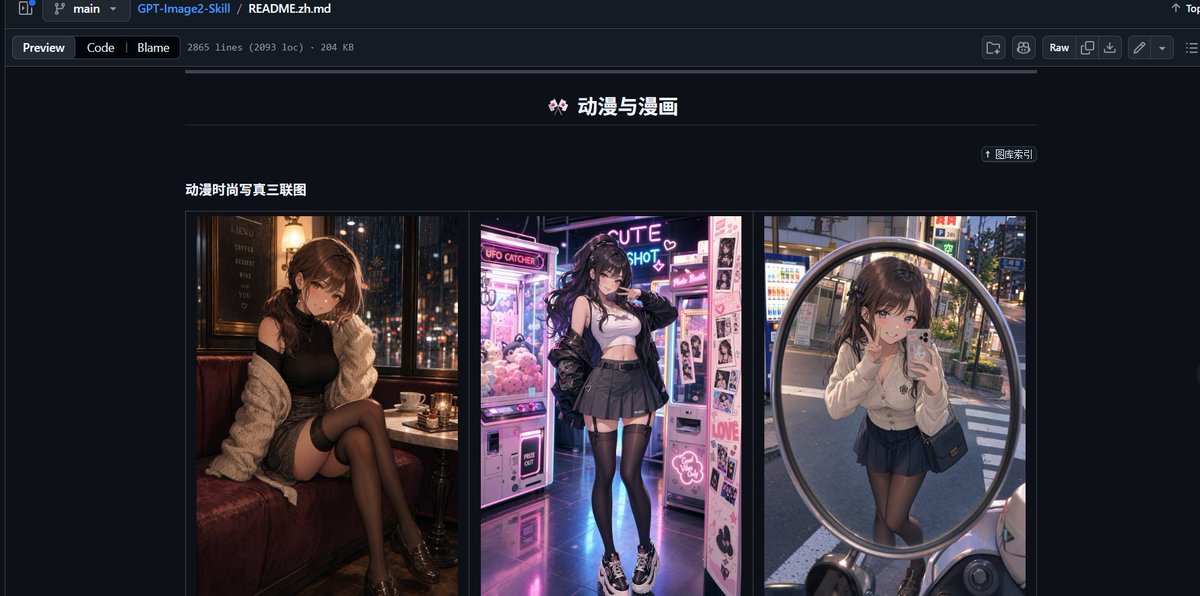
GitHub README Anime Gallery Screenshot

Prompt

Goal: Create a realistic desktop browser screenshot of a GitHub repository README page in dark mode, showcasing an image-prompt collection. The page should look like GitHub’s file preview interface, with the repository path and README file visible at the top. Canvas: Wide 16:9 screenshot, approximately 1200×565 px, dark navy/black GitHub UI, sharp interface details, no browser address bar. Top interface: Show a GitHub-style header and breadcrumb bar with branch selector “main”, repository name “GPT-Image2-Skill”, and file path “README.zh.md”. Under it, include tabs/buttons “Preview”, “Code”, and “Blame”, plus small metadata text reading approximately “2865 lines (2093 loc) · 204 KB”. On the right side include typical GitHub controls such as “Raw” and small icon buttons. Main README content: Center the content column on a dark background. At the top of the visible README section, place a centered Chinese title with a small decorative emoji: “🎀 动漫与漫画”. Beneath it, draw a thin horizontal divider line. On the upper right of the content area, include a small pill-shaped link button labeled “↑ 图库索引”. Section: Below the divider, add a bold subsection title on the left: “动漫时尚写真三联图”. Under this title, create one bordered gallery row containing exactly 3 vertical image panels placed side by side with narrow gaps: 1. Left panel: anime-fashion style portrait of a young woman sitting in a cozy dim café booth at night, warm lamps, city lights outside the window, black outfit, cream cardigan, black stockings, moody cinematic lighting; face intentionally blurred or pixelated. 2. Center panel: anime-fashion style full-body portrait of a young woman in a neon arcade or photo booth area, pink and purple glowing claw machines and sticker photo machines, white crop top, black jacket, pleated skirt, thigh-high stockings, chunky sneakers; face intentionally blurred or pixelated. 3. Right panel: anime-fashion style mirror selfie reflected in a large round convex street mirror in an urban Japanese street, vending machines and evening city background, cream cardigan, dark pleated skirt, black stockings, small shoulder bag; face intentionally blurred or pixelated. Visual style: Highly realistic GitHub dark-mode screenshot combined with vivid anime-fashion thumbnail imagery. Use crisp UI typography, thin borders, muted gray separators, and a dark navy page background. Keep the thumbnails colorful and glossy while the surrounding GitHub interface remains subdued. Text constraints: Preserve the visible Chinese labels exactly where shown: “动漫与漫画”, “图库索引”, and “动漫时尚写真三联图”. Do not add extra README sections, comments, watermarks, or unrelated text. The final image should resemble a social media screenshot demonstrating a repository’s built-in prompt presets.

Runs on 18 models

  • Flux
  • Flux 2
  • Flux Kontext
  • GPT-4o Image
  • GPT Image
  • GPT Image 2
  • GPT Image 2.5
  • Grok Imagine
  • Ideogram V3
  • Imagen 4
  • Midjourney
  • Nano Banana
  • +6 more

What this prompt produces

Realistic Group Selfie with Smartphone Flash Effect Not specified nano-banana-pro
Four Seasons Portrait Collage Not specified nano-banana-pro
Minimalist Dog Sketch Clipart Not specified nano-banana-pro
Mecha Girl figure concept generated by Nano Banana Pro Not specified nano-banana-pro
Candid Flash Photography: Chaotic Holiday Party (Duplicate) Not specified nano-banana-pro
Ethereal Floral Studio Portrait Not specified nano-banana-pro

Run this prompt with the API

The request below sends this prompt, with its default values filled in, to the first model it runs on. Swap the model name for any other model listed above.

Prompt API docs
/api/v1/gpt_image_2/text_to_image
curl -X POST https://runapi.ai/api/v1/gpt_image_2/text_to_image \
  -H "Authorization: Bearer $RUNAPI_API_KEY" \
  -H "Content-Type: application/json" \
  --data-binary @- <<'JSON'
{
  "model": "gpt-image-2",
  "prompt": "Goal: Create a realistic desktop browser screenshot of a GitHub repository README page in dark mode, showcasing an image-prompt collection. The page should look like GitHub’s file preview interface, with the repository path and README file visible at the top.\n\nCanvas: Wide 16:9 screenshot, approximately 1200×565 px, dark navy/black GitHub UI, sharp interface details, no browser address bar.\n\nTop interface: Show a GitHub-style header and breadcrumb bar with branch selector “main”, repository name “GPT-Image2-Skill”, and file path “README.zh.md”. Under it, include tabs/buttons “Preview”, “Code”, and “Blame”, plus small metadata text reading approximately “2865 lines (2093 loc) · 204 KB”. On the right side include typical GitHub controls such as “Raw” and small icon buttons.\n\nMain README content: Center the content column on a dark background. At the top of the visible README section, place a centered Chinese title with a small decorative emoji: “🎀 动漫与漫画”. Beneath it, draw a thin horizontal divider line. On the upper right of the content area, include a small pill-shaped link button labeled “↑ 图库索引”.\n\nSection: Below the divider, add a bold subsection title on the left: “动漫时尚写真三联图”. Under this title, create one bordered gallery row containing exactly 3 vertical image panels placed side by side with narrow gaps:\n1. Left panel: anime-fashion style portrait of a young woman sitting in a cozy dim café booth at night, warm lamps, city lights outside the window, black outfit, cream cardigan, black stockings, moody cinematic lighting; face intentionally blurred or pixelated.\n2. Center panel: anime-fashion style full-body portrait of a young woman in a neon arcade or photo booth area, pink and purple glowing claw machines and sticker photo machines, white crop top, black jacket, pleated skirt, thigh-high stockings, chunky sneakers; face intentionally blurred or pixelated.\n3. Right panel: anime-fashion style mirror selfie reflected in a large round convex street mirror in an urban Japanese street, vending machines and evening city background, cream cardigan, dark pleated skirt, black stockings, small shoulder bag; face intentionally blurred or pixelated.\n\nVisual style: Highly realistic GitHub dark-mode screenshot combined with vivid anime-fashion thumbnail imagery. Use crisp UI typography, thin borders, muted gray separators, and a dark navy page background. Keep the thumbnails colorful and glossy while the surrounding GitHub interface remains subdued.\n\nText constraints: Preserve the visible Chinese labels exactly where shown: “动漫与漫画”, “图库索引”, and “动漫时尚写真三联图”. Do not add extra README sections, comments, watermarks, or unrelated text. The final image should resemble a social media screenshot demonstrating a repository’s built-in prompt presets."
}
JSON

Try a prompt

Estimated: $0.04 / image

Sign in to generate with RunAPI.

Sign in to generate

Sign in to start generating with your available language models.

















