Anime Crowd Camera POV Comparison

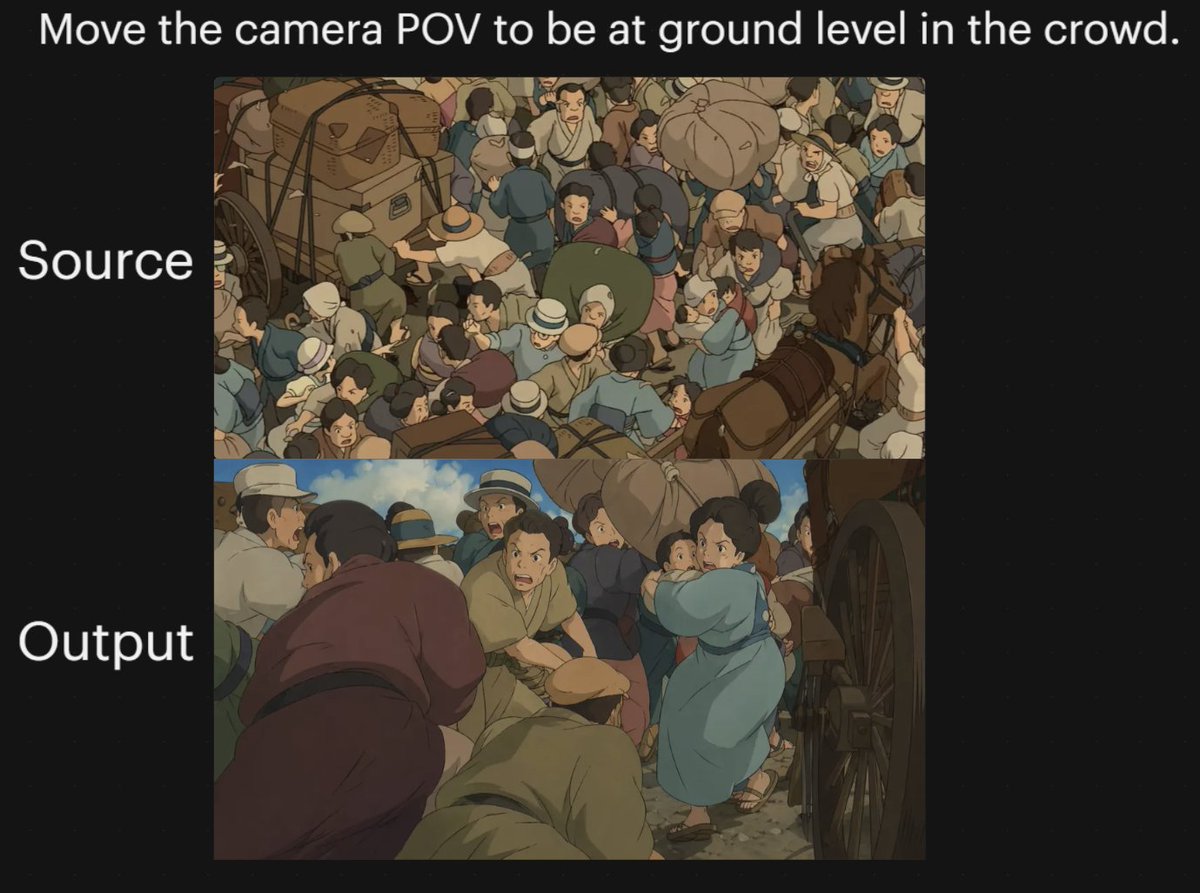
This prompt generates a two-panel black-background comparison graphic showing an anime crowd scene before and after changing the camera to a ground-level perspective, useful for demonstrating viewpoint transformation in image models.
Anime Crowd Camera POV Comparison

Prompt

A two-panel comparison graphic on a black background demonstrating a dramatic camera-angle change in an anime-style crowded street scene. Place a large white sentence centered across the top: "Move the camera POV to be at ground level in the crowd.". On the left side, add two large white labels aligned with the panels: "Source" beside the upper panel and "Output" beside the lower panel. Create exactly 2 stacked rectangular image panels centered on the canvas. In the top panel, show a high-angle overhead view of a densely packed historical street crowd in a hand-painted anime film style, with dozens of people pressed together around horse-drawn carts and wagon wheels; include bundled luggage, hats, muted earth-tone clothing, blue and tan garments, and a busy composition where figures overlap in every direction. In the bottom panel, recreate the same type of scene but shift the camera to a low, ground-level point of view inside the crowd, looking between bodies and beside a large wagon wheel on the right edge. The foreground should feel immersive and cramped, with several bent or crouched figures close to the camera, a person in a muted purple robe on the left foreground, a kneeling or hunched figure in tan near the center bottom, and a woman in a light blue dress or coat toward the right-middle turning through the crowd while holding a small child. Keep the environment as a chaotic old-world market or transit street with horses, carts, people in brimmed hats and simple period clothing, dusty ground, and warm subdued colors. Use soft cinematic anime lighting, painterly shading, and the visual feel of a classic Studio Ghibli crowd sequence. The overall image should read as a before-and-after camera experiment, with the upper panel as the original overhead composition and the lower panel as the transformed low-angle perspective.

Runs on 18 models

  • Flux
  • Flux 2
  • Flux Kontext
  • GPT-4o Image
  • GPT Image
  • GPT Image 2
  • GPT Image 2.5
  • Grok Imagine
  • Ideogram V3
  • Imagen 4
  • Midjourney
  • Nano Banana
  • +6 more

What this prompt produces

Realistic Group Selfie with Smartphone Flash Effect Not specified nano-banana-pro
Four Seasons Portrait Collage Not specified nano-banana-pro
Minimalist Dog Sketch Clipart Not specified nano-banana-pro
Mecha Girl figure concept generated by Nano Banana Pro Not specified nano-banana-pro
Candid Flash Photography: Chaotic Holiday Party (Duplicate) Not specified nano-banana-pro
Ethereal Floral Studio Portrait Not specified nano-banana-pro

Run this prompt with the API

The request below sends this prompt, with its default values filled in, to the first model it runs on. Swap the model name for any other model listed above.

Prompt API docs
/api/v1/gpt_image_2/text_to_image
curl -X POST https://runapi.ai/api/v1/gpt_image_2/text_to_image \
  -H "Authorization: Bearer $RUNAPI_API_KEY" \
  -H "Content-Type: application/json" \
  --data-binary @- <<'JSON'
{
  "model": "gpt-image-2",
  "prompt": "A two-panel comparison graphic on a black background demonstrating a dramatic camera-angle change in an anime-style crowded street scene. Place a large white sentence centered across the top: \"Move the camera POV to be at ground level in the crowd.\". On the left side, add two large white labels aligned with the panels: \"Source\" beside the upper panel and \"Output\" beside the lower panel. Create exactly 2 stacked rectangular image panels centered on the canvas. In the top panel, show a high-angle overhead view of a densely packed historical street crowd in a hand-painted anime film style, with dozens of people pressed together around horse-drawn carts and wagon wheels; include bundled luggage, hats, muted earth-tone clothing, blue and tan garments, and a busy composition where figures overlap in every direction. In the bottom panel, recreate the same type of scene but shift the camera to a low, ground-level point of view inside the crowd, looking between bodies and beside a large wagon wheel on the right edge. The foreground should feel immersive and cramped, with several bent or crouched figures close to the camera, a person in a muted purple robe on the left foreground, a kneeling or hunched figure in tan near the center bottom, and a woman in a light blue dress or coat toward the right-middle turning through the crowd while holding a small child. Keep the environment as a chaotic old-world market or transit street with horses, carts, people in brimmed hats and simple period clothing, dusty ground, and warm subdued colors. Use soft cinematic anime lighting, painterly shading, and the visual feel of a classic Studio Ghibli crowd sequence. The overall image should read as a before-and-after camera experiment, with the upper panel as the original overhead composition and the lower panel as the transformed low-angle perspective."
}
JSON

Try a prompt

Estimated: $0.04 / image

Sign in to generate with RunAPI.

Sign in to generate

Sign in to start generating with your available language models.