GPT Image 2 Manga Planning Infographic

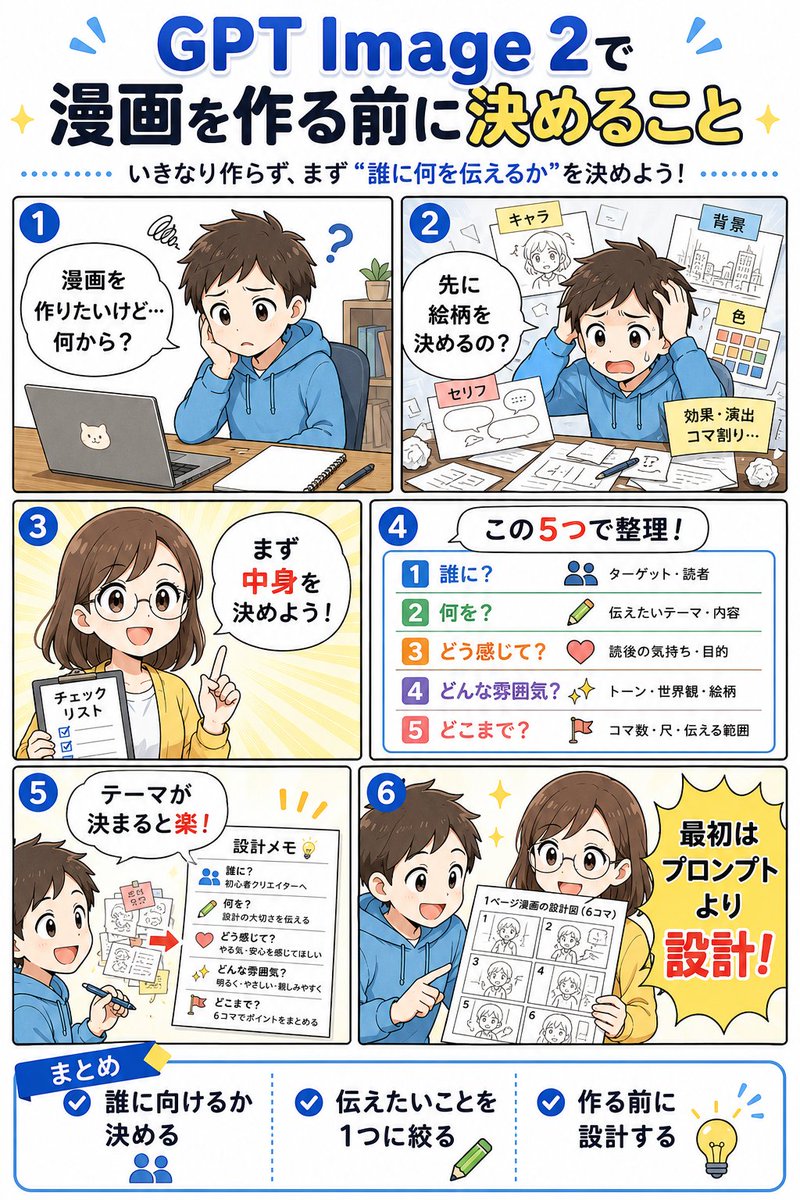
A Japanese manga-style educational infographic explaining the five planning decisions to make before creating a comic with GPT Image 2.
GPT Image 2 Manga Planning Infographic

Prompt

Goal: Create a vertical Japanese manga-style educational infographic about planning a comic before making it with GPT Image 2. The main headline should read 「GPT Image 2で 漫画を作る前に決めること」 with 「決めること」 emphasized in yellow, and the subtitle should read 「いきなり作らず、まず“誰に何を伝えるか”を決めよう!」. Canvas: Portrait 2:3 infographic, clean white background, bright blue accent color, thick rounded comic-panel borders, cheerful instructional tone, polished digital anime illustration. Use large readable Japanese typography with blue, black, yellow, and red emphasis. Add small sparkle and motion-line decorations near the title. Layout: Arrange exactly 6 numbered manga panels in a 2-column grid, numbered with blue circles 1 through 6 in the upper-left corner of each panel, followed by one wide bottom summary box. Panel 1: A young male student in a blue hoodie sits at a wooden desk with a laptop that has a cat sticker, a notebook, and a pen. He looks confused with a scribble above his head and a question mark. Add a speech bubble: 「漫画を作りたいけど…何から?」. His face is covered by a soft beige rectangular blur. Panel 2: The same boy worries at a cluttered desk covered with papers. Around him float exactly 5 planning sheets or sticky notes labeled: 「キャラ」, 「背景」, 「色」, 「セリフ」, and 「効果・演出 コマ割り…」. Add a speech bubble: 「先に絵柄を決めるの?」. Panel 3: A young female teacher/advisor in a yellow cardigan holds a checklist and raises one finger, standing against a warm yellow radial burst background. Her face is covered by a soft beige rectangular blur. Add a speech bubble: 「まず中身を決めよう!」. The checklist title reads 「チェックリスト」 and shows three checked boxes. Panel 4: A clean list card titled 「この5つで整理!」. Show exactly 5 colored rows with matching icons and labels: 1 「誰に?」 with a people icon and note 「ターゲット・読者」; 2 「何を?」 with a pencil icon and note 「伝えたいテーマ・内容」; 3 「どう感じて?」 with a heart icon and note 「読後の気持ち・目的」; 4 「どんな雰囲気?」 with sparkles icon and note 「トーン・世界観・絵柄」; 5 「どこまで?」 with a flag icon and note 「コマ数・尺・伝える範囲」. Panel 5: The boy is now smiling and writing, with sketches and sticky notes on the wall. Add a speech bubble: 「テーマが決まると楽!」. Include a paper titled 「設計メモ」 with exactly 5 checklist items corresponding to the same five questions: 「誰に?」, 「何を?」, 「どう感じて?」, 「どんな雰囲気?」, 「どこまで?」. Panel 6: The boy in the blue hoodie and the female advisor in the yellow cardigan stand together happily. The boy's face is covered by a soft beige rectangular blur. The advisor holds a storyboard sheet labeled 「1ページ漫画の設計図(6コマ)」 containing exactly 6 small storyboard thumbnails numbered 1 to 6. On the right, place a large yellow starburst speech shape reading 「最初はプロンプトより設計!」 with 「設計!」 in large red letters. Bottom summary box: A wide rounded rectangle with a blue ribbon label 「まとめ」. Divide it into exactly 3 columns with blue check icons. Column 1 text: 「誰に向けるか決める」 with a people icon. Column 2 text: 「伝えたいことを1つに絞る」 with a pencil icon. Column 3 text: 「作る前に設計する」 with a lightbulb icon. Visual style: Friendly Japanese educational manga infographic, crisp line art, soft shadows, expressive anime characters, simple school/desk props, blue and yellow highlight palette, high legibility, balanced spacing, no photorealism. Constraints: Use exactly 6 main panels, exactly 5 planning questions in the list, exactly 3 bottom summary points, and keep all visible text in Japanese as specified. Do not add extra panels, extra checklist rows, watermarks, logos, or unrelated text.

Runs on 18 models

  • Flux
  • Flux 2
  • Flux Kontext
  • GPT-4o Image
  • GPT Image
  • GPT Image 2
  • GPT Image 2.5
  • Grok Imagine
  • Ideogram V3
  • Imagen 4
  • Midjourney
  • Nano Banana
  • +6 more

What this prompt produces

Realistic Group Selfie with Smartphone Flash Effect Not specified nano-banana-pro
Four Seasons Portrait Collage Not specified nano-banana-pro
Minimalist Dog Sketch Clipart Not specified nano-banana-pro
Mecha Girl figure concept generated by Nano Banana Pro Not specified nano-banana-pro
Candid Flash Photography: Chaotic Holiday Party (Duplicate) Not specified nano-banana-pro
Ethereal Floral Studio Portrait Not specified nano-banana-pro

Run this prompt with the API

The request below sends this prompt, with its default values filled in, to the first model it runs on. Swap the model name for any other model listed above.

Prompt API docs
/api/v1/gpt_image_2/text_to_image
curl -X POST https://runapi.ai/api/v1/gpt_image_2/text_to_image \
  -H "Authorization: Bearer $RUNAPI_API_KEY" \
  -H "Content-Type: application/json" \
  --data-binary @- <<'JSON'
{
  "model": "gpt-image-2",
  "prompt": "Goal: Create a vertical Japanese manga-style educational infographic about planning a comic before making it with GPT Image 2. The main headline should read 「GPT Image 2で 漫画を作る前に決めること」 with 「決めること」 emphasized in yellow, and the subtitle should read 「いきなり作らず、まず“誰に何を伝えるか”を決めよう!」.\n\nCanvas: Portrait 2:3 infographic, clean white background, bright blue accent color, thick rounded comic-panel borders, cheerful instructional tone, polished digital anime illustration. Use large readable Japanese typography with blue, black, yellow, and red emphasis. Add small sparkle and motion-line decorations near the title.\n\nLayout: Arrange exactly 6 numbered manga panels in a 2-column grid, numbered with blue circles 1 through 6 in the upper-left corner of each panel, followed by one wide bottom summary box.\n\nPanel 1: A young male student in a blue hoodie sits at a wooden desk with a laptop that has a cat sticker, a notebook, and a pen. He looks confused with a scribble above his head and a question mark. Add a speech bubble: 「漫画を作りたいけど…何から?」. His face is covered by a soft beige rectangular blur.\n\nPanel 2: The same boy worries at a cluttered desk covered with papers. Around him float exactly 5 planning sheets or sticky notes labeled: 「キャラ」, 「背景」, 「色」, 「セリフ」, and 「効果・演出 コマ割り…」. Add a speech bubble: 「先に絵柄を決めるの?」.\n\nPanel 3: A young female teacher/advisor in a yellow cardigan holds a checklist and raises one finger, standing against a warm yellow radial burst background. Her face is covered by a soft beige rectangular blur. Add a speech bubble: 「まず中身を決めよう!」. The checklist title reads 「チェックリスト」 and shows three checked boxes.\n\nPanel 4: A clean list card titled 「この5つで整理!」. Show exactly 5 colored rows with matching icons and labels: 1 「誰に?」 with a people icon and note 「ターゲット・読者」; 2 「何を?」 with a pencil icon and note 「伝えたいテーマ・内容」; 3 「どう感じて?」 with a heart icon and note 「読後の気持ち・目的」; 4 「どんな雰囲気?」 with sparkles icon and note 「トーン・世界観・絵柄」; 5 「どこまで?」 with a flag icon and note 「コマ数・尺・伝える範囲」.\n\nPanel 5: The boy is now smiling and writing, with sketches and sticky notes on the wall. Add a speech bubble: 「テーマが決まると楽!」. Include a paper titled 「設計メモ」 with exactly 5 checklist items corresponding to the same five questions: 「誰に?」, 「何を?」, 「どう感じて?」, 「どんな雰囲気?」, 「どこまで?」.\n\nPanel 6: The boy in the blue hoodie and the female advisor in the yellow cardigan stand together happily. The boy's face is covered by a soft beige rectangular blur. The advisor holds a storyboard sheet labeled 「1ページ漫画の設計図(6コマ)」 containing exactly 6 small storyboard thumbnails numbered 1 to 6. On the right, place a large yellow starburst speech shape reading 「最初はプロンプトより設計!」 with 「設計!」 in large red letters.\n\nBottom summary box: A wide rounded rectangle with a blue ribbon label 「まとめ」. Divide it into exactly 3 columns with blue check icons. Column 1 text: 「誰に向けるか決める」 with a people icon. Column 2 text: 「伝えたいことを1つに絞る」 with a pencil icon. Column 3 text: 「作る前に設計する」 with a lightbulb icon.\n\nVisual style: Friendly Japanese educational manga infographic, crisp line art, soft shadows, expressive anime characters, simple school/desk props, blue and yellow highlight palette, high legibility, balanced spacing, no photorealism.\n\nConstraints: Use exactly 6 main panels, exactly 5 planning questions in the list, exactly 3 bottom summary points, and keep all visible text in Japanese as specified. Do not add extra panels, extra checklist rows, watermarks, logos, or unrelated text."
}
JSON

Try a prompt

Estimated: $0.04 / image

Sign in to generate with RunAPI.

Sign in to generate

Sign in to start generating with your available language models.