AI Image Generator Collage Failure Screenshot

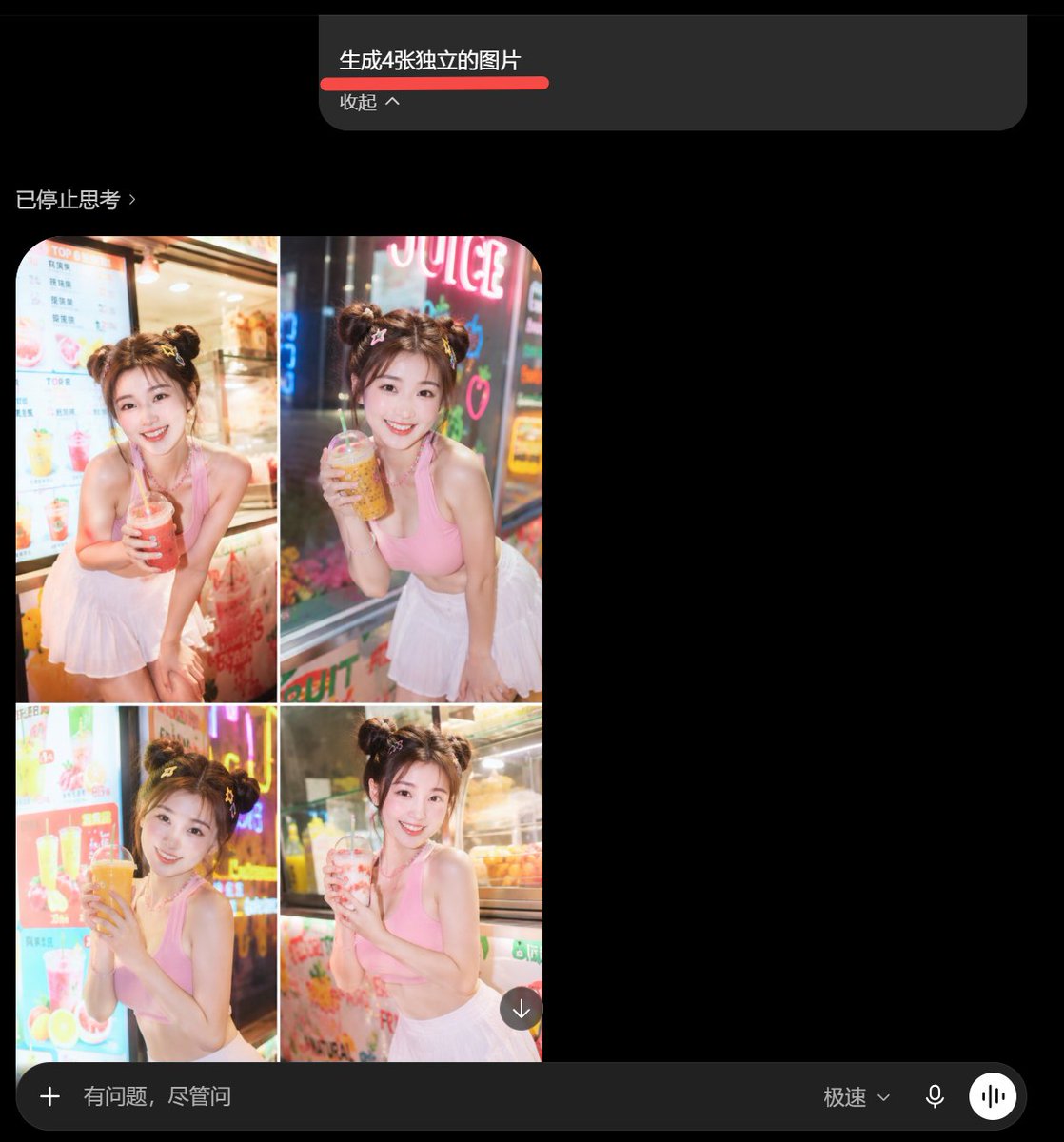
A dark-mode mobile chat screenshot showing an AI image generator producing one 2x2 collage instead of four independent images.
AI Image Generator Collage Failure Screenshot

Prompt

Goal: Create a dark-mode mobile chat screenshot showing an AI image generator response that incorrectly combines four requested images into one 2x2 collage. Canvas: Square screenshot, approximately 768×768 px, black background, cropped like a smartphone app interface in dark mode. Top prompt card: Near the top center, place a wide dark gray rounded rectangle message card. Inside it, show the Chinese prompt text 生成4张独立的图片 in white, with a thick red underline beneath it. Below that, show smaller gray text 收起 ^. The card has a rounded lower-right corner and sits against empty black space. Status line: On the left below the prompt card, add a small gray status label 已停止思考 ›. Main generated image area: Under the status line on the left, show exactly 1 rounded-corner generated image panel containing exactly 4 photo tiles arranged in a 2×2 grid, separated by thin white dividers. Each tile shows the same young woman in a bright beverage shop setting, but with slightly different pose and drink: 1. Top-left tile: smiling young woman with double-bun hairstyle, pink sleeveless crop top and white pleated skirt, leaning forward and holding a red iced drink with a straw, menu board behind her. 2. Top-right tile: same woman holding an amber bubble tea or juice drink, neon sign behind her, night street-shop lighting. 3. Bottom-left tile: same woman holding a large orange drink with both hands, colorful drink menu and neon lights behind her. 4. Bottom-right tile: same woman holding a pale pink drink, refrigerated display case behind her. The woman should have fair skin, soft glam makeup, brown hair in two messy buns with small hair accessories, a cheerful expression, and a cute influencer-style pose. The photo style is glossy, overexposed, saturated, and slightly unrealistic, like an AI-generated social media portrait collage. Overlay controls: Add one small circular download button with a downward arrow at the lower-right corner of the collage image. Bottom input bar: Across the bottom, draw a long dark gray rounded input bar. It contains exactly 5 visible elements: a plus icon on the far left, placeholder text 有问题,尽管问, a speed mode label 极速⌄, a microphone icon, and a white circular voice-wave button on the far right. Visual style: Preserve the look of a real mobile app screenshot: black empty negative space on the right, subtle gray UI text, rounded rectangles, clean sans-serif font, and slightly compressed screenshot quality. Do not create four separate files; the visual joke is that the four images are fused into one collage.

Runs on 18 models

  • Flux
  • Flux 2
  • Flux Kontext
  • GPT-4o Image
  • GPT Image
  • GPT Image 2
  • GPT Image 2.5
  • Grok Imagine
  • Ideogram V3
  • Imagen 4
  • Midjourney
  • Nano Banana
  • +6 more

What this prompt produces

Realistic Group Selfie with Smartphone Flash Effect Not specified nano-banana-pro
Four Seasons Portrait Collage Not specified nano-banana-pro
Minimalist Dog Sketch Clipart Not specified nano-banana-pro
Mecha Girl figure concept generated by Nano Banana Pro Not specified nano-banana-pro
Candid Flash Photography: Chaotic Holiday Party (Duplicate) Not specified nano-banana-pro
Ethereal Floral Studio Portrait Not specified nano-banana-pro

Run this prompt with the API

The request below sends this prompt, with its default values filled in, to the first model it runs on. Swap the model name for any other model listed above.

Prompt API docs
/api/v1/gpt_image_2/text_to_image
curl -X POST https://runapi.ai/api/v1/gpt_image_2/text_to_image \
  -H "Authorization: Bearer $RUNAPI_API_KEY" \
  -H "Content-Type: application/json" \
  --data-binary @- <<'JSON'
{
  "model": "gpt-image-2",
  "prompt": "Goal: Create a dark-mode mobile chat screenshot showing an AI image generator response that incorrectly combines four requested images into one 2x2 collage.\n\nCanvas: Square screenshot, approximately 768×768 px, black background, cropped like a smartphone app interface in dark mode.\n\nTop prompt card: Near the top center, place a wide dark gray rounded rectangle message card. Inside it, show the Chinese prompt text 生成4张独立的图片 in white, with a thick red underline beneath it. Below that, show smaller gray text 收起 ^. The card has a rounded lower-right corner and sits against empty black space.\n\nStatus line: On the left below the prompt card, add a small gray status label 已停止思考 ›.\n\nMain generated image area: Under the status line on the left, show exactly 1 rounded-corner generated image panel containing exactly 4 photo tiles arranged in a 2×2 grid, separated by thin white dividers. Each tile shows the same young woman in a bright beverage shop setting, but with slightly different pose and drink:\n1. Top-left tile: smiling young woman with double-bun hairstyle, pink sleeveless crop top and white pleated skirt, leaning forward and holding a red iced drink with a straw, menu board behind her.\n2. Top-right tile: same woman holding an amber bubble tea or juice drink, neon sign behind her, night street-shop lighting.\n3. Bottom-left tile: same woman holding a large orange drink with both hands, colorful drink menu and neon lights behind her.\n4. Bottom-right tile: same woman holding a pale pink drink, refrigerated display case behind her.\nThe woman should have fair skin, soft glam makeup, brown hair in two messy buns with small hair accessories, a cheerful expression, and a cute influencer-style pose. The photo style is glossy, overexposed, saturated, and slightly unrealistic, like an AI-generated social media portrait collage.\n\nOverlay controls: Add one small circular download button with a downward arrow at the lower-right corner of the collage image.\n\nBottom input bar: Across the bottom, draw a long dark gray rounded input bar. It contains exactly 5 visible elements: a plus icon on the far left, placeholder text 有问题,尽管问, a speed mode label 极速⌄, a microphone icon, and a white circular voice-wave button on the far right.\n\nVisual style: Preserve the look of a real mobile app screenshot: black empty negative space on the right, subtle gray UI text, rounded rectangles, clean sans-serif font, and slightly compressed screenshot quality. Do not create four separate files; the visual joke is that the four images are fused into one collage."
}
JSON

Try a prompt

Estimated: $0.04 / image

Sign in to generate with RunAPI.

Sign in to generate

Sign in to start generating with your available language models.

















