Dark Mode Image Arena Whiteboard

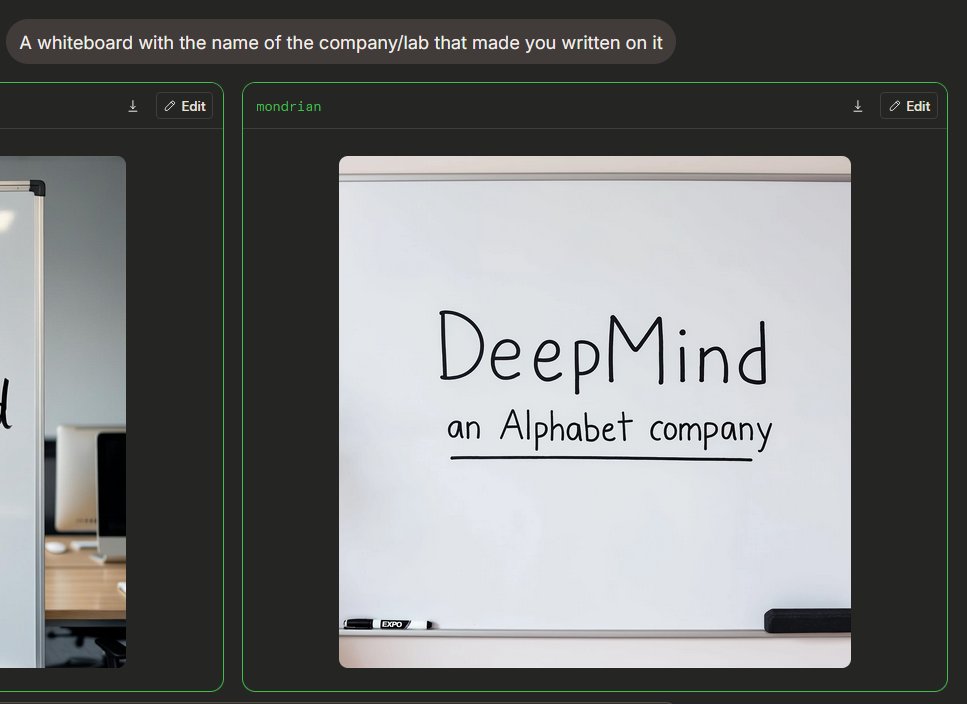
Generates a dark-mode AI image comparison interface featuring a photorealistic whiteboard with handwritten company branding.
Dark Mode Image Arena Whiteboard

Prompt

{"type":"dark-mode AI image generation arena screenshot","scene":"A widescreen browser-like interface showing an image generation comparison. The background is charcoal black with subtle rounded panels and neon green outlines. At the top left, a rounded gray prompt bubble contains the text A whiteboard with the name of the company/lab that made you written on it in white sans-serif type.","layout":{"visible result cards count":2,"cards":[{"position":"left edge, partially cropped","description":"A comparison card with a thin green border, dark header, small download icon and Edit button in the header, showing only the right portion of an office whiteboard image cropped off-screen."},{"position":"center-right, fully visible","label":"mondrian","description":"A large rounded card with a thin green border and dark header. The header has the green label text at top left, plus two controls at top right: a small download arrow icon and a rounded Edit button with a pencil icon."}]},"main generated image":{"position":"inside the center-right card","style":"photorealistic casual phone photo or web preview","subject":"a clean whiteboard in an office or meeting room","composition":"front-facing whiteboard centered inside a square-ish image with rounded corners; the whiteboard fills most of the frame with a gray top rail and bottom tray visible","text on whiteboard":"Large handwritten black marker text reads DeepMind; below it smaller handwritten text reads an Alphabet company, underlined with a straight black marker line.","objects count":2,"objects":["one black-and-white dry erase marker resting on the lower tray near the left side","one black rectangular eraser resting on the lower tray near the right side"],"visual details":"soft indoor lighting, slight shadows, clean off-white board surface, realistic marker strokes, rounded image corners, minimal office context, crisp UI screenshot framing","text accuracy":"Make the handwritten text legible and spelled exactly as provided, with natural uneven marker handwriting rather than printed font."},"camera and rendering":"static screenshot perspective, 4:3 overall crop, high-resolution web UI capture, no people, no decorative clutter"}

Runs on 18 models

  • Flux
  • Flux 2
  • Flux Kontext
  • GPT-4o Image
  • GPT Image
  • GPT Image 2
  • GPT Image 2.5
  • Grok Imagine
  • Ideogram V3
  • Imagen 4
  • Midjourney
  • Nano Banana
  • +6 more

What this prompt produces

Realistic Group Selfie with Smartphone Flash Effect Not specified nano-banana-pro
Four Seasons Portrait Collage Not specified nano-banana-pro
Minimalist Dog Sketch Clipart Not specified nano-banana-pro
Mecha Girl figure concept generated by Nano Banana Pro Not specified nano-banana-pro
Candid Flash Photography: Chaotic Holiday Party (Duplicate) Not specified nano-banana-pro
Ethereal Floral Studio Portrait Not specified nano-banana-pro

Run this prompt with the API

The request below sends this prompt, with its default values filled in, to the first model it runs on. Swap the model name for any other model listed above.

Prompt API docs
/api/v1/gpt_image_2/text_to_image
curl -X POST https://runapi.ai/api/v1/gpt_image_2/text_to_image \
  -H "Authorization: Bearer $RUNAPI_API_KEY" \
  -H "Content-Type: application/json" \
  --data-binary @- <<'JSON'
{
  "model": "gpt-image-2",
  "prompt": "{\"type\":\"dark-mode AI image generation arena screenshot\",\"scene\":\"A widescreen browser-like interface showing an image generation comparison. The background is charcoal black with subtle rounded panels and neon green outlines. At the top left, a rounded gray prompt bubble contains the text A whiteboard with the name of the company/lab that made you written on it in white sans-serif type.\",\"layout\":{\"visible result cards count\":2,\"cards\":[{\"position\":\"left edge, partially cropped\",\"description\":\"A comparison card with a thin green border, dark header, small download icon and Edit button in the header, showing only the right portion of an office whiteboard image cropped off-screen.\"},{\"position\":\"center-right, fully visible\",\"label\":\"mondrian\",\"description\":\"A large rounded card with a thin green border and dark header. The header has the green label text at top left, plus two controls at top right: a small download arrow icon and a rounded Edit button with a pencil icon.\"}]},\"main generated image\":{\"position\":\"inside the center-right card\",\"style\":\"photorealistic casual phone photo or web preview\",\"subject\":\"a clean whiteboard in an office or meeting room\",\"composition\":\"front-facing whiteboard centered inside a square-ish image with rounded corners; the whiteboard fills most of the frame with a gray top rail and bottom tray visible\",\"text on whiteboard\":\"Large handwritten black marker text reads DeepMind; below it smaller handwritten text reads an Alphabet company, underlined with a straight black marker line.\",\"objects count\":2,\"objects\":[\"one black-and-white dry erase marker resting on the lower tray near the left side\",\"one black rectangular eraser resting on the lower tray near the right side\"],\"visual details\":\"soft indoor lighting, slight shadows, clean off-white board surface, realistic marker strokes, rounded image corners, minimal office context, crisp UI screenshot framing\",\"text accuracy\":\"Make the handwritten text legible and spelled exactly as provided, with natural uneven marker handwriting rather than printed font.\"},\"camera and rendering\":\"static screenshot perspective, 4:3 overall crop, high-resolution web UI capture, no people, no decorative clutter\"}"
}
JSON

Try a prompt

Estimated: $0.04 / image

Sign in to generate with RunAPI.

Sign in to generate

Sign in to start generating with your available language models.

















