Underwater AI Model Comparison

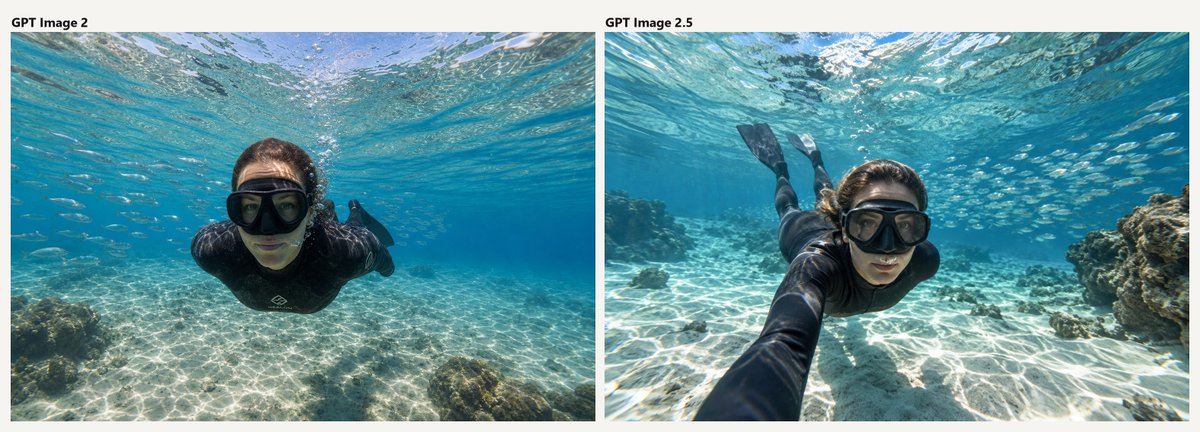
Creates a two-panel labeled comparison graphic of photorealistic underwater snorkeler images for visual model benchmarking.
Underwater AI Model Comparison

Prompt

Goal: Create a wide side-by-side comparison image showing two underwater snorkeling photos of the same scene, as if comparing model outputs. Canvas: Horizontal 2:1 aspect ratio on an off-white background, with two large rectangular photo panels placed side by side and separated by a narrow vertical gutter. Add small black bold labels above the panels: left label reads GPT Image 2, right label reads GPT Image 2.5. Layout: Use exactly 2 photo panels. The left panel occupies the left half and the right panel occupies the right half. Keep the labels aligned near the upper-left corner of each panel. No borders other than the off-white background margin and the central gap. Subject details: Both panels show a realistic underwater wide-angle action-camera photograph in clear tropical turquoise water. The subject is a young woman snorkeler wearing a black wetsuit or rash guard, a large black snorkel mask, and black fins. She is swimming horizontally toward the camera just below the rippling water surface. Sunlight creates bright caustic patterns across the shallow sandy seabed. Small fish are visible in the blue water, and coral or rocky reef formations appear near the edges. Left panel: The snorkeler is centered and closer to the camera, facing forward with arms tucked back, body streamlined, black mask dominating the face. The water is bright cyan, the sandy bottom is shallow and patterned with sun ripples, and a small reef rock sits in the lower-left foreground. The overall look is clean, slightly artificial, and symmetrical. Right panel: The snorkeler is angled diagonally from lower center toward upper left, with one arm extended toward the camera in a selfie-like perspective. Her fins are visible behind her near the top-left area, and larger reef rocks appear on the right side. The water has richer color contrast, stronger surface shimmer, more fish in the background, and a more dynamic wide-angle composition. Visual style: Photorealistic underwater photography, natural sunlight, crisp details, GoPro-style wide-angle lens, high clarity, realistic water refraction, vivid aquamarine and sandy white tones. Constraints: Include exactly 2 labeled panels and exactly 2 visible text labels. Do not add extra captions, watermarks, UI elements, arrows, or decorative graphics.

Runs on 18 models

  • Flux
  • Flux 2
  • Flux Kontext
  • GPT-4o Image
  • GPT Image
  • GPT Image 2
  • GPT Image 2.5
  • Grok Imagine
  • Ideogram V3
  • Imagen 4
  • Midjourney
  • Nano Banana
  • +6 more

What this prompt produces

咖啡馆旅行手账分栏页 Not specified gpt-image-2
日系 Chibi 互动小插画 Not specified gpt-image-2
动漫动作短片设定分镜板 Not specified gpt-image-2
Realistic Group Selfie with Smartphone Flash Effect Not specified nano-banana-pro
Four Seasons Portrait Collage Not specified nano-banana-pro
Minimalist Dog Sketch Clipart Not specified nano-banana-pro

Run this prompt with the API

The request below sends this prompt, with its default values filled in, to the first model it runs on. Swap the model name for any other model listed above.

Prompt API docs
/api/v1/gpt_image_2/text_to_image
curl -X POST https://runapi.ai/api/v1/gpt_image_2/text_to_image \
  -H "Authorization: Bearer $RUNAPI_API_KEY" \
  -H "Content-Type: application/json" \
  --data-binary @- <<'JSON'
{
  "model": "gpt-image-2",
  "prompt": "Goal: Create a wide side-by-side comparison image showing two underwater snorkeling photos of the same scene, as if comparing model outputs.\n\nCanvas: Horizontal 2:1 aspect ratio on an off-white background, with two large rectangular photo panels placed side by side and separated by a narrow vertical gutter. Add small black bold labels above the panels: left label reads GPT Image 2, right label reads GPT Image 2.5.\n\nLayout: Use exactly 2 photo panels. The left panel occupies the left half and the right panel occupies the right half. Keep the labels aligned near the upper-left corner of each panel. No borders other than the off-white background margin and the central gap.\n\nSubject details: Both panels show a realistic underwater wide-angle action-camera photograph in clear tropical turquoise water. The subject is a young woman snorkeler wearing a black wetsuit or rash guard, a large black snorkel mask, and black fins. She is swimming horizontally toward the camera just below the rippling water surface. Sunlight creates bright caustic patterns across the shallow sandy seabed. Small fish are visible in the blue water, and coral or rocky reef formations appear near the edges.\n\nLeft panel: The snorkeler is centered and closer to the camera, facing forward with arms tucked back, body streamlined, black mask dominating the face. The water is bright cyan, the sandy bottom is shallow and patterned with sun ripples, and a small reef rock sits in the lower-left foreground. The overall look is clean, slightly artificial, and symmetrical.\n\nRight panel: The snorkeler is angled diagonally from lower center toward upper left, with one arm extended toward the camera in a selfie-like perspective. Her fins are visible behind her near the top-left area, and larger reef rocks appear on the right side. The water has richer color contrast, stronger surface shimmer, more fish in the background, and a more dynamic wide-angle composition.\n\nVisual style: Photorealistic underwater photography, natural sunlight, crisp details, GoPro-style wide-angle lens, high clarity, realistic water refraction, vivid aquamarine and sandy white tones.\n\nConstraints: Include exactly 2 labeled panels and exactly 2 visible text labels. Do not add extra captions, watermarks, UI elements, arrows, or decorative graphics."
}
JSON

Try a prompt

Estimated: $0.04 / image

Sign in to generate with RunAPI.

Sign in to generate

Sign in to start generating with your available language models.